Customize Widget
Layout
Avatar
Colors
Live Preview
Embed Code
<!-- Trailhead Widget -->
<div id="trailhead-widget"></div>
<script src="https://jitendrazaa.com/Trailhead.php?profileId=YOUR_PROFILE_ID"></script>
Embed your Trailhead badges, points, rank & certifications on any website in seconds | Read the full guide
<!-- Trailhead Widget -->
<div id="trailhead-widget"></div>
<script src="https://jitendrazaa.com/Trailhead.php?profileId=YOUR_PROFILE_ID"></script>
<!-- Certification Widget -->
<div id="certification-widget"></div>
<script src="https://jitendrazaa.com/Trailhead.php?type=certification&profileId=YOUR_PROFILE_ID"></script>
<!-- All In One Widget -->
<div id="allinone-widget"></div>
<script src="https://jitendrazaa.com/Trailhead.php?type=allinone&profileId=YOUR_PROFILE_ID"></script>
The Trailhead Widget is a free tool by Jitendra Zaa that lets you embed your Salesforce Trailhead profile on any website. It displays your badges, points, trails, rank, and certifications. Choose from 3 widget types: Trailhead Stats, Certifications, or All In One. Customize colors, layouts, and more. Simply enter your Profile ID and copy the embed code.
Direct Embed Support: These platforms allow you to paste the widget code directly.
Embed the widget on your WordPress site in seconds:
Add credibility to your Substack posts:
Screenshot Workaround: These platforms don't support direct embeds, but you can still showcase your credentials.
Showcase credentials in your Medium posts:
Boost your professional profile visibility:
Showcase your Salesforce skills on GitHub:
Bonus Tip: Combine your Trailhead widget with your Salesforce certification verification links. Each certification has a unique verification URL from Salesforce - add these to your portfolio for extra credibility!
Showcase your Salesforce skills to potential employers. Add the widget to your online resume or portfolio to display verified achievements.
Easily embed the widget in WordPress using a Custom HTML block. Perfect for Salesforce consultants and bloggers to build credibility.
Display your team's collective Salesforce expertise. Show certifications and badges on your consulting firm's about page.
Link to your widget page from LinkedIn or include screenshots. Great for personal branding in the Salesforce ecosystem.
The Trailhead Widget is a free embeddable tool that displays your Salesforce Trailhead profile statistics including badges, points, trails completed, rank, and certifications on any website or blog.
Go to salesforce.com/trailblazer/me and copy the last part of your profile URL. For example, if your URL is salesforce.com/trailblazer/jitendrazaa, your Profile ID is jitendrazaa.
Yes, the Trailhead Widget is completely free to use. Simply generate your embed code and add it to your website. There are no hidden costs or premium features.
You can customize layout (vertical, horizontal, compact), avatar size (40px to 100px), background colors (including transparent), and for certifications you can choose grid, list, or compact view, sort order (newest, oldest, name), and toggle display of certificate images, year earned, and status.
Yes! Use the "All In One" widget which combines your Trailhead profile (avatar, name, rank, badges, points, trails) with your Salesforce certifications in a single embeddable widget.
No, your Trailhead profile must be set to public for the widget to display your data. Private profiles will show a "Private Profile" message.
The widget caches data for 1 hour to ensure fast loading times. After that, it fetches fresh data automatically.
In WordPress, add a "Custom HTML" block to your page or post, then paste the embed code. For the classic editor, switch to "Text" mode and paste the code. The widget works with any WordPress theme.
Yes, all widget layouts are fully responsive and automatically adapt to mobile screens. The compact layout works especially well on smaller devices.
The widget only displays publicly available information from your Trailhead profile. No login credentials or private data is collected. The widget fetches data directly from Salesforce's public Trailblazer API.
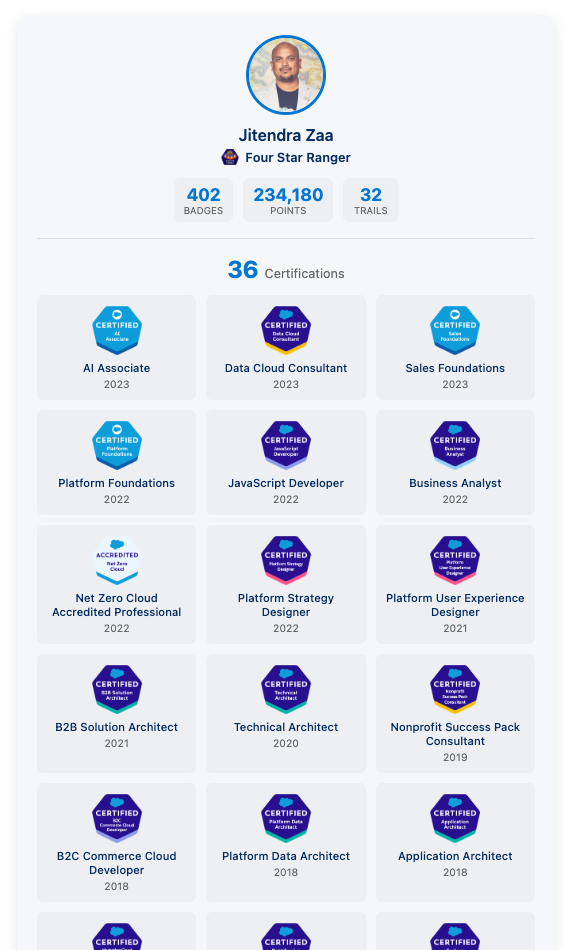
Example widget displaying Trailhead stats and certifications
Help other Trailblazers discover this free widget!
Learn more about Trailhead and Salesforce career tips: