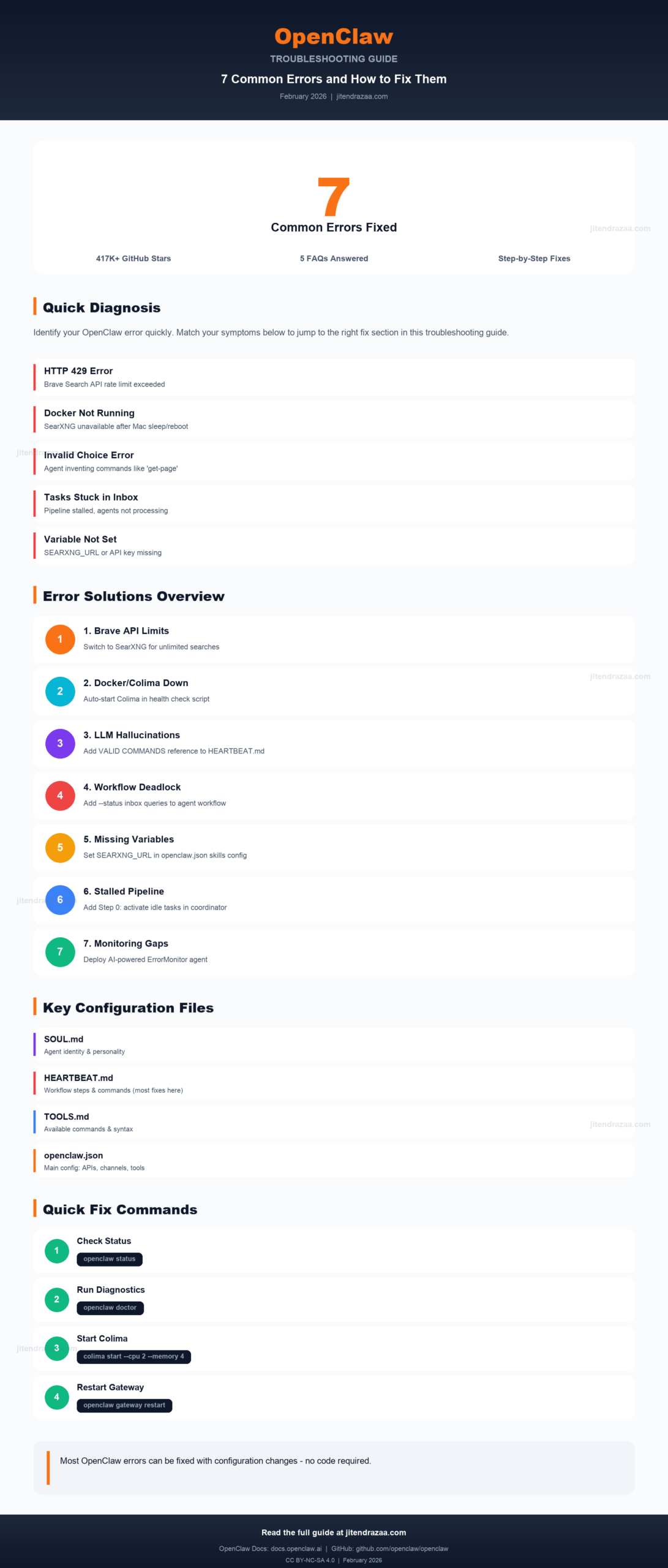
Visual summary: 7 common OpenClaw errors and their solutions
Comprehensive troubleshooting guide for Brave API rate limits, SearXNG Docker issues, LLM command hallucinations, and agent workflow problems
Visual summary: 7 common OpenClaw errors and their solutions
OpenClaw (formerly Moltbot and ClawdBot) is an open-source AI assistant with over 417,000 GitHub stars. While the official troubleshooting documentation covers basic issues, real-world deployments often encounter more complex problems, especially when running multi-agent configurations with SearXNG, Docker, and external APIs.
This guide documents seven common errors encountered during OpenClaw setup and operation, along with step-by-step solutions verified in production environments. Each error includes the exact error message, root cause analysis, and tested fix.
| Category | Severity | Impact | Fix Difficulty |
|---|---|---|---|
| Brave API Rate Limits | High | Research agents blocked | Easy |
| SearXNG Docker/Colima | Critical | SearXNG unavailable, no web search | Medium |
| LLM Command Hallucination | Critical | 33+ errors/day, Notion interactions fail | Medium |
| Agent Workflow Deadlock | High | Tasks stuck, no production output | Medium |
| Environment Variables | Medium | Skills fail with "not set" errors | Easy |
| Task Status Transition | High | Pipeline appears healthy but stalled | Medium |
| Error Monitoring Gaps | Medium | Critical errors go unnoticed | Complex |
Before diving into specific errors, it's essential to understand OpenClaw's file structure. Knowing where to apply fixes is as important as knowing what to fix.
~/.openclaw/. Understanding which file controls what behavior will help you apply fixes correctly.| File | Location | Purpose |
|---|---|---|
| openclaw.json | ~/.openclaw/openclaw.json |
Main configuration: API keys, channels (Telegram/WhatsApp), tools settings, agent list |
| Gateway Logs | ~/.openclaw/logs/gateway.err.log |
Error logs - check here first when something fails |
| Scripts | ~/.openclaw/scripts/ |
Custom automation: health checks, notifications, monitoring |
| Credentials | ~/.openclaw/credentials/ |
Auth tokens for Telegram, WhatsApp, and other services |
If you're running multiple AI agents, each agent has its own configuration directory with these key files:
When a user sends a message to an OpenClaw agent, here's how the configuration files work together:
| File | What It Controls | When to Edit |
|---|---|---|
| SOUL.md | Agent's identity, expertise, personality traits, and high-level goals | Changing agent behavior or adding new capabilities |
| HEARTBEAT.md | Recurring tasks the agent performs, workflow steps, and valid command references | Most fixes go here - add command references, workflow fixes, validation rules |
| TOOLS.md | Documentation of available commands with syntax examples | Adding new tools or updating command documentation |
~/.openclaw/workspace/agents/[agent-name]/HEARTBEAT.md. This is where you add command validation rules, workflow fixes, and anti-hallucination patterns.| Problem | File to Edit |
|---|---|
| Disable/enable web search | openclaw.json → tools.web.search.enabled |
| Add SearXNG skill config | openclaw.json → skills.entries |
| Fix command hallucinations | HEARTBEAT.md → Add valid commands reference |
| Fix workflow deadlocks | HEARTBEAT.md → Add status query steps |
| Add health check scripts | ~/.openclaw/scripts/ → Create .sh file |
| Configure LaunchAgents (macOS) | ~/Library/LaunchAgents/ai.openclaw.*.plist |
OpenClaw's built-in web search uses the Brave Search API by default. While convenient, the free tier has strict limitations that can quickly block research-intensive agents.
| Limit Type | Value | Impact |
|---|---|---|
| Rate Limit | 1 request/second | Parallel searches blocked |
| Monthly Quota | 2,000 requests | Exhausted quickly with active agents |
| Concurrent Agents | Not supported | Multiple agents hit limits simultaneously |
SearXNG provides unlimited, self-hosted search by aggregating results from multiple engines including Google, DuckDuckGo, Startpage, and Brave itself.
"tools": {
  "web": {
    "search": {
      "enabled": true,
      "provider": "brave"
    }
  }
}"tools": {
"web": {
"search": {
"enabled": false,
"provider": "brave"
}
}
}Update each agent's HEARTBEAT.md with explicit SearXNG usage:
# USE SearXNG for all web searches (unlimited, self-hosted):
python3 ~/.openclaw/workspace/skills/local-websearch/searxng_search.py "query" --count 10

# Example for research agent:
python3 ~/.openclaw/workspace/skills/local-websearch/searxng_search.py
  "React best practices 2026" --count 10

# Example for contact research:
python3 ~/.openclaw/workspace/skills/local-websearch/searxng_search.py
"John Doe software architect profile" --count 10| Feature | Brave (Disabled) | SearXNG (Active) |
|---|---|---|
| Rate Limit | 1/sec | Unlimited |
| Monthly Quota | 2,000 | Unlimited |
| Cost | Free tier limited | Self-hosted free |
| Search Engines | Brave only | Google, DuckDuckGo, Startpage, Brave (aggregated) |
| Privacy | API-based | Self-hosted, no tracking |
# Restart OpenClaw gateway to apply changes
launchctl kickstart -k gui/$(id -u)/ai.openclaw.gateway

# Verify SearXNG is working
curl -s "http://localhost:8888/search?q=test&format=json" | head -c 100Note: OpenClaw itself does not require Docker. This section only applies if you're running SearXNG (self-hosted search engine) as an alternative to Brave Search API. On macOS, SearXNG typically runs in Docker using Colima as the container runtime. According to Colima documentation, it provides a lightweight, free alternative to Docker Desktop. However, Colima doesn't automatically restart after Mac sleep or reboot, leaving SearXNG unavailable.
This error occurs when:
Update your SearXNG health check script to automatically start Colima when Docker is unavailable:
#!/bin/bash
# searxng-healthcheck.sh (v4)

start_colima() {
    log "Colima/Docker not running. Attempting to start Colima..."

    # Check if colima is installed
    if ! command -v colima &>/dev/null; then
        log "ERROR: Colima is not installed"
        return 1
    fi

    # Check if already running
    if colima status &>/dev/null; then
        log "Colima is already running"
        return 0
    fi

    # Start Colima with recommended settings
    log "Starting Colima with cpu=2, memory=4..."
    if colima start --cpu 2 --memory 4 >> "$LOG_FILE" 2>&1; then
        log "Colima started successfully"

        # Wait for Docker socket to be available
        local waited=0
        while [[ $waited -lt 30 ]]; do
            if docker info &>/dev/null; then
                log "Docker is now accessible"
                return 0
            fi
            sleep 2
            waited=$((waited + 2))
        done
        log "WARNING: Colima started but Docker not accessible after 30s"
        return 1
    else
        log "ERROR: Failed to start Colima"
        return 1
    fi
}

ensure_docker_running() {
    if docker info &>/dev/null; then
        return 0
    fi

    log "Docker is not running, attempting to start Colima..."
    start_colima
}# Stop Colima to simulate the problem
colima stop
# Trigger health check manually
~/.openclaw/scripts/searxng-healthcheck.sh
# Check the log - should show auto-recovery
tail -20 ~/.openclaw/logs/searxng-health.logcap_drop: - ALL from docker-compose.yaml to create initial config files.One of the most frustrating issues with AI agents is command hallucination - when the LLM invents commands, flags, or API endpoints that don't exist. This happens because LLMs pattern-match to common conventions (like RESTful APIs) instead of following your documented CLI commands.
LLMs are trained on vast amounts of code and documentation. When they encounter a CLI tool, they often:
get-resource, list-items, fetch-data are common patterns--search, --name, --filter seem logical even when unsupportedThe fix is to provide explicit command documentation that includes both valid commands AND common invalid patterns. Add this section to your agent's HEARTBEAT.md file:
~/.openclaw/workspace/agents/[agent-name]/HEARTBEAT.md## CRITICAL: Valid Commands Reference
**ONLY use these exact commands. Do NOT invent or guess commands.**
### VALID COMMANDS:
list-items --type [type] --status [status]
create-item "[name]" --type [type]
update-item "[id]" --field [value]
delete-item "[id]"
### INVALID COMMANDS (NEVER USE):
get-item [X] (use: list-items --id [id])
fetch-data [X] (use: list-items)
--search [X] (not supported)
--name [X] (use: --title instead)
### COMMAND STRUCTURE:
[subcommand] [positional-args] [--flags]
[OK] create-item "My Item" --type project
[X] --type project create-item "My Item"Here's a real-world example from a Notion integration where agents hallucinated REST-style commands:
| Hallucinated Command | Why LLM Chose It | Correct Command |
|---|---|---|
get-page |
REST pattern: GET /page | query-tasks / query-documents |
get-task |
REST pattern: GET /task/:id | query-tasks --id [ID] |
--search [term] |
Common flag in many CLIs | Not supported (use query with filters) |
| Missing subcommand | Focused on flags, forgot structure | Always start with subcommand: add-contact |
# Missing subcommand (common mistake):
python3 notion-helper.py --organization "Acme"
--role "Manager" --email "user@example.com"# Subcommand FIRST, then positional, then flags:
python3 notion-helper.py add-contact "John Smith"
--organization "Acme" --role "Manager"
--email "user@example.com"Add this verification pattern to your agent's workflow:
--search, --name, etc.get-*, fetch-*, list-* unless documentedEven with correct commands, multi-agent systems can experience workflow deadlocks where tasks get stuck and production output flatlines despite agents reporting "healthy" status.
Agents typically query only --status assigned and --status in_progress, missing their inbox tasks entirely:
Update each agent's HEARTBEAT.md to query inbox before other statuses:
### Step 1: Check Your Tasks

# Check inbox FIRST - these are tasks waiting to be started
python3 ~/.openclaw/scripts/notion-helper.py query-tasks --assignee ResearchBot --status inbox

# Then check assigned and in_progress
python3 ~/.openclaw/scripts/notion-helper.py query-tasks --assignee ResearchBot --status assigned
python3 ~/.openclaw/scripts/notion-helper.py query-tasks --assignee ResearchBot --status in_progressAdd explicit status update requirements:
### Step 2: If Tasks Found - START WORKING

**CRITICAL: Before doing ANY work, update task status to in_progress:**

python3 ~/.openclaw/scripts/notion-helper.py update-task "[task-id]" --status in_progress

# ... do the actual work ...

# When COMPLETE, update status:
python3 ~/.openclaw/scripts/notion-helper.py update-task "[task-id]" --status doneAdd a "Step 0" to the coordinator agent (like Coordinator) to activate idle tasks:
### Step 0: ACTIVATE IDLE AGENT TASKS (DO THIS FIRST!)

**Check for agent tasks stuck in inbox:**

python3 ~/.openclaw/scripts/notion-helper.py query-tasks --assignee ResearchBot --status inbox
python3 ~/.openclaw/scripts/notion-helper.py query-tasks --assignee WriterBot --status inbox
python3 ~/.openclaw/scripts/notion-helper.py query-tasks --assignee OutreachBot --status inbox

**For EACH agent task in inbox, ACTIVATE IT:**

python3 ~/.openclaw/scripts/notion-helper.py update-task "[task-id]" --status in_progress

**This ensures agents pick up their work on next heartbeat!**Update health check to count only ACTIVELY working tasks:
# Just counts tasks
in_progress_count = tasks in progress

# Reports "healthy" even if all
# tasks are waiting on external factors# Evaluates task quality
For EACH in_progress task:
- ACTIVELY WORKING? → Count
- WAITING? → Don't count
IF active_work_count < 2:
→ ACTIVATE INBOX TASKSAdd proactive work sections for when agents have no assigned tasks:
### Step 3: If NO Tasks Found - PROACTIVE WORK

**Do NOT just reply HEARTBEAT_OK. Find new opportunities!**

# For research agents:
Search for trending topics in your domain
Monitor competitor activities and industry news
Find new data sources or APIs to integrate

# For writing agents:
Check content calendar for upcoming deadlines
Draft outlines for planned blog posts or docs

# For outreach agents:
Research potential partners or collaborators
Find contact information for key stakeholders| Time | Agent | Expected Action |
|---|---|---|
| :00 | Coordinator | Activate ResearchBot/WriterBot inbox tasks → in_progress |
| :02 | ResearchBot | See in_progress task, start research |
| :04 | WriterBot | See in_progress task, start writing |
| :06 | OutreachBot | If waiting, do proactive contact research |
Skills and tools often require environment variables that may not be passed correctly to agent subprocesses, even when configured in openclaw.json.
Even with correct configuration in openclaw.json, the LaunchAgent may not inject environment variables into agent subprocesses:
// In openclaw.json - correctly configured but not working:
"searxng": {
  "enabled": true,
  "env": {
    "SEARXNG_URL": "http://localhost:8888"
  }
}Edit ~/Library/LaunchAgents/ai.openclaw.gateway.plist and add the environment variable:
<key>EnvironmentVariables</key>
<dict>
    <key>SEARXNG_URL</key>
    <string>http://localhost:8888</string>
</dict>launchctl kickstart -k does NOT reload environment variables from plist! You must use bootout + bootstrap for full reload.# WRONG - doesn't reload env vars:
launchctl kickstart -k gui/$(id -u)/ai.openclaw.gateway
# CORRECT - full reload:
launchctl bootout gui/$(id -u)/ai.openclaw.gateway
launchctl bootstrap gui/$(id -u) ~/Library/LaunchAgents/ai.openclaw.gateway.plist# Check if env var is now present:
launchctl print gui/$(id -u)/ai.openclaw.gateway | grep SEARXNG
# Expected output:
# SEARXNG_URL => http://localhost:8888Fix by adding explicit wrong/right examples to the writing agent's HEARTBEAT.md:
# Missing --content argument:
python3 notion-helper.py save-document "Title"
--type report_draft --author WriterBot# --content is REQUIRED:
python3 notion-helper.py save-document "Title"
--type report_draft
--content "Full document content here"
--author WriterBotTraditional error monitoring using hardcoded patterns often misses novel error types. For example, LLM command hallucinations weren't caught because the pattern "exec failed.*not found" doesn't match argparse errors like "invalid choice".
# Traditional CRITICAL_PATTERNS miss argparse errors:
CRITICAL_PATTERNS=(
    "Config invalid"
    "exec failed.*not found"     # ← Requires "not found"
    "No such file or directory"
    "ECONNREFUSED"
    "Error.*API"                 # ← It's "error:" lowercase!
)

# Actual error format - NOT MATCHED:
notion-helper.py: error: argument command: invalid choice: 'get-page'Instead of bash scripts with hardcoded patterns, create a dedicated OpenClaw agent (ErrorMonitor) that uses Claude's semantic understanding to detect and diagnose errors.
| Component | Location | Purpose |
|---|---|---|
| Agent Config | openclaw.json (agents.list) | Register ErrorMonitor as agent |
| Identity | agents/error-monitor/SOUL.md | Personality & purpose |
| Tasks | agents/error-monitor/HEARTBEAT.md | Monitoring workflow |
| Cron | cron/jobs.json | Schedule: every 5 min + 8-hourly |
| Category | Pattern Examples | Typical Fix |
|---|---|---|
| LLM_Hallucination | invalid choice: 'get-page' |
Update agent HEARTBEAT.md with valid commands |
| Notion_Error | HTTP 404, permission denied | Check Notion integration permissions |
| Connection | ECONNREFUSED:8888 |
docker start searxng |
| Config | Config invalid | openclaw doctor --fix |
| API | API rate limit | Check API quotas, switch to SearXNG |
# Verify ErrorMonitor agent registered
openclaw agents list
# Should show your configured agents including error-monitor

# Check cron jobs
openclaw cron list
# Should show: error-monitor-system, error-monitor-8hr-report

# Force run ErrorMonitor (test)
openclaw agent error-monitor --message "Check HEARTBEAT.md and monitor system health now."

# View ErrorMonitor logs
tail -50 ~/.openclaw/logs/error-monitor.logThis error occurs when using SearXNG (self-hosted search) and Colima (Docker VM on macOS) is stopped, typically after Mac sleep or reboot. OpenClaw itself doesn't require Docker - only SearXNG does. Fix it by starting Colima with colima start --cpu 2 --memory 4 or update your SearXNG health check script to auto-start Colima.
Brave's free tier limits you to 1 request/second and 2,000 requests/month. Switch to SearXNG by setting "enabled": false for Brave in openclaw.json and adding explicit SearXNG commands to your agent HEARTBEAT files. SearXNG is self-hosted and provides unlimited searches.
This is LLM command hallucination where agents pattern-match to RESTful API conventions instead of following documented commands. Fix by adding explicit "VALID COMMANDS ONLY" reference with examples of invalid commands to each agent's HEARTBEAT.md file.
Agents may only query 'assigned' and 'in_progress' tasks, missing inbox items. Add --status inbox queries to each agent's HEARTBEAT.md and ensure the coordinator agent has a "Step 0" to activate idle tasks by moving them to 'in_progress' status.
ErrorMonitor is an OpenClaw agent that provides AI-powered error monitoring using semantic analysis instead of hardcoded patterns. It runs every 5 minutes, detects LLM hallucinations and other errors, sends Telegram alerts with intelligent diagnosis, and uses your Claude Max subscription without additional API costs.
Reference guide for technical terms and abbreviations used throughout this article.
