Master server-side scripting from fundamentals to advanced techniques. Learn types, best practices, GlideRecord, debugging, and real-world implementation patterns.
Reading time: ~35 minutes| Last Updated: December 2025
4 Types of Business Rules
Before, After, Async & Display — when to use each
Execution Order & Flowcharts
Visual diagrams showing BR sequence with workflows
30 Interview Questions
From basics to advanced scenarios with answers
20+ Code Examples & Video
Copy-paste scripts, debugging guide & live demo
1
What is a Business Rule?
Quick Answer: A Business Rule is a server-side script in ServiceNow that executes when records are displayed, inserted, updated, deleted, or when a table is queried. Unlike Client Scripts that run on the browser, Business Rules run on the server, ensuring data integrity and enabling complex processing.
If you're new to ServiceNow development, understanding Business Rules is fundamental. According to the official ServiceNow documentation, Business Rules automate and enforce business logic or policies whenever data changes in a table.
Business Rules are stored in the sys_script table and can be accessed via System Definition > Business Rules in the navigator. They're the backbone of server-side automation in ServiceNow, running regardless of how data is modified - whether through the UI, APIs, imports, or scripts.
Key Characteristics
Server-Side Execution: Runs on the ServiceNow server, not in the user's browser
Universal Application: Runs regardless of how data is modified (UI, API, script, import)
Access to Server APIs: Can use GlideRecord, GlideSystem, and other server-side APIs
Condition-Based: Can include conditions to control when the script executes
Pro Tip: For those new to ServiceNow, the ServiceNow Community developer forum recommends going through the trainings at developer.servicenow.com along with official documentation to get a clearer picture of all concepts.
2
Four Types of Business Rules
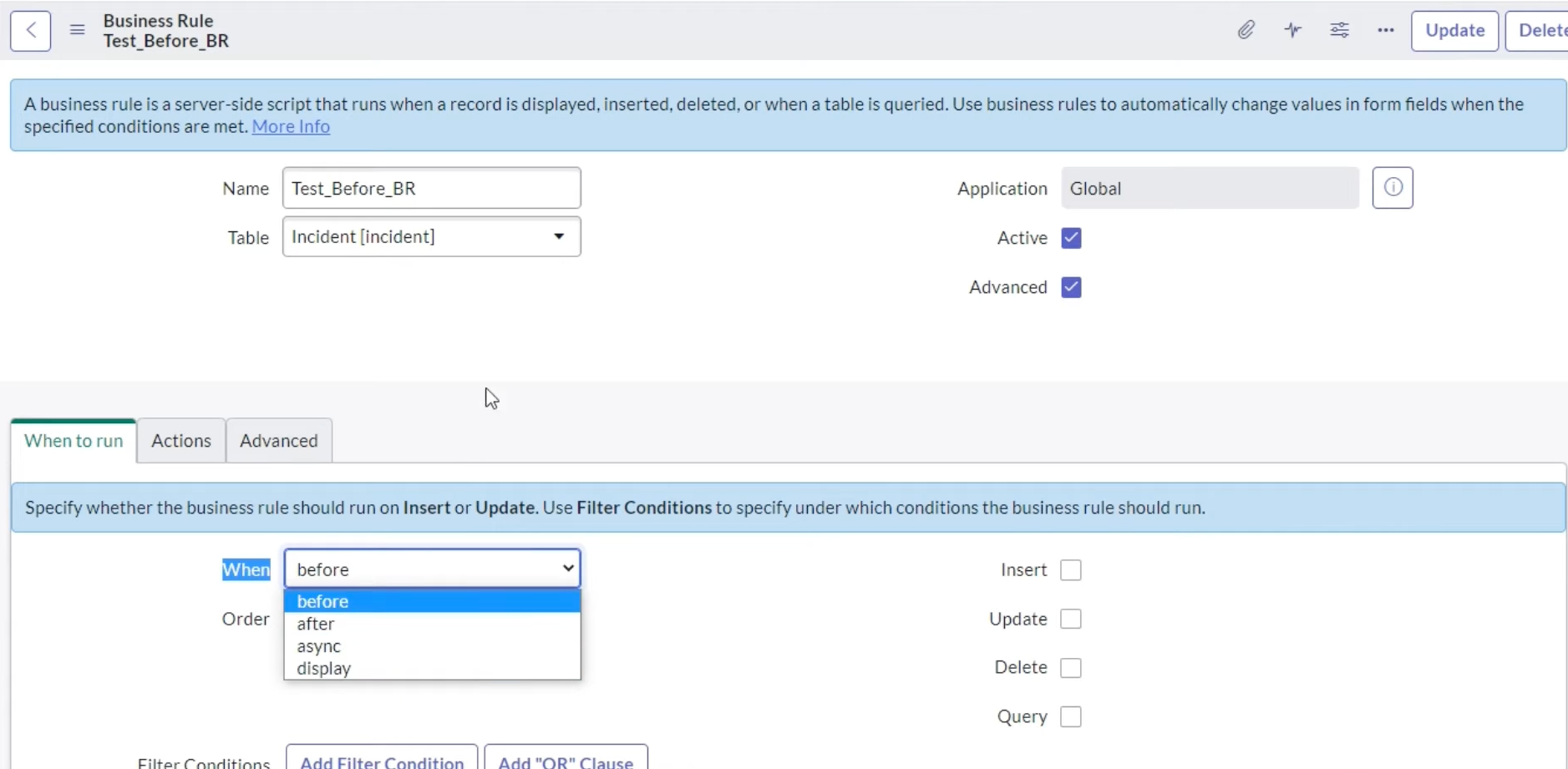
ServiceNow provides four distinct types of Business Rules, each designed for specific use cases based on when they execute relative to database operations. Understanding these types is crucial for effective ServiceNow development.
Figure 1: The "When to run" tab in ServiceNow Business Rule configuration — Select before, after, async, or display to control execution timing
Before
Executes BEFORE the database operation
Validation, field manipulation
Database
Insert, Update, Delete operation occurs
Record saved to DB
After
Executes AFTER the database operation
Notifications, related updates
Async
Runs in background after saving
Heavy processing, APIs
Type
When It Runs
Common Use Cases
Key Considerations
Before
Before database operation
Data validation, field auto-population, abort action
No current.update() needed - changes auto-save
After
After database operation (synchronous)
Updating related records, triggering events
Blocks user until complete; use for immediate needs
Async
After database (asynchronous, background)
Emails, external APIs, SLA calculations
Non-blocking; runs via scheduler
Display
When record is loaded for viewing
Pass data to client via g_scratchpad
Only runs on form load, not on insert/update
Best Practice: According to the ServiceNow Community best practices guide, use Async Business Rules instead of After Business Rules whenever possible to improve user experience.
3
Before Business Rules
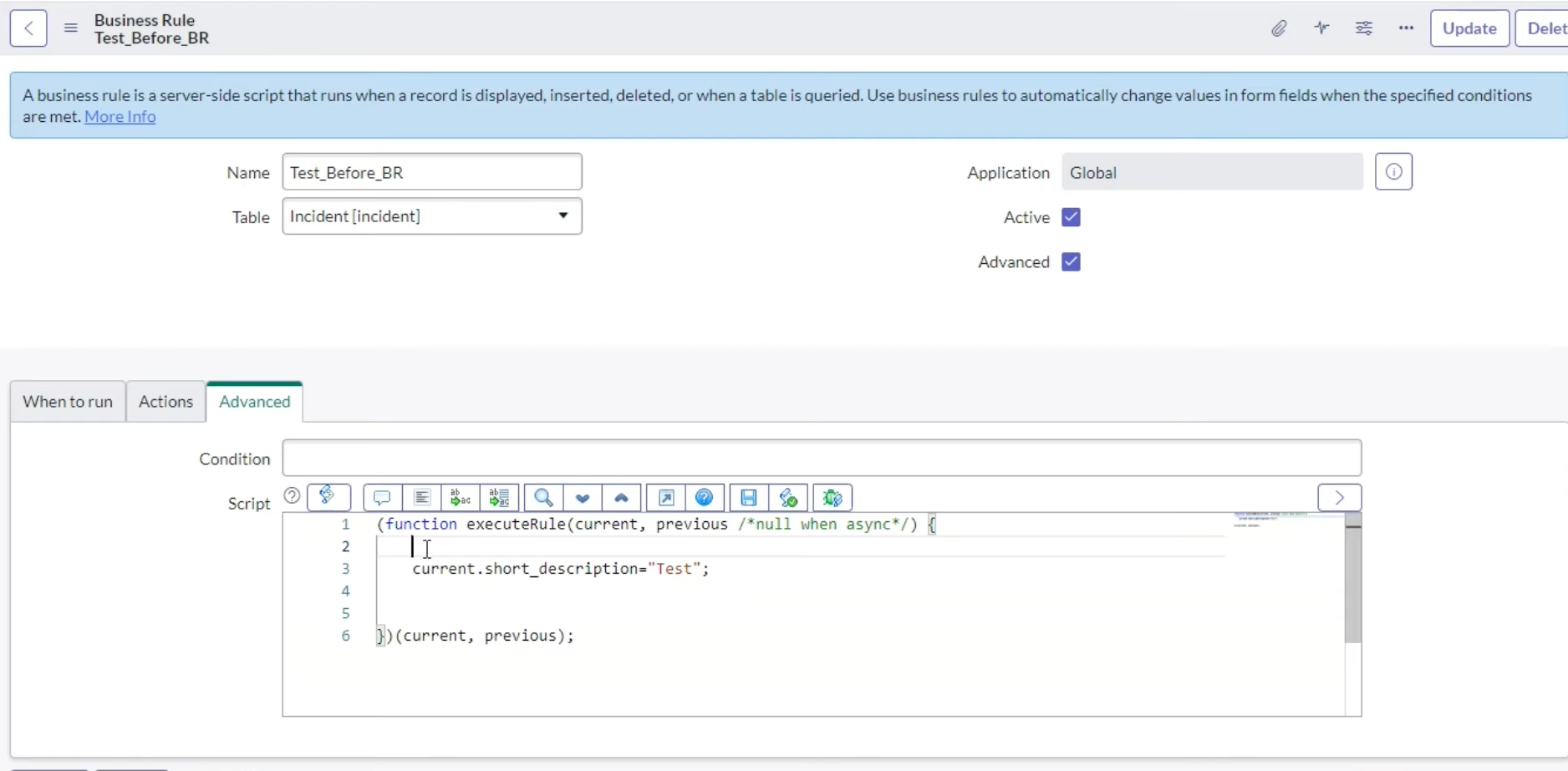
Before Business Rules execute before the record is saved to the database. They're ideal for data validation, field manipulation, and controlling whether an operation should proceed.
Figure 2: The "Advanced" tab with Script editor — Write custom JavaScript using the current and previous objects to manipulate record data
Video Tutorial: Learn Before Business Rules with live scripting scenarios.
Learn ServiceNow with Ravi
Shoutout to Ravi Gaurav for this excellent hands-on tutorial covering server-side scripting fundamentals and Business Rule development!
Key Characteristics
No current.update() needed: Changes made to the current record are automatically saved when all Before BRs complete
Can abort operations: Use current.setAbortAction(true) to prevent insert/update/delete
Access to previous values: The previous object contains the record's state before modification
Synchronous execution: Blocks the transaction until complete
Example 1: Auto-Populate Fields
(function executeRule(current, previous /*null when async*/) {
    // Auto-populate assignment group based on category
    if (current.category == 'network') {
        current.assignment_group.setDisplayValue('Network Team');
    } else if (current.category == 'hardware') {
        current.assignment_group.setDisplayValue('Hardware Support');
    }

    // Set priority based on urgency and impact
    if (current.urgency == 1 && current.impact == 1) {
        current.priority = 1; // Critical
    }

    // No current.update() needed - changes save automatically
})(current, previous);
Example 2: Date Validation with Abort
Use setAbortAction() to prevent invalid operations. As noted in the ServiceNow Community forum, this is essential for server-side validation:
(function executeRule(current, previous /*null when async*/) {
    // Validate that end date is after start date
    if ((!current.u_start_date.nil()) && (!current.u_end_date.nil())) {
        var start = current.u_start_date.getGlideObject().getNumericValue();
        var end = current.u_end_date.getGlideObject().getNumericValue();

        if (start > end) {
            gs.addErrorMessage('Start date must be before end date');
            current.u_start_date.setError('Invalid date range');
            current.setAbortAction(true);
        }
    }
})(current, previous);
Important: The setAbortAction() method can only be executed from the same scope as the record being modified. Cross-scope Business Rules cannot use this method directly - use the "Abort action" checkbox instead.
Example 3: Prevent Unauthorized State Changes
(function executeRule(current, previous /*null when async*/) {
    // Prevent closing incident without resolution notes
    if (current.state == 6) { // Resolved
        if (current.close_notes.nil()) {
            gs.addErrorMessage('Resolution notes are required before closing');
            current.setAbortAction(true);
        }
    }

    // Prevent reopening after 30 days
    if (current.state.changes() && previous.state == 7) { // Was Closed
        var closedDate = previous.closed_at.getGlideObject();
        var now = new GlideDateTime();
        var daysDiff = gs.dateDiff(closedDate.getValue(), now.getValue(), true);

        if (Math.abs(daysDiff) > 30) {
            gs.addErrorMessage('Cannot reopen incidents closed more than 30 days ago');
            current.setAbortAction(true);
        }
    }
})(current, previous);
4
After Business Rules
After Business Rules execute after the record is saved to the database. They run synchronously, meaning the user must wait for them to complete before the transaction finishes.
Key Characteristics
Record already saved: The current record exists in the database with a sys_id
current.update() required: If modifying the current record, you must call current.update()
Synchronous: Blocks user interaction until complete
Best for related records: Ideal for updating records on other tables
Example 1: Create Related Task
(function executeRule(current, previous /*null when async*/) {
    // When a high priority incident is created, auto-create a problem task
    if (current.priority == 1 && current.operation() == 'insert') {
        var problem = new GlideRecord('problem');
        problem.initialize();
        problem.short_description = 'Investigate: ' + current.short_description;
        problem.description = 'Auto-created from critical incident: ' + current.number;
        problem.u_related_incident = current.sys_id;
        problem.assignment_group = current.assignment_group;
        problem.insert();

        // Log the created problem
        gs.info('Created Problem ' + problem.number + ' for Incident ' + current.number);
    }
})(current, previous);
Example 2: Update Parent Record
(function executeRule(current, previous /*null when async*/) {
    // Update parent change request when all tasks are complete
    if (current.state == 3) { // Closed Complete
        var parent = new GlideRecord('change_request');
        if (parent.get(current.parent)) {
            // Check if all child tasks are complete
            var openTasks = new GlideAggregate('change_task');
            openTasks.addQuery('parent', current.parent);
            openTasks.addQuery('state', '!=', 3);
            openTasks.addQuery('sys_id', '!=', current.sys_id);
            openTasks.addAggregate('COUNT');
            openTasks.query();

            if (openTasks.next() && openTasks.getAggregate('COUNT') == 0) {
                parent.state = 3; // Move to Review
                parent.update();
            }
        }
    }
})(current, previous);
Warning: Avoid using current.update() in After Business Rules when possible. As the Quality Clouds best practices notes, this can cause recursive execution. If you must update the current record, use setWorkflow(false) to prevent recursion.
5
Async Business Rules
Async Business Rules run asynchronously in the background after the database operation completes. According to the ServiceNow performance guidelines, they're queued by the scheduler and run as soon as resources are available.
Key Characteristics
Non-blocking: User can continue working immediately after form submission
Scheduler-based: Jobs appear in System Scheduler > Scheduled Jobs as "ASYNC: [BR Name]"
Priority field matters: Determines execution order in the queue (100, 200, 300, etc.)
Caution with Delete: If triggered on delete, the record won't exist when the script runs
When to Use Async Instead of After
Use Case
After BR
Async BR
Send email notifications
Call external REST APIs
SLA calculations
Heavy data processing
User needs immediate feedback
Must complete before user proceeds
Example: External API Integration
(function executeRule(current, previous /*null when async*/) {
    // Send critical incident to external monitoring system
    if (current.priority == 1) {
        try {
            var request = new sn_ws.RESTMessageV2('External_Monitor', 'POST_Alert');
            request.setStringParameter('incident_number', current.number);
            request.setStringParameter('description', current.short_description);
            request.setStringParameter('priority', current.priority.getDisplayValue());

            var response = request.execute();
            var httpStatus = response.getStatusCode();

            if (httpStatus == 200) {
                gs.info('Successfully sent alert for ' + current.number);
            } else {
                gs.error('Failed to send alert: ' + response.getBody());
            }
        } catch (ex) {
            gs.error('Exception sending alert: ' + ex.message);
        }
    }
})(current, previous);
Example: Email with Attachment Processing
(function executeRule(current, previous /*null when async*/) {
    // Process attachments after they're fully uploaded
    // Using Async ensures attachments are available

    var attachments = new GlideRecord('sys_attachment');
    attachments.addQuery('table_name', 'incident');
    attachments.addQuery('table_sys_id', current.sys_id);
    attachments.query();

    var attachmentList = [];
    while (attachments.next()) {
        attachmentList.push(attachments.file_name.toString());
    }

    if (attachmentList.length > 0) {
        // Queue event for email notification with attachment info
        gs.eventQueue('incident.attachments_added', current,
            attachmentList.join(', '),
            attachmentList.length.toString());
    }
})(current, previous);
Performance Note: The ServiceNow Community warns that if many users trigger the same Async BR simultaneously, all scheduler workers could become busy with that BR, delaying SLA updates and email processing. Monitor scheduler queue depth in production.
6
Display Business Rules & g_scratchpad
Display Business Rules execute when a record is loaded for viewing on a form - after data is read from the database but before it's displayed to the user. Their primary purpose is passing server-side data to client scripts via the g_scratchpad object.
Understanding g_scratchpad
The g_scratchpad object is a bridge between server and client. It's a one-directional process (server to client) that eliminates the need for expensive AJAX calls.
Display BR (Server)
Populates g_scratchpad
g_scratchpad.myValue = 'data';
Client Script
Reads g_scratchpad
var val = g_scratchpad.myValue;
Example 1: Check User Group Membership
Display Business Rule:
(function executeRule(current, previous /*null when async*/) {
    // Check if current user is member of VIP Support group
    var groupSysId = 'd625dccec0a8016700a222a0f7900d06'; // VIP Support group
    g_scratchpad.isVIPSupport = gs.getUser().isMemberOf(groupSysId);

    // Also pass user's department
    g_scratchpad.userDepartment = gs.getUser().getDepartmentID();

    // Pass calculated field not on the form
    g_scratchpad.daysSinceCreated = gs.dateDiff(current.sys_created_on,
        gs.nowDateTime(), true);
})(current, previous);
Client Script (onLoad):
function onLoad() {
    // Show/hide VIP-only fields based on group membership
    if (g_scratchpad.isVIPSupport) {
        g_form.setDisplay('u_vip_notes', true);
        g_form.setDisplay('u_escalation_path', true);
    } else {
        g_form.setDisplay('u_vip_notes', false);
        g_form.setDisplay('u_escalation_path', false);
    }

    // Show age warning for old records
    if (parseInt(g_scratchpad.daysSinceCreated) > 30) {
        g_form.showFieldMsg('state',
            'This record is over 30 days old', 'warning');
    }
}
Example 2: Pass Parent Record Data
Display Business Rule (on problem_task table):
(function executeRule(current, previous /*null when async*/) {
    // Pass parent problem details to form
    var gr = new GlideRecord('problem');
    if (gr.get(current.parent)) {
        g_scratchpad.parentProblem = current.parent.toString();
        g_scratchpad.parentShortDesc = gr.short_description.toString();
        g_scratchpad.parentAssignedTo = gr.assigned_to.toString();
        g_scratchpad.parentAssignmentGroup = gr.assignment_group.toString();
    }
})(current, previous);
Client Script (onLoad):
function onLoad() {
    // Auto-populate fields from parent on new record
    if (g_form.isNewRecord() && g_scratchpad.parentProblem) {
        g_form.setValue('short_description',
            'Task for: ' + g_scratchpad.parentShortDesc);
        g_form.setValue('assigned_to', g_scratchpad.parentAssignedTo);
        g_form.setValue('assignment_group', g_scratchpad.parentAssignmentGroup);
    }
}
Performance Benefit: Using Display BRs with g_scratchpad eliminates round-trip server calls from client scripts. This is one of the core principles to maintain optimal performance in ServiceNow - minimize AJAX calls from the client.
7
Query Business Rules
Before Query Business Rules are a special type that execute before every query on a table. According to the ServiceNow performance best practices, they can add filters to control which records users can access, making them powerful but potentially performance-impacting.
Key Characteristics
Runs on every query: Executes whether data access is via UI, script, API, or import
Data segregation: Used to limit what records users can access
Performance impact: Can significantly affect system performance if not optimized
Not for security: Use ACLs for security; Query BRs are for filtering
Example: Filter by User's Company
(function executeRule(current, previous /*null when async*/) {
    // Only show records belonging to user's company
    var userCompany = gs.getUser().getCompanyID();

    if (userCompany) {
        current.addQuery('company', userCompany);
    }
})(current, previous);
Performance Warning: Query Business Rules run on EVERY query to the table. The ServiceNow Query BR definitive guide strongly recommends using ACLs, Domain Separation, and out-of-box security features instead. These are optimized for performance and cause less technical debt. Use Query BRs only as a last resort.
Best Practices for Query BRs
Add app-tier caching: Cache frequently accessed data to reduce database load
Ensure proper indexes: Work with your DBA to ensure supporting indexes exist
Limit scope: Add conditions to the BR to limit when it runs
Don't disable ACLs: Use Query BRs to supplement, not replace, ServiceNow's built-in security
8
Execution Order & Priority
Understanding execution order is crucial for debugging and avoiding conflicts. According to the ServiceNow Community, business rules apply consistently regardless of whether records are accessed through forms, lists, or web services. However, Display business rules only run when viewing forms.
When Does Each Business Rule Type Execute?
Each Business Rule type responds to specific database operations. Use the checkboxes in the "When to run" tab to configure which operations trigger your rule:
BR Type
Insert
Update
Delete
Query
Display
When It Fires
Before
✓
✓
✓
✗
✗
Before record is written to database
After
✓
✓
✓
✗
✗
After record is committed (synchronous)
Async
✓
✓
✓
✗
✗
After record is committed (background job)
Display
✗
✗
✗
✗
✓
When form is loaded for viewing only
Query
✗
✗
✗
✓
✗
Before any GlideRecord query executes
Key Insight: Before, After, and Async all respond to the same operations (Insert/Update/Delete). The difference is timing: Before runs pre-save, After runs post-save synchronously, Async runs post-save in background.
Execution Flow Diagram
Business Rules Execution Flow
User Action
Insert / Update / Delete
BEFORE
Business Rules
Use for: Validation, field defaults, setAbortAction(), modify current record
DATABASE OPERATION
Record Written / Committed
AFTER
Business Rules
Use for: Update related records, trigger events, audit logging (blocks user)
ASYNC
Business Rules
Use for: Emails, external APIs, heavy processing (non-blocking)
Response to User
Form saved / redirected
DISPLAY Flow (Form Load Only)
Open Form
Display BR
Populates g_scratchpad
QUERY Flow (Any GlideRecord)
Query Data
Query BR
Adds filters to query
Complete Execution Sequence
When a form is submitted, here's the detailed execution order:
Order
Component
Location
Purpose
1
onSubmit Client Scripts
Browser
Client-side validation before submit
2
Before BR (Order < 1000)
Server
Server validation, field manipulation
3
Engines (Workflow, etc.)
Server
At order 1000
4
Before BR (Order ≥ 1000)
Server
After engine processing
5
Database Operation
Database
Insert / Update / Delete
6
After Business Rules
Server
Synchronous post-save logic
7
Async Business Rules
Scheduler
Background tasks (non-blocking)
Understanding the Order Field
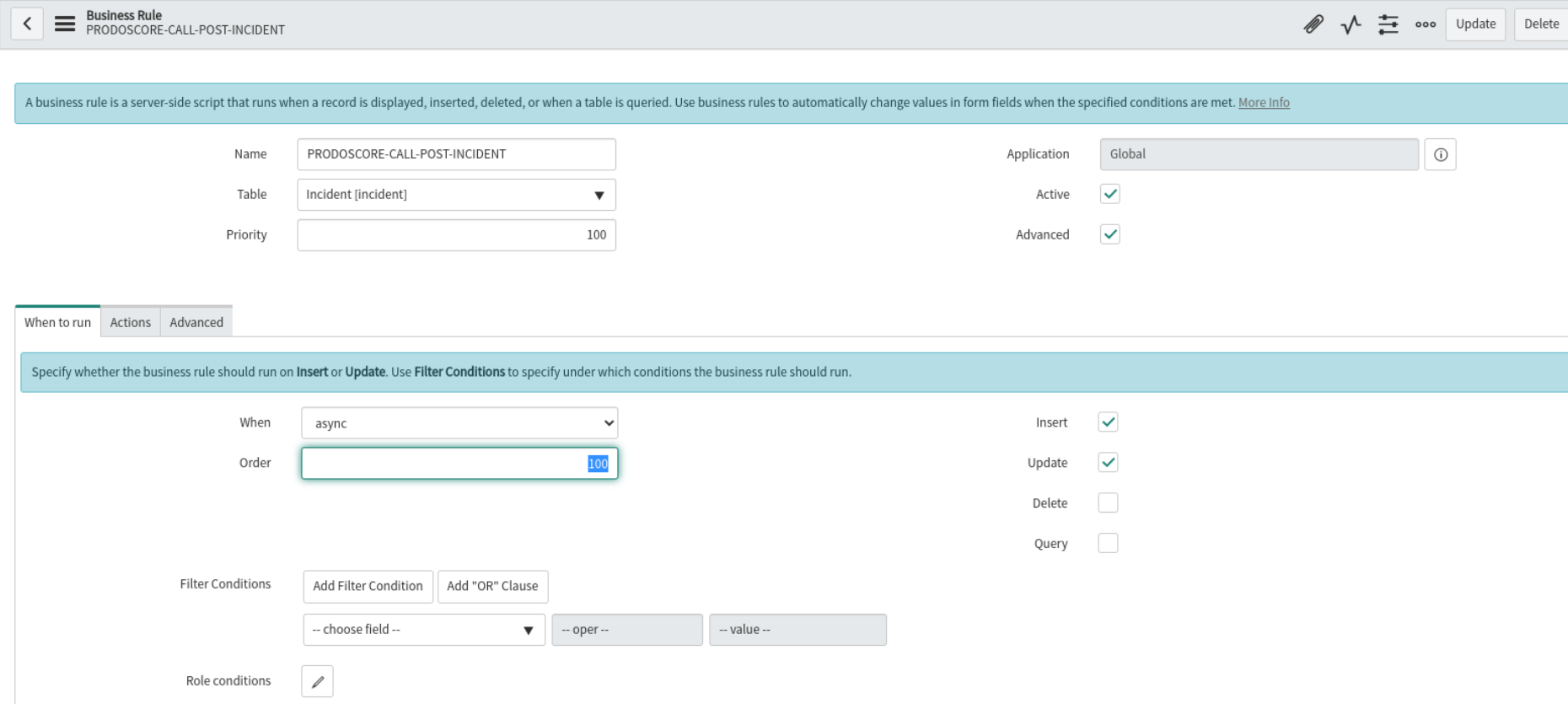
The Order field determines execution sequence among Business Rules of the same type. Lower values execute first. The default is 100, and the magic number 1000 is when ServiceNow engines (workflows, approvals) run.
Figure 4: The Order field in Business Rule configuration — Set values below 1000 to run before engines, above 1000 to run after engines
Order 100
Runs First
Early validation
Order 500
Mid Processing
Field calculations
Order 1000
Engines Run Here
Workflows trigger
Order 2000
Runs Last
Final cleanup
Important: If two Business Rules have the same Order value, their execution sequence is not guaranteed. Always use distinct order values (100, 200, 300) to ensure predictable execution.
Priority Field (Async Only)
For Async Business Rules, there are two relevant fields:
Order: Determines when the BR is queued in the scheduler
Priority: Determines execution priority within the queue (100, 200, 300, etc.)
Pro Tip: Use Order values like 100, 200, 300 instead of sequential numbers (1, 2, 3). This leaves room to insert new BRs between existing ones without renumbering.
9
Business Rules vs GlideRecord: Understanding the Difference
A common point of confusion for ServiceNow beginners is understanding the relationship between Business Rules and GlideRecord. They are fundamentally different concepts that work together.
Key Distinction: A Business Rule is an automation mechanism (WHEN to run code), while GlideRecord is a database API (HOW to interact with data). Business Rules use GlideRecord to perform database operations.
Business Rule vs GlideRecord Comparison
Aspect
Business Rule
GlideRecord
What is it?
An automation trigger/container
A JavaScript API/class
Purpose
Define WHEN code runs (on insert, update, delete, query)
Define HOW to interact with database (CRUD operations)
Stored in
sys_script table
Not stored - it's a runtime API
Configuration
Table, When (Before/After/Async), Conditions, Order
N/A - used within scripts
Relationship
Contains scripts that USE GlideRecord
Used BY Business Rules (and other scripts)
How They Work Together
Think of it this way: A Business Rule is the "container" that defines when your automation runs, and GlideRecord is the "tool" you use inside that container to work with data.
// This is a BUSINESS RULE (the automation container)
// It runs AFTER an incident is updated

(function executeRule(current, previous) {
    // Inside the BR, we use GLIDERECORD (the database API)
    // to create a related task

    var task = new GlideRecord('task');  // GlideRecord API
    task.initialize();
    task.short_description = 'Follow-up for ' + current.number;
    task.parent = current.sys_id;
    task.insert();  // GlideRecord method

})(current, previous);
The 'current' Object
In Business Rules, current is a special GlideRecord object that represents the record being processed. You don't need to query for it - ServiceNow provides it automatically:
(function executeRule(current, previous) {
    // 'current' IS a GlideRecord - no need to create one!
    // It already contains the record being inserted/updated

    current.priority = 1;  // Modify the current record
    current.assignment_group.setDisplayValue('Network Team');

    // For Before BRs: changes save automatically
    // For After BRs: would need current.update() (but avoid this!)

})(current, previous);
When to Use GlideRecord in Business Rules
Query other tables: Look up related records, validate against other data
Create new records: Auto-generate tasks, problems, or child records
Update related records: Cascade changes to parent/child records
Aggregate data: Count, sum, or calculate across multiple records
// QUERY: Find records
var gr = new GlideRecord('incident');
gr.addQuery('priority', 1);
gr.query();
while (gr.next()) { /* process */ }

// INSERT: Create new record
var gr = new GlideRecord('task');
gr.initialize();
gr.short_description = 'New task';
gr.insert();

// UPDATE: Modify existing records
var gr = new GlideRecord('incident');
gr.addQuery('state', 1);
gr.query();
while (gr.next()) {
    gr.state = 2;
    gr.update();  // Required for GlideRecord updates
}

// COUNT: Use GlideAggregate (more efficient!)
var ga = new GlideAggregate('incident');
ga.addAggregate('COUNT');
ga.query();
if (ga.next()) {
    var count = ga.getAggregate('COUNT');
}
Remember: In Before Business Rules, don't call current.update() - changes to current are saved automatically. Use update() only when modifying OTHER records via GlideRecord.
10
Best Practices & Common Pitfalls
Following best practices is essential for maintaining a performant and maintainable ServiceNow instance. These guidelines come from Quality Clouds and the ServiceNow Community.
Use Declarative Actions When Possible
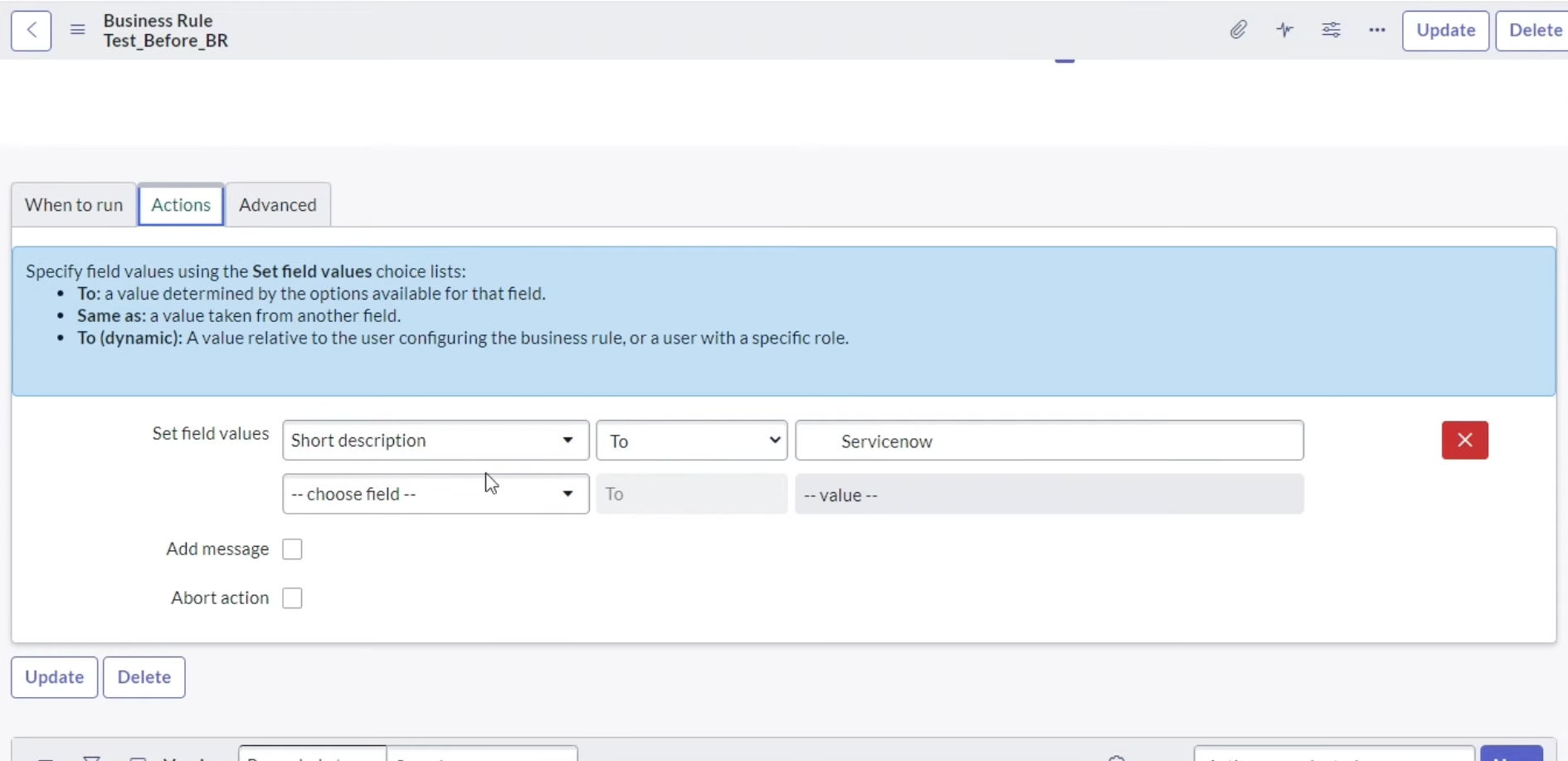
Before writing custom scripts, consider using ServiceNow's built-in Actions tab for simple field value assignments. Declarative actions are easier to maintain, less error-prone, and don't require scripting knowledge.
Figure 3: The "Actions" tab for declarative field assignments — Set field values without writing code using "To", "Same as", or "To (dynamic)" options
Critical Do's
Use conditions: Always add conditions to limit when BRs execute
Use Async for long operations: External APIs, emails, heavy processing
Use Before for validation: Data checks, field population, abort actions
Use After for related records: Updating other tables after save
Add error handling: Try-catch blocks for external integrations
Log appropriately: Use gs.info() for tracking, gs.error() for failures
Critical Don'ts
NEVER use current.update() in a Before Business Rule: Changes are automatically saved. Using update() causes recursive execution.
// BAD - Don't do this in Before BR
current.state = 2;
current.update(); // WRONG! Will cause recursion

// GOOD - Just set the value
current.state = 2;
// No update() needed - saves automatically
Avoid Global Business Rules: They load on every page, impacting performance. Use Script Includes instead - they only load when called.
Preventing Recursion
If you must use current.update() in an After BR, prevent recursion with setWorkflow(false):
(function executeRule(current, previous) {
    // Only if absolutely necessary in After BR
    current.u_processed = true;
    current.setWorkflow(false); // Prevents recursive BRs
    current.update();
    current.setWorkflow(true); // Re-enable for future operations
})(current, previous);
Performance Optimization Checklist
Practice
Why It Matters
Use GlideAggregate for counts
Database-optimized, doesn't load all records
Avoid multiple OR conditions
Poor database performance
Don't use CONTAINS in high-volume BRs
Full table scans are expensive
Use Script Includes over Global BRs
Only loads when called
Cache repeated lookups
Reduces database queries
Use setLimit() when appropriate
Don't retrieve more records than needed
11
Debugging & Troubleshooting
Effective debugging is essential for ServiceNow developers. According to ServiceNow's debugging guide, Business Rules exceeding 100ms are automatically logged as slow. This section covers the logging functions, debugging tools, and troubleshooting techniques every developer should know.
GlideSystem Logging Functions
ServiceNow provides several logging functions through the gs (GlideSystem) object. Understanding when to use each is crucial for effective debugging:
Function
Log Level
Writes To
Scoped App?
Use Case
gs.debug()
DEBUG
Session log, sys_log
Yes
Detailed debugging info (requires session debug enabled)
gs.info()
INFO
Session log, sys_log
Yes
General information messages
gs.warn()
WARN
Session log, sys_log
Yes
Warning conditions that aren't errors
gs.error()
ERROR
Session log, sys_log
Yes
Error conditions and exceptions
gs.log()
INFO
sys_log, node log file
No
Global scope only (legacy)
gs.print()
—
Node log file only
No
Text file logging only
Important: In scoped applications, gs.log() will throw an error. Always use gs.info() or gs.debug() instead. This is a common mistake that causes Business Rules to fail silently.
Viewing Log Output
Log messages can be viewed in several locations depending on the logging function used:
System Logs > All: View all gs.info(), gs.warn(), gs.error(), and gs.debug() output in the sys_log table
Session Debug Output: When session debugging is enabled, messages appear at the bottom of forms and lists
Script Debugger (New York+): The session log tab shows real-time output
Node Log File Browser: Navigate to System Logs > Node Log File Browser for gs.log() and gs.print() output
Tip: When viewing System Logs > All, ensure the "Source" field filter is empty. If filtered, your logs may not appear even though they were written successfully.
Understanding Log Fields
According to ServiceNow KB2593531, log entries contain structured fields for effective debugging:
_timestamp: Exact timestamp in UTC with microsecond precision
_level: Severity level (INFO, DEBUG, ERROR, WARN)
_message: The actual log content
_txid: Transaction ID for correlating related log entries across components
_session_id: Session identifier for tracking user activity
_user / _logged_in_user: User context (shows impersonation when active)
_system_id: Identifies which node generated the log
Session Debug for Business Rules
Session debugging is essential for seeing gs.debug() output and understanding Business Rule execution. According to the ServiceNow Developer Blog:
Enable Debug Business Rule: Navigate to System Diagnostics > Session Debug > Debug Business Rule
Enable Debug Security: Also enable Debug Security to see ACL restrictions
View Output: Debug messages appear at the bottom of forms and lists after you perform an action
Before Query Rules: Debug output reveals query business rules that may be filtering records unexpectedly
REST API Debugging: When debugging via REST, add the header X-WantSessionDebugMessages: true to include gs.debug() output in the response.
Script Tracer
The Script Tracer provides detailed execution tracking for server-side scripts:
Navigate to System Diagnostics > Script Tracer
Click Start Tracer to begin capturing script activity
Perform the transaction you want to trace
Review results showing detailed execution logs, timing, and record changes
Transaction Logs
For performance analysis, use the Transaction Logs to identify slow Business Rules:
Navigate to System Logs > Transactions (All users)
Add columns: Business rule time, Browser time, Client response time, SQL time, ACL time
Sort by "Business rule time" descending to find slow transactions
Business Rules exceeding 100ms are flagged as slow
Debugging Code Example
Use this pattern for comprehensive debugging in your Business Rules:
(function executeRule(current, previous) {
    var BR_NAME = 'MyBusinessRule';

    // Entry point logging
    gs.info('[' + BR_NAME + '] Starting - Table: ' + current.getTableName() +
            ', Record: ' + current.getUniqueValue());

    try {
        var startTime = new Date().getTime();

        // Debug level for detailed tracing (requires session debug)
        gs.debug('[' + BR_NAME + '] Field values - state: ' + current.state +
                 ', priority: ' + current.priority);

        // Your business logic here
        // ...

        var endTime = new Date().getTime();
        gs.info('[' + BR_NAME + '] Completed in ' + (endTime - startTime) + 'ms');

    } catch (ex) {
        // Always log errors with stack trace
        gs.error('[' + BR_NAME + '] Error: ' + ex.message);
        gs.error('[' + BR_NAME + '] Stack: ' + ex.stack);
    }
})(current, previous);
Common Troubleshooting Checklist
If your Business Rule isn't executing or logging, check these common issues:
Is it Active? Verify the "Active" checkbox is checked
Correct Table? Ensure the Business Rule is on the right table
When to Run? Check that Insert/Update/Delete/Query checkboxes match your scenario
Conditions Met? Remove all conditions temporarily to test if the rule fires
Scoped App? Replace gs.log() with gs.info() in scoped applications
Log Filters? Clear the "Source" filter in System Logs > All to see all entries
Session Debug? Enable session debugging to see gs.debug() output
12
Business Rules vs Client Scripts vs UI Policies
Choosing the right scripting mechanism is crucial. According to the ServiceNow Community discussion, each has specific use cases.
Feature
Business Rule
Client Script
UI Policy
Execution
Server-side
Browser (client-side)
Browser (client-side)
Triggers on
Insert, Update, Delete, Query
onLoad, onChange, onSubmit
Form load, Field change
APIs Available
GlideRecord, gs, etc.
g_form, g_user, g_scratchpad
UI Policy Actions
Works with
Any data access (UI, API, script)
Form interactions only
Form interactions only
Scripting Required
Yes
Yes
Optional
Quick Decision Guide
Scenario
Recommended Approach
Make field mandatory/read-only/hidden
UI Policy - No scripting needed
Complex client-side logic
Client Script
onSubmit validation before save
Client Script (immediate feedback)
Server-side data validation
Before Business Rule
Auto-populate fields on save
Before Business Rule
Create related records after save
After Business Rule
Send notifications/emails
Async Business Rule
Logic must run regardless of access method
Business Rule
Pass server data to form
Display BR + g_scratchpad
Pro Tip: UI Policies are faster than Client Scripts. ServiceNow recommends using UI Policies for simple show/hide/mandatory/read-only logic whenever possible.
13
Common Interview Questions
Based on the ServiceNow Community's interview guide and real interview experiences, here are 30 frequently asked Business Rule questions organized by difficulty level:
Fundamental Questions (1-10)
What is a Business Rule in ServiceNow? A server-side script that runs when records are inserted, updated, deleted, displayed, or queried. Stored in sys_script table. (Q1)
What are the four types of Business Rules? Before, After, Async, and Display. Each runs at a different point relative to the database operation. (Q2)
Where are Business Rules stored? In the sys_script table. Access via System Definition > Business Rules. (Q3)
What's the difference between Before and After Business Rules? Before runs before database save (changes auto-save, no update() needed). After runs after save (update() required to modify current record). (Q4)
When does a Display Business Rule run? When a record is loaded for viewing on a form only. Does not run on list views, APIs, or during insert/update operations. (Q5)
What is the purpose of the "Active" checkbox? Controls whether the Business Rule executes. Unchecking it disables the rule without deleting it. (Q6)
What operations can trigger a Business Rule? Insert, Update, Delete, Query (for Query BRs), and Display (for Display BRs). (Q7)
What is the current object? A GlideRecord object representing the record being processed. Contains the new values during the transaction. (Q8)
What is the previous object? A GlideRecord object containing the record's values before modification. Only available in Before and After BRs on update operations. (Q9)
How do you check if a field value changed? Use current.field_name.changes() or compare current.field_name != previous.field_name. (Q10)
Intermediate Questions (11-20)
Why should you avoid using current.update() in Business Rules? It causes recursive execution where the rule triggers itself. Before BRs auto-save changes. After BRs should use current.setWorkflow(false) before update() to prevent recursion. (Q11)
What is g_scratchpad and how is it used? An object that passes data from Display BRs (server-side) to Client Scripts (client-side). Set values in Display BR, read them in onLoad Client Script. (Q12)
What does the Order field control? Execution sequence among BRs of the same type on the same table. Lower values run first. Default is 100. Order 1000 is when engines (workflows) execute. (Q13)
How do you prevent a record from being saved? Use current.setAbortAction(true) in a Before BR. Optionally add a message with gs.addErrorMessage(). (Q14)
What's the difference between Async and After Business Rules? After runs synchronously (blocks user until complete). Async runs in background via scheduler (non-blocking). Use Async for emails, external APIs, heavy processing. (Q15)
What is a Query Business Rule? Runs before every GlideRecord query on a table. Used to add automatic filters for row-level security. Use sparingly due to performance impact. (Q16)
How do you access related record data in a Business Rule? Use dot-walking (e.g., current.caller_id.email) or create a new GlideRecord query to fetch related records. (Q17)
What logging functions work in scoped applications? gs.info(), gs.debug(), gs.warn(), gs.error(). Note: gs.log() does NOT work in scoped apps. (Q18)
How do you prevent workflows from running when updating a record? Call current.setWorkflow(false) before the update operation. (Q19)
What is the difference between gs.nil() and checking for empty string? gs.nil() checks for null, undefined, and empty string. It's more comprehensive than == ''. (Q20)
Execution Order & Sequence Questions (21-25)
What is the complete execution order when a user submits a form? onSubmit Client Script → Before BR (Order < 1000) → Engines/Workflows (Order 1000) → Before BR (Order ≥ 1000) → Database Operation → After BR → Async BR(Q21)
If you have a Before BR, After BR, Workflow, and Async BR on the same table, what's the execution sequence on insert?
Before BR → Workflow (at Order 1000) → Database Insert → After BR → Async BR (background). The user sees the response after After BR completes. (Q22)
A table has UI Policy, Client Script (onChange), Before BR, and After BR. User changes a field and saves. What's the order?
onChange Client Script → UI Policy (field change) → onSubmit Client Script → Before BR → Database → After BR. UI Policy and Client Scripts run on client before server-side BRs. (Q23)
You have two Before BRs: one with Order 100, another with Order 500. Which runs first?
Order 100 runs first. Lower order values execute before higher values. If both have the same order, execution sequence is not guaranteed. (Q24)
When do Query Business Rules execute relative to other automations?
Query BRs run BEFORE the query returns results, before any form is displayed. They execute on every GlideRecord query, list view, report, or API call on that table. (Q25)
Advanced & Scenario Questions (26-30)
Can you call a Business Rule directly from a Client Script?
No. Use GlideAjax to call a Script Include, which can contain similar server-side logic. Alternatively, use a Display BR with g_scratchpad for passing data to client. (Q26)
A Before BR sets a field value, and an After BR reads that same field. Will the After BR see the updated value?
Yes. The Before BR changes are committed to the database before After BRs run. The current object in After BR reflects the saved state. (Q27)
You need to update a parent record when a child record is created. Should you use Before or After BR?
After BR. The child record must exist in the database (have a sys_id) before you can reliably update the parent with a reference to it. (Q28)
How do you prevent infinite loops when an After BR updates the current record?
Use current.setWorkflow(false) to prevent BRs from re-triggering, or add a condition checking current.operation() == 'update' with a specific field change. (Q29)
A Flow, Business Rule, and Workflow all exist on the same table. What's the execution order?
Before BR → Flow Designer flows (run as part of engines at ~Order 1000) → Workflows → After BR → Async BR. Flows and Workflows run between Before and After BRs. (Q30)
Interview Tip: When answering Business Rule questions, always mention: (1) the BR type, (2) when it runs relative to database operations, (3) whether current.update() is needed, and (4) appropriate use cases. This demonstrates comprehensive understanding.
14
Abbreviations & Glossary
Abbreviations & Glossary
Reference guide for technical terms and abbreviations used throughout this article.
ACL-Access Control List
API-Application Programming Interface
AJAX-Asynchronous JavaScript and XML
BR-Business Rule
CS-Client Script
DB-Database
GR-GlideRecord (database API)
ITSM-IT Service Management
OOB-Out of Box
REST-Representational State Transfer
SLA-Service Level Agreement
UI-User Interface
Related Reading
Continue your ServiceNow learning journey with these related guides: