MuleSoft Interview Guide
Jitendra's Blog
COMPLETE DEVELOPER GUIDE

MuleSoft: The Complete Guide

40+ expert interview questions covering API-led connectivity, DataWeave, AI capabilities, certifications & career path

41
Interview Questions
13
Topic Categories
3
Difficulty Levels
2025
Updated

API-Led Connectivity

Architecture patterns and layer design

1 Explain the three layers of API-led connectivity in MuleSoft.
Beginner

According to MuleSoft's official documentation, API-led connectivity is an architectural approach that organizes APIs into three distinct layers:

  • System APIs (Bottom Layer): These interact directly with backend systems of record such as databases, SAP, Salesforce, and legacy systems. They expose raw data in a secure and reliable way, abstracting the complexity of underlying systems.
  • Process APIs (Middle Layer): This layer contains business logic and orchestration. Process APIs aggregate data from multiple System APIs and apply transformations according to business requirements. They don't directly interact with source systems.
  • Experience APIs (Top Layer): These APIs are tailored for specific channels or consumers (mobile apps, web applications, partner integrations). They format and deliver data optimized for each user experience.

As noted by Salesforce Ben, this architecture promotes reusability, loose coupling, and independent scalability of each layer.

Experience APIs
Mobile Apps, Web Apps, Partner Portals
Top Layer
Process APIs
Business Logic, Orchestration, Transformations
Middle Layer
System APIs
SAP, Salesforce, Databases, Legacy Systems
Bottom Layer
2 In which layer should Salesforce be connected when processing Kafka events?
Intermediate

Salesforce connections belong in the System API layer. According to MuleSoft Salesforce Connector documentation, System APIs handle all direct interactions with backend systems.

The typical flow for processing Kafka events into Salesforce would be:

  1. Experience API: Receives or triggers the event consumption
  2. Process API: Reads from Kafka, validates, transforms, deduplicates, and orchestrates the business logic
  3. System API: Connects to Salesforce using the appropriate connector (REST, Bulk, or Composite API) to persist the processed data
3 How to design a pipeline for high-volume vs. low-volume real-time events from Kafka to Salesforce?
Advanced

This scenario requires different strategies based on volume and latency requirements:

For High-Volume Events (millions per day, batch processing acceptable):

  • Use Salesforce Bulk API v2 which automatically chunks data into internal batches
  • Implement scheduled batch jobs during off-peak hours
  • Use Anypoint MQ as a buffer to collect events before bulk processing
  • Configure parallel consumers with multiple Kafka partitions

For Low-Volume Events (real-time/near real-time required):

  • Use Salesforce REST API or Composite API for synchronous processing
  • Process events immediately as they arrive from Kafka
  • Implement idempotency checks using Object Store or Redis
  • Use error handling with immediate retries for transient failures

High Volume

Millions of records, batch processing OK

Bulk API v2

Low Volume

Real-time processing required

REST / Composite API
Pro Tip: The Composite API allows up to 25 subrequests in a single call, maintaining transactional integrity while reducing API callouts. For larger volumes up to 500 records, use the Composite Graph resource.

DataWeave Transformations

Data mapping and transformation functions

4 What are the differences between map, mapObject, flatMap, and pluck in DataWeave?
Beginner

According to MuleSoft DataWeave documentation, these are the key differences:

map

Transforms each item in an array

Array → Array

mapObject

Transforms object key-value pairs

Object → Object

flatMap

Maps and flattens nested arrays

Array[] → Array

pluck

Extracts object pairs into array

Object → Array
Operator Input Type Output Type Primary Use
map Array Array Transform each item in an array
mapObject Object Object Transform object key-value pairs, return object
pluck Object Array Extract object key-value pairs into an array
flatMap Array of Arrays Array Map and flatten nested arrays simultaneously
// map - iterates over arrays
%dw 2.0
output application/json
---
[1, 2, 3] map ((item) -> item * 2)
// Output: [2, 4, 6]

// mapObject - iterates over object properties
%dw 2.0
output application/json
---
{a: 1, b: 2} mapObject ((value, key) -> {(upper(key)): value})
// Output: {"A": 1, "B": 2}

// pluck - converts object to array
%dw 2.0
output application/json
---
{a: 1, b: 2} pluck ((value, key) -> key)
// Output: ["a", "b"]

// flatMap - maps and flattens
%dw 2.0
output application/json
---
[[1, 2], [3, 4]] flatMap ((item) -> item)
// Output: [1, 2, 3, 4]
5 How to handle deeply nested JSON with 5-6 levels of nesting?
Intermediate

For deeply nested JSON structures, you have several approaches:

  • Recursive mapObject: Use mapObject recursively for objects at each level
  • flatten function: Use the flatten function to convert nested arrays into a flat structure
  • Dot notation navigation: Access nested properties directly with payload.level1.level2.level3
  • Descendants selector: Use payload..fieldName to find all occurrences of a field regardless of depth
// Flattening deeply nested arrays
%dw 2.0
output application/json
---
flatten(flatten(payload.level1.level2.level3))

// Using descendants selector
%dw 2.0
output application/json
---
payload..targetField

Kafka Integration

Event streaming and message processing

Kafka to Salesforce Integration Flow
Kafka Topic
Consumer Group
MuleSoft
Salesforce
6 How do Kafka consumer groups and partitions work in MuleSoft?
Intermediate

According to the Apache Kafka Connector 4.12 documentation, MuleSoft provides comprehensive support for Kafka consumer groups and partitions:

  • Consumer Groups: Multiple consumers can exist in a single group, with the connector ensuring high performance through one consumer per thread
  • Partition Subscription: You can subscribe to specific Kafka partitions for targeted message processing
  • Offset Management: The connector supports automatic offset commit and manual commit modes
Best Practice: Use consumer groups to distribute workload across multiple workers. Each partition can only be consumed by one consumer within a group, enabling parallel processing while maintaining message ordering within partitions.
7 How is offset management handled in MuleSoft Kafka Connector?
Advanced

The Kafka Connector Reference provides several operations for offset management:

  • Seek Operation: Sets the current offset for a given topic and partition to a specific value
  • Commit Operation: Commits offsets associated with consumed messages (works only with MANUAL Ack mode)
  • Flexible Reading: Read from beginning, end, or a pre-specified offset position
// Kafka consumer configuration with manual offset
<kafka:consumer config-ref="Kafka_Config"
    topic="orders"
    consumerGroup="order-processors"
    offsetReset="EARLIEST"
    ackMode="MANUAL"/>

// Commit offset after successful processing
<kafka:commit config-ref="Kafka_Config"/>
8 How to ensure message ordering when processing Kafka events in MuleSoft?
Advanced

Message ordering in Kafka-MuleSoft integration requires careful architecture:

  • Partition Key Strategy: Use meaningful partition keys (e.g., customer ID) to ensure related messages go to the same partition
  • Single Consumer per Partition: Configure one consumer per partition within a consumer group
  • Sequential Processing: Process messages one at a time within each partition, committing offsets only after successful processing
  • Avoid Parallel Processing: Don't use parallel for-each or async processing if order matters
Important: Message ordering is only guaranteed within a single partition. If absolute ordering across all messages is required, use a single partition (which limits throughput).

Salesforce Integration

CRM connectivity and data synchronization

9 How to ensure idempotency and prevent duplicate records in Salesforce?
Advanced

According to MuleSoft's best practices guide, there are several strategies to prevent duplicates:

Message In
New event arrives
Check Store
Lookup event ID
Process
If unique, process
Store ID
Save to Object Store
  • External ID Fields: Use Salesforce External ID fields for upsert operations, allowing matching based on external system identifiers
  • Idempotent Message Validator: Implement the idempotent filter to detect and reject duplicate messages based on unique IDs
  • Object Store / Redis Caching: Store processed event IDs in Object Store or Redis with TTL to track recently processed messages
  • Replay ID Deduplication: Use Object Store v2 to retain replay IDs and prevent reprocessing after restarts
// Idempotent Message Validator with Object Store
<idempotent-message-validator doc:name="Check Duplicate"
    idExpression="#[payload.eventId]">
    <os:private-object-store
        alias="eventStore"
        entryTtl="2"
        entryTtlUnit="HOURS"/>
</idempotent-message-validator>

According to MuleSoft documentation, the validator uses an Object Store to check if a message has already been processed, throwing a DUPLICATE_MESSAGE exception if found.

10 What's the difference between Salesforce Bulk API and Composite API?
Intermediate

According to Salesforce Developer documentation:

Feature Bulk API Composite API
Processing Asynchronous Synchronous
Volume Thousands to millions of records Up to 500 records (graph), 25 subrequests (batch)
Use Case Large data migrations, batch processing Complex multi-object operations, transactional integrity
Transactions No native transaction support Supports all-or-none transactions
Best For High-volume, non-time-sensitive operations Related operations requiring consistency
Recommendation: Use Bulk API v2 for large data volumes as it automatically handles batching, error handling, and retries. Use Composite API when you need to create parent-child relationships in a single transaction.
11 What Salesforce connectors and operations are available in MuleSoft?
Beginner

The Salesforce Connector supports multiple APIs:

  • REST API: Standard CRUD operations (Create, Read, Update, Delete, Query)
  • SOAP API: Legacy integrations and complex queries
  • Bulk API: High-volume data operations (v1 and v2)
  • Streaming API: Real-time event notifications via PushTopics and Platform Events
  • Metadata API: Deploy and retrieve metadata
  • Composite Connector: Batch requests, tree operations, and composite API calls

Error Handling & Reliability

Retry patterns, DLQ, and fault tolerance

Error Handling & Retry Flow
Message
Received
Until
Successful
Success
or
Dead Letter
Queue
12 How to implement retry logic in MuleSoft? Explain Until Successful scope.
Intermediate

According to MuleSoft documentation, the Until Successful scope executes processors within it until they all succeed or the maximum retries are exhausted.

Key Configuration Parameters:

  • maxRetries: Maximum number of retry attempts
  • millisBetweenRetries: Minimum interval between attempts (default: 60000ms)
<until-successful maxRetries="5" millisBetweenRetries="3000">
    <http:request config-ref="HTTP_Config"
        method="POST"
        path="/api/resource">
        <http:response-validator>
            <http:failure-status-code-validator values="500"/>
        </http:response-validator>
    </http:request>
</until-successful>
Error Handling: If the final retry fails, Until Successful throws a MULE:RETRY_EXHAUSTED error. Only retry for transient errors (connectivity, 500 errors) - not for validation errors (400, 401) which won't be fixed by retrying.
13 Explain Dead Letter Queues (DLQ) and how to implement them with Anypoint MQ.
Advanced

According to Anypoint MQ documentation, a Dead Letter Queue stores messages that cannot be successfully processed after multiple attempts.

DLQ Configuration Steps:

  1. Create a DLQ (standard or FIFO queue type)
  2. Assign the DLQ to your main queue via "Assign a Dead Letter Queue" toggle
  3. Configure the number of delivery attempts before moving to DLQ

Retry and Reprocess Pattern:

  • Enrich failed messages with metadata (source queue, retry count, error description)
  • Publish to a dedicated error queue
  • Process error queue after a delay
  • Either re-queue for retry or move to DLQ if retry limit exceeded

The Anypoint MQ REM dashboard provides tools to monitor errors and resubmit messages from DLQ back to source queues.

14 What are the differences between error-continue and error-propagate?
Beginner

error-continue:

  • Handles the error and allows the flow to continue executing subsequent components
  • The error is considered "handled"
  • Useful for non-critical errors where processing should continue

error-propagate:

  • Handles the error, performs cleanup/logging, then re-throws the error
  • Stops the current flow and propagates error to parent flow or caller
  • Useful when you need to log errors but still want upstream handling
<error-handler>
    <on-error-continue type="HTTP:CONNECTIVITY">
        <logger message="Connection issue, using cached data"/>
        <set-payload value="#[vars.cachedData]"/>
    </on-error-continue>

    <on-error-propagate type="HTTP:UNAUTHORIZED">
        <logger message="Auth failed: #[error.description]"/>
        <!-- Error propagates to caller -->
    </on-error-propagate>
</error-handler>
15 How to handle failed records for retry processing?
Intermediate

A robust failed record handling strategy involves:

  • Error Queue: Route failed messages to an Anypoint MQ error queue with enriched metadata
  • DLQ Assignment: Configure DLQ for messages that fail all retry attempts
  • Scheduled Reprocessing: Use a scheduler to retry error queue messages after a configurable delay
  • Parking Queue: Final destination for messages that fail all retry and reprocess attempts

According to Anypoint MQ best practices, maintaining a delivery counter and enriching messages with error context enables intelligent retry decisions.

Security & Authentication

OAuth, JWT, mTLS, and API policies

Basic Auth
OAuth 2.0
Client ID
JWT Token
mTLS
16 What authentication mechanisms are commonly used in MuleSoft integrations?
Beginner

According to MuleSoft HTTP Authentication documentation, common mechanisms include:

  • Basic Authentication: Username/password credentials encoded in headers
  • OAuth 2.0: Industry standard for API authorization (Client Credentials, Authorization Code grants)
  • Client ID Enforcement: Validates client credentials registered in API Manager
  • JWT Validation: Validates JSON Web Tokens from identity providers like Okta
  • mTLS (Mutual TLS): Two-way certificate authentication
17 Explain OAuth 2.0 Client Credentials grant type in MuleSoft.
Intermediate

According to MuleSoft OAuth documentation, the Client Credentials grant type is designed for machine-to-machine communication without human intervention.

Key Characteristics:

  • Application authenticates using its own credentials (client ID and secret)
  • No user context or consent required
  • Ideal for backend services and automated processes
  • Tokens typically have shorter lifespans and can be refreshed programmatically

As noted in the MuleSoft JWT Validation Policy documentation, combining OAuth 2.0 with JWT validation ensures only authorized clients can access your APIs.

18 What is mTLS and when should it be used?
Advanced

According to a Salesforce Developers Blog article from October 2025, Mutual TLS (mTLS) extends standard TLS by requiring both client and server to authenticate each other using digital certificates.

Benefits of mTLS:

  • Provides an additional security layer beyond OAuth2
  • Ensures only authorized systems with valid certificates can connect
  • Eliminates dependency on IP allowlisting
  • Scalable and operationally efficient for cloud environments

Use Cases:

  • Salesforce-to-Salesforce integrations
  • MuleSoft-to-Salesforce connections
  • High-security financial or healthcare integrations
  • Zero-trust architecture implementations
19 Explain rate limiting vs. throttling in MuleSoft API Manager.
Intermediate

According to MuleSoft Rate Limiting Policy documentation:

Feature Rate Limiting Throttling
Behavior Hard limit - rejects excess requests Queues excess requests for later processing
Response Returns 429 (Too Many Requests) Delays response or eventually rejects
Use Case Protect APIs from overload Smooth traffic spikes
Configuration Requests per time window Delay between retries, max retry attempts

Response Headers Returned:

  • X-Ratelimit-Remaining: Available quota
  • X-Ratelimit-Limit: Maximum requests per window
  • X-Ratelimit-Reset: Time until new window starts (milliseconds)

Anypoint MQ & Messaging

Asynchronous messaging and queues

Anypoint MQ

MuleSoft's managed cloud messaging

Fully Managed

Apache Kafka

High-throughput streaming platform

Self/Confluent Managed
20 What is Anypoint MQ and when should it be used?
Beginner

Anypoint MQ is MuleSoft's cloud-based messaging service that enables reliable asynchronous communication between applications. Key features include:

  • Message Queuing: Standard and FIFO queues for different ordering requirements
  • Message Exchanges: Publish messages to multiple queues simultaneously
  • Dead Letter Queues: Handle failed message processing
  • Cloud-native: Fully managed, scalable infrastructure

Common Use Cases:

  • Decoupling systems for asynchronous processing
  • Buffering high-volume event streams
  • Reliable message delivery with guaranteed processing
  • Load leveling during traffic spikes
21 How does Anypoint MQ compare with Apache Kafka?
Intermediate
Feature Anypoint MQ Apache Kafka
Architecture Traditional message queue Distributed streaming platform
Message Retention Until consumed/TTL expires Configurable retention (time/size based)
Replay Limited Full replay from any offset
Throughput Moderate Very high (millions/second)
Management Fully managed by MuleSoft Self-managed or Confluent Cloud
Best For MuleSoft-centric integrations Event streaming, high-volume data pipelines

Advanced Topics

Migration, deployment, and API design

22 What is the approach to migrate from legacy systems (like webMethods) to MuleSoft?
Advanced

A successful migration strategy involves:

  • Assessment Phase: Inventory existing integrations, document data flows, and identify dependencies
  • API-Led Design: Redesign integrations following API-led connectivity patterns
  • Phased Migration: Migrate services incrementally, starting with less critical integrations
  • Coexistence Strategy: Run legacy and new systems in parallel during transition
  • Testing: Comprehensive functional and performance testing before cutover
23 What are the different ways to deploy applications to CloudHub?
Beginner

CloudHub deployment options include:

  • Anypoint Studio: Right-click project → Deploy to CloudHub
  • Anypoint Platform: Upload JAR file through Runtime Manager
  • Maven/CLI: Automated deployment via Mule Maven Plugin or Anypoint CLI
  • CI/CD Pipelines: Integration with Jenkins, GitHub Actions, Azure DevOps

Key Deployment Considerations:

  • Worker size and count based on expected load
  • Region selection for latency optimization
  • Environment-specific properties configuration
  • Object Store v2 for persistent storage needs
24 Explain RAML and its role in API design.
Beginner

RAML (RESTful API Modeling Language) is a YAML-based language for describing RESTful APIs. Key benefits include:

  • Design-First Approach: Define API contract before implementation
  • Documentation: Auto-generate API documentation from RAML specs
  • Code Generation: Generate server stubs and client SDKs
  • Reusability: Define reusable types, traits, and resource types
  • Validation: Validate requests/responses against schema
#%RAML 1.0
title: Customer API
version: v1
baseUri: https://api.example.com/{version}

types:
  Customer:
    properties:
      id: string
      name: string
      email: string

/customers:
  get:
    description: Get all customers
    responses:
      200:
        body:
          application/json:
            type: Customer[]
  post:
    body:
      application/json:
        type: Customer
25 What are other popular MuleSoft connectors besides Salesforce and Kafka?
Beginner

MuleSoft provides hundreds of pre-built connectors for enterprise integrations:

  • Database: MySQL, Oracle, SQL Server, PostgreSQL
  • Enterprise Systems: SAP, Oracle EBS, PeopleSoft
  • File Systems: SFTP, FTP, File, Amazon S3
  • Messaging: JMS, ActiveMQ, RabbitMQ, IBM MQ
  • Cloud Services: AWS (S3, SQS, Lambda), Azure, Google Cloud
  • Protocols: HTTP, HTTPS, SOAP, REST
  • Others: Email, Workday, ServiceNow, NetSuite
Connector Selection Tip: Always check for MuleSoft Certified connectors first, as they're officially supported and regularly updated. For unsupported systems, you can build custom connectors using the MuleSoft SDK.

Platform & Licensing

Anypoint Platform components and pricing models

26 What are the main components of MuleSoft Anypoint Platform?
Beginner

According to MuleSoft documentation, Anypoint Platform is a unified integration platform with several core components:

Design Center

Create APIs and integrations visually

API Design

Anypoint Exchange

Marketplace for reusable assets

Asset Repository

API Manager

Govern, secure, and monitor APIs

API Governance

Runtime Manager

Deploy and manage Mule apps

Operations

As explained in Salesforce Ben's platform guide, these components work together to provide end-to-end API lifecycle management.

27 What are the different MuleSoft licensing models?
Intermediate

According to the Anypoint Platform Pricing documentation, MuleSoft offers two primary licensing models:

1. Usage-Based Pricing (New Model - Since March 2024):

  • Integration Starter: 50 flows, 5 million messages, 10,000 GB data throughput per year
  • Integration Advanced: 200 flows, 20 million messages, 40,000 GB data throughput per year
  • Pay for what you use with ability to purchase additional capacity packs

2. Legacy vCore-Based Model:

  • Gold: Base subscription with standard vCore allocation
  • Platinum: Enhanced features like HA clustering, business groups
  • Titanium: Premium support with 24/7 coverage and faster response times
2025 Trend: According to MuleSoft's official pricing page, the usage-based model allows enterprises to start small and scale seamlessly, making it more cost-effective for organizations with fluctuating workloads.
28 What is the difference between API Manager and Runtime Manager?
Beginner

According to API Manager documentation and Runtime Manager documentation:

Aspect API Manager Runtime Manager
Primary Focus API governance, security, and analytics Application deployment and monitoring
Key Functions Apply policies, control access, track usage Deploy, manage, monitor Mule applications
Scope API-level configuration Application and server-level operations
Use Case Enforce rate limiting, OAuth policies Scale workers, view logs, restart apps

Infrastructure & Deployment

vCore sizing, scaling, VPC, and load balancers

CloudHub Infrastructure Components
Internet
Load Balancer
VPC
Workers
29 How to decide on vCore sizing for MuleSoft applications?
Intermediate

According to CloudHub Architecture documentation, vCore sizing depends on several factors:

vCore Size Memory Best For
0.1 vCore 500 MB Simple integrations, low traffic, schedulers
0.2 vCore 1 GB Moderate traffic, small payloads
1 vCore 1.5 GB Production APIs, medium complexity
2 vCore 3.5 GB High traffic, large payload transformations
4 vCore 7.5 GB Enterprise workloads, complex orchestrations
Sizing Best Practice: Start with smaller vCores and scale based on actual CPU utilization metrics from CloudHub monitoring. Larger payloads reduce TPS capacity, so memory-intensive operations need higher vCore allocation.
30 What is the difference between horizontal and vertical scaling in MuleSoft?
Intermediate

According to MuleSoft scalability documentation:

Horizontal Scaling

Add more workers (instances)

High Request Volume

Vertical Scaling

Increase vCore size

Large Payloads/CPU

When to use each:

  • Horizontal: Many concurrent requests with small payloads - add workers to distribute load
  • Vertical: CPU-intensive transformations or large payload processing - increase vCore size
  • Both: High volume with large payloads - combine both strategies
Important: According to CloudHub High Availability documentation, batch jobs run on a single worker and cannot be distributed across multiple workers.
31 What is a Dedicated Load Balancer (DLB) and when should it be used?
Advanced

According to MuleSoft DLB documentation, a Dedicated Load Balancer routes external HTTP/HTTPS traffic to Mule applications within a VPC.

Use Cases for DLB:

  • Custom Domain Names: Use your own vanity URLs instead of cloudhub.io
  • SSL/TLS Termination: Manage your own certificates
  • No Rate Limiting: Unlike shared load balancer, DLB has no rate limit policies
  • IP Allowlisting: Restrict access to specific IP ranges
  • URL Mapping: Route different paths to different applications

DLB Architecture:

  • Each DLB is associated with one Anypoint VPC
  • Each DLB unit = 2 workers handling load balancing
  • Maximum 4 DLB units (8 workers) per DLB
  • Static IP addresses available for firewall configuration
TLS Update (2025): According to MuleSoft's DLB guide, support for TLS 1.1 ends on October 2, 2025 for new DLBs. Update configurations to use TLS 1.2 or later.
32 How does VPC and secure tunneling (VPN) work in MuleSoft?
Advanced
VPC & VPN Architecture
On-Premises
Data Center
SAP, Databases, Legacy
IPsec VPN Tunnel
Encrypted | 1.25 Gbps
CloudHub VPC
DLB
Workers
Firewall
Private IPs | Isolated Network | Up to 10 VPN Connections
Encrypted Tunnel
Private Cloud Network

According to MuleSoft VPC documentation and Anypoint VPN documentation:

Virtual Private Cloud (VPC):

  • Logically isolated network within CloudHub
  • Private IP addressing for your Mule applications
  • Firewall rules to control inbound/outbound traffic
  • Required for DLB and VPN connectivity

VPN Connectivity Options:

  • IPsec VPN: Site-to-site tunnel between on-premises data center and CloudHub VPC
  • AWS Direct Connect: Dedicated network connection to AWS
  • Transit Gateway: Connect multiple VPCs and on-premises networks

VPN Specifications:

  • Maximum throughput: 1.25 Gbps per VPN
  • Up to 10 VPN connections per VPC
  • Supports BGP (dynamic) or static routing
  • Two tunnels per connection for high availability
Best Practice: According to VPC connectivity methods, use BGP routing for automatic failover if your VPN endpoint supports it.
33 What are the key considerations for MuleSoft in regulated industries (HIPAA, PCI-DSS)?
Advanced

According to MuleSoft Trust Center and Salesforce Compliance documentation:

MuleSoft Compliance Architecture
HIPAA
PCI-DSS
SOC 2
GDPR
ISO 27001
Data Security
  • TLS 1.2/1.3 in transit
  • AES-256 at rest
  • Data masking
Access Control
  • RBAC permissions
  • SSO / SAML 2.0
  • MFA enforcement
Network Isolation
  • VPC deployment
  • VPN tunneling
  • Firewall rules
Audit & Monitoring
  • Comprehensive logs
  • API analytics
  • Alerting rules
Healthcare: Business Associate Agreement (BAA) available for PHI processing

MuleSoft Certifications:

  • SOC 1 & SOC 2: Service organization controls for security and availability
  • ISO 27001: Information security management
  • HIPAA: Healthcare data protection (BAA available)
  • PCI-DSS: Payment card industry compliance
  • GDPR: European data protection compliance

Key Solution Components for Compliance:

  • Data Encryption: TLS for data in transit, encryption at rest
  • API Governance: Enforce authentication, authorization policies via API Manager
  • Audit Logging: Comprehensive logs for compliance audits
  • VPC Isolation: Private network for sensitive data processing
  • Role-Based Access Control: Granular permissions via Access Management
Healthcare Tip: According to HIPAA compliance guides, Salesforce will sign a Business Associate Agreement (BAA) for MuleSoft, making it suitable for protected health information (PHI) processing.

AI & Automation

Einstein AI, Agentforce, and AI Chain connectors

34 What AI capabilities are available in MuleSoft?
Advanced

According to MuleSoft AI documentation and the MAC Project, MuleSoft offers a comprehensive suite of AI connectors:

MuleSoft AI Ecosystem
Einstein AI
LLMs via Salesforce Trust Layer
Agentforce
AI Agent orchestration
MAC AI Chain
Multi-LLM orchestration
MCP & A2A
Agent-to-Agent protocols
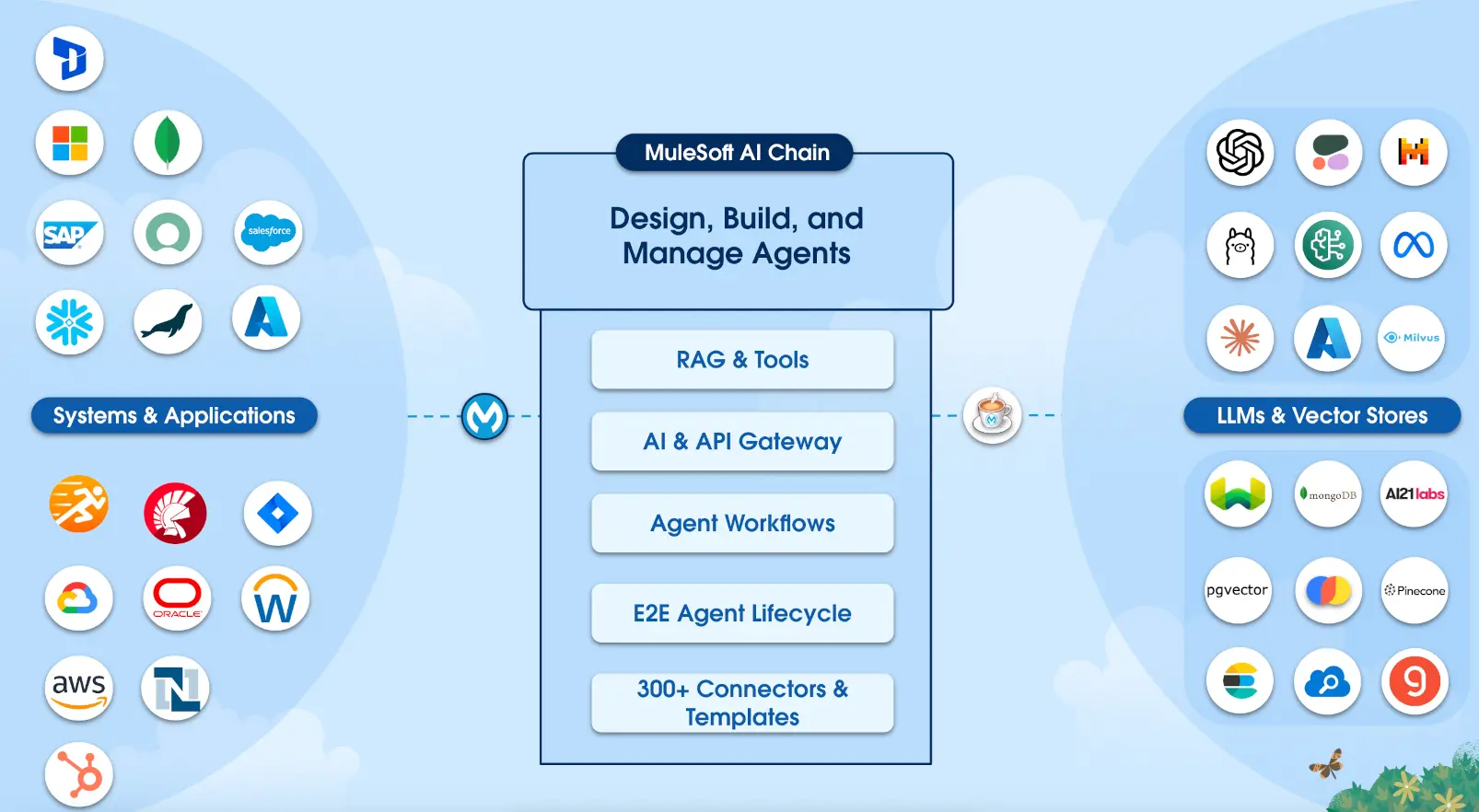
MuleSoft AI Chain MAC Project architecture showing Einstein AI, Agentforce, and LLM connectors
MuleSoft AI Chain (MAC) Project — Orchestrating LLMs and AI Agents in Anypoint Platform — Source: MAC Project

Key AI Connectors:

  • Einstein AI Connector: Provides connectivity to LLMs via Salesforce Einstein Trust Layer with built-in security and privacy controls
  • Agentforce Connector: Enables integration with AI agents running in Salesforce's Agentforce platform for autonomous task execution
  • MuleSoft AI Chain (MAC): Open-source project for orchestrating multiple LLMs, including support for Amazon Bedrock, OpenAI, and more
  • Inference & Vector Connectors: Next-generation connectors for AI model inference and vector database operations
New in 2025: According to Salesforce announcements, MuleSoft now supports Model Context Protocol (MCP) to turn APIs into tools for AI agents, and Agent2Agent (A2A) protocol for cross-enterprise agent collaboration.
35 What is the Agentforce Connector and how does it work?
Advanced

According to MuleSoft documentation, the Agentforce Connector provides seamless integration with AI agents running in Salesforce's Agentforce platform:

Start Session
Initialize agent connection
Continue
Send prompts to agent
Agent Actions
Execute API calls
End Session
Close connection

Key Operations:

  • Start Agent Conversation: Establishes connection and initializes the AI agent session
  • Continue Agent Conversation: Sends user prompts and receives agent responses
  • End Agent Conversation: Gracefully terminates the agent session

Use Cases:

  • Surfacing AI agent capabilities in external applications (mobile apps, portals)
  • Orchestrating multi-step workflows with autonomous AI decision-making
  • Enabling chatbots and virtual assistants powered by Salesforce AI
<!-- Agentforce Connector Example -->
<agentforce:start-agent-conversation config-ref="Agentforce_Config"
    agentId="0XxRM000000001"
    target="#[vars.conversationId]"/>

<agentforce:continue-agent-conversation config-ref="Agentforce_Config"
    conversationId="#[vars.conversationId]"
    message="#[payload.userInput]"/>
36 What is the MuleSoft AI Chain (MAC) Project?
Intermediate

According to the MAC Project documentation and MuleSoft's official blog:

The MuleSoft AI Chain (MAC) project is an open-source initiative to help organizations design, build, and manage AI agents directly within Anypoint Platform. It provides a suite of AI-powered connectors:

Connector Purpose Key Features
AI Chain Multi-LLM orchestration Chain prompts, RAG patterns, tool calling
Einstein AI Salesforce Trust Layer Secure LLM access, data masking
Amazon Bedrock AWS AI models Claude, Titan, Llama integration
MAC Vectors Vector databases Embeddings, similarity search
MAC WebCrawler Web scraping for AI Content extraction for RAG
RAG Pattern: The MAC project simplifies building Retrieval-Augmented Generation (RAG) applications by combining vector stores with LLM prompts, enabling AI responses grounded in your enterprise data.

Market & API Standards

RAML vs OpenAPI, industry positioning, and market comparison

37 What is the difference between RAML and OpenAPI (OAS)? Which should be used?
Intermediate

According to MuleSoft's official guidance and OAS 3.0 documentation:

RAML vs OpenAPI Comparison
R
RAML
RESTful API Modeling Language
  • Created by MuleSoft (2013)
  • YAML-based syntax
  • Resource types & traits
  • Native APIkit support
  • Better for design-first
O
OpenAPI (OAS)
OpenAPI Specification 3.0
  • Linux Foundation (Swagger)
  • JSON or YAML format
  • Industry standard
  • Wider tool support
  • Better for interoperability
Aspect RAML OpenAPI (OAS 3.0)
Origin MuleSoft (2013) Swagger → Linux Foundation (2015)
Format YAML only JSON or YAML
Reusability Resource types, traits, overlays Components, $ref references
Tool Ecosystem MuleSoft-centric Swagger UI, Postman, AWS, Azure
Industry Adoption MuleSoft ecosystem Industry standard (wider adoption)
MuleSoft Support Full native support Full support since OAS 3.0

MuleSoft's Roadmap:

According to MuleSoft's announcement, MuleSoft joined the OpenAPI Initiative and now explicitly supports OAS for describing APIs. While RAML remains fully supported, OAS 3.0 is recommended for:

  • Regulatory requirements (financial services, healthcare)
  • Multi-vendor environments requiring interoperability
  • Teams using Swagger UI, Postman, or third-party API tools
Best Practice: According to MuleSoft documentation, you can convert between RAML and OAS 3.0 in Anypoint Platform, allowing teams to leverage the strengths of both formats.
38 How does MuleSoft compare to competitors in the iPaaS market?
Advanced

According to Gartner's Magic Quadrant for iPaaS (published May 2025) and independent analysis:

Gartner Magic Quadrant for iPaaS (2025)
LEADER
Boomi
11x consecutive
LEADER
Informatica
IDMC platform
LEADER
Workato
7x Leader
CHALLENGER
MuleSoft
Strong execution
Note: MuleSoft moved from Leader (2024) to Challenger (2025). Gartner cited slower general-purpose iPaaS innovation compared to competitors, though MuleSoft remains strong in Salesforce-centric integrations.
Gartner Magic Quadrant for iPaaS 2025 showing MuleSoft, Boomi, Informatica, and Workato positions
Gartner Magic Quadrant for Integration Platform as a Service (iPaaS) 2025 — Source: Gartner
Platform Strengths Considerations
MuleSoft API-led connectivity, Salesforce ecosystem, enterprise governance Higher cost, complexity for simple integrations
Boomi Low-code, broad connector library, consistent Leader positioning Less suited for complex custom integrations
Informatica Data quality, MDM integration, AI-powered data management Primarily data-focused vs. API-focused
Workato AI automation, recipe-based, rapid implementation Less enterprise governance features
IBM (App Connect) Hybrid cloud, mainframe connectivity, watsonx AI, strong enterprise support Best suited for IBM-centric environments

When to Choose MuleSoft:

  • Heavy Salesforce ecosystem investment (Sales Cloud, Service Cloud, Marketing Cloud)
  • API-first strategy with strong governance requirements
  • Enterprise-scale integrations requiring full lifecycle management
  • Need for Agentforce AI agent integration
Market Context: According to Gartner, the iPaaS market exceeded $9 billion in 2024 and is forecast to exceed $17 billion by 2028. The 2025 landscape is being redefined by low-code platforms, AI automation, and agentic capabilities.

Career & Certifications

MuleSoft certification path and career progression

39 What MuleSoft certifications are available and what is the recommended path?
Beginner

According to MuleSoft Training Portal, certifications are organized into Developer and Architect tracks:

MuleSoft Certification Path
All items below are official MuleSoft certifications
Developer Track
LEVEL 1 CERTIFICATION
MCD - Developer
2-6 months experience
LEVEL 2 CERTIFICATION
MCD - Developer II
Production-ready apps
SPECIALTY CERTIFICATION
Hyperautomation
Salesforce + MuleSoft
Architect Track
FOUNDATION CERTIFICATION
Integration Associate
Core terminology
LEVEL 1 CERTIFICATION
Integration Architect
Technical governance
EXPERT CERTIFICATION
Platform Architect
Enterprise strategy
Certification Focus Area Prerequisites
Integration Associate Core integration terminology, API-led connectivity concepts None (entry-level)
MCD Level 1 Design, build, test, deploy basic APIs 2-6 months MuleSoft experience
MCD Level 2 Production apps, DevOps, non-functional requirements MCD Level 1 + project experience
Hyperautomation Specialist Automation solutions across Salesforce + MuleSoft MCD Level 1 + Salesforce experience
Integration Architect Technical governance, solution quality MCD Level 1 recommended
Platform Architect Enterprise strategy, application networks Integration Architect + enterprise experience
Exam Details: Platform Architect exam (Mule-Arch-202) requires 70% passing score (42/60 questions), costs ~$400 USD, and lasts 120 minutes. Certifications are valid for 2 years with free maintenance exams.
40 What career paths are available for MuleSoft professionals?
Beginner

According to industry career guides, MuleSoft professionals can pursue several career trajectories:

MuleSoft Career Progression
Junior Developer
0-2 years
Senior Developer
2-5 years
Tech Lead
5-8 years
Architect
8+ years

Common Career Roles:

  • MuleSoft Developer: Build and maintain integrations using Anypoint Platform
  • Integration Consultant: Design solutions and advise clients on best practices
  • Integration Architect: Define technical standards and governance frameworks
  • Platform Architect: Lead enterprise-wide API strategy and application networks
  • Technical Lead: Manage development teams and delivery timelines
  • Salesforce + MuleSoft Specialist: Hybrid role combining CRM and integration expertise
Market Demand: MuleSoft skills remain in high demand, especially for professionals with Salesforce ecosystem experience and AI/Agentforce integration capabilities.
41 What skills are essential for a MuleSoft developer?
Beginner

Based on industry requirements and MuleSoft certification objectives:

Technical Skills
  • DataWeave transformations
  • API design (RAML/OAS)
  • Anypoint Studio
  • Error handling patterns
  • Connectors & operations
Platform Knowledge
  • CloudHub deployment
  • Runtime Manager
  • API Manager policies
  • Anypoint Exchange
  • VPC & networking
Soft Skills
  • Problem-solving
  • API-first thinking
  • Documentation
  • Stakeholder communication
  • Agile methodology

Key Takeaways

Summary and preparation tips

For MuleSoft interviews, focus on these core competencies:

  • API-Led Connectivity: Understand the three-layer architecture and when to use each layer
  • DataWeave: Master transformation functions like map, mapObject, flatMap, and pluck
  • Error Handling: Know retry patterns, DLQ implementation, and error scopes
  • Salesforce Integration: Understand Bulk API vs. Composite API and idempotency patterns
  • Security: Be familiar with OAuth 2.0, JWT, mTLS, and API policies
  • Real-World Scenarios: Practice designing solutions for high-volume event processing

Abbreviations & Glossary

Quick reference for technical terms used in this guide

Abbreviation Full Form Meaning
API Application Programming Interface A set of protocols enabling different software applications to communicate with each other
RAML RESTful API Modeling Language YAML-based language for describing RESTful APIs used in MuleSoft Design Center
OAS OpenAPI Specification Industry-standard format for describing REST APIs (also known as Swagger)
DLQ Dead Letter Queue A queue that stores messages that couldn't be processed after multiple retries
OAuth Open Authorization Industry-standard protocol for token-based authorization between applications
JWT JSON Web Token Compact, URL-safe token format for securely transmitting claims between parties
mTLS Mutual Transport Layer Security Two-way SSL authentication where both client and server verify each other's certificates
TLS Transport Layer Security Cryptographic protocol for secure data transmission over networks
VPC Virtual Private Cloud Isolated cloud network providing private IP addresses and network isolation for Mule workers
VPN Virtual Private Network Encrypted tunnel connecting on-premises networks to cloud resources securely
IPsec Internet Protocol Security Protocol suite for encrypting and authenticating IP packets in VPN tunnels
DLB Dedicated Load Balancer CloudHub component that distributes traffic across multiple workers with custom SSL certificates
vCore Virtual Core MuleSoft's compute unit measuring worker capacity (1 vCore = ~0.1 physical CPU cores)
CRUD Create, Read, Update, Delete Four basic operations for persistent storage in databases and APIs
REST Representational State Transfer Architectural style for designing networked applications using HTTP methods
SOAP Simple Object Access Protocol XML-based messaging protocol for exchanging structured information in web services
MQ Message Queue Asynchronous communication method where messages are stored until consumed
TTL Time To Live Duration for which data or messages remain valid before expiration
HIPAA Health Insurance Portability and Accountability Act U.S. regulation protecting sensitive patient health information (PHI)
PCI-DSS Payment Card Industry Data Security Standard Security standard for organizations handling credit card information
SOC 2 Service Organization Control 2 Audit framework for service providers storing customer data in the cloud
GDPR General Data Protection Regulation European Union regulation on data protection and privacy
BAA Business Associate Agreement Contract required by HIPAA between covered entities and their business associates
SSO Single Sign-On Authentication scheme allowing users to access multiple applications with one login
SAML Security Assertion Markup Language XML-based standard for exchanging authentication data between identity providers
MFA Multi-Factor Authentication Security method requiring two or more verification factors for access
RBAC Role-Based Access Control Security approach restricting system access based on user roles within an organization
CI/CD Continuous Integration/Continuous Deployment DevOps practices for automating code building, testing, and deployment
SLA Service Level Agreement Contract defining expected service performance metrics and uptime guarantees
AES Advanced Encryption Standard Symmetric encryption algorithm used for data encryption at rest
LLM Large Language Model AI models trained on vast text data for natural language understanding and generation
MAC MuleSoft AI Chain Open-source project for orchestrating multiple LLMs within Anypoint Platform
MCP Model Context Protocol Protocol enabling APIs to be exposed as tools for AI agents
A2A Agent-to-Agent Protocol for AI agents to communicate and collaborate across enterprise systems
RAG Retrieval-Augmented Generation AI pattern combining vector search with LLM prompts for grounded responses
iPaaS Integration Platform as a Service Cloud-based integration platforms for connecting applications and data
MCD MuleSoft Certified Developer Official MuleSoft developer certification validating API and integration skills
MDM Master Data Management Processes and tools for ensuring consistent, accurate master data across systems
Link copied to clipboard!
Previous Post
Tableau AI Complete Guide: Features, Pricing & Power BI/Looker Comparison
Next Post
CMDB Complete Guide 2025
Archives by Year
2025 16 2024 2 2023 9 2022 8 2021 4 2020 18 2019 16 2018 21 2017 34 2016 44 2015 54 2014 30 2013 31 2012 46 2011 114 2010 162
Search Blog

Leave a Reply

This site uses Akismet to reduce spam. Learn how your comment data is processed.

Discover more from Jitendra Zaa

Subscribe now to keep reading and get access to the full archive.

Continue Reading