Salesforce Tableau AI: Features, Pricing & Industry Comparison
Master every AI capability in Tableau - from out-of-box features like Tableau Pulse and Tableau Agent to custom ML integrations with TabPy. Plus, see how Tableau compares to industry leaders Power BI and Looker based on Gartner's 2026 Magic Quadrant
Reading time: ~31 minutes| Last Updated: August 2026
Article Updated: August 2026
This article has been refreshed with the latest information, including 2026 Gartner Magic Quadrant coverage, Tableau Next general availability, and current pricing comparisons. Originally published December 2025.
What's New in This Update (August 2026)
Updated: 2026 Gartner Magic Quadrant coverage (published June 2026) with the latest Leader positions
Added: Tableau MCP servers GA (May 2026) across Next, Cloud, and Server
Added: Tableau Agent in dashboards (GA June 2026) and Azure OpenAI support on Server 2026.2
Updated: Tableau Next now generally available with the Tableau+ bundle
Updated: Current Power BI and Fabric pricing for accurate comparison
Expanded: Einstein Trust Layer guidance including Server customer-connected LLM considerations
5+
Core AI Products
$15-115
User/Month Pricing
250K
Data Services Credits (Tableau+)
4
Custom Integration Methods
1
Tableau History & Evolution
Quick Answer: Tableau AI is the suite of AI capabilities in Salesforce Tableau - Tableau Pulse, Tableau Agent, Agentforce skills, Tableau Semantics, and Tableau Next - that deliver automated insights, natural language analytics, and agentic workflows on top of trusted, governed data.
Before diving into Tableau's powerful AI capabilities, understanding the company's journey provides essential context for how this industry-leading analytics platform evolved. From a Stanford research project to a $15.7 billion Salesforce acquisition, Tableau's story reflects the transformation of the business intelligence industry itself.
The Stanford Origins (2003)
Tableau was founded in 2003 based on groundbreaking research at Stanford University. The founding team brought together academic excellence and entrepreneurial vision:
Christian Chabot
Co-founder and original CEO who led Tableau's growth from startup to IPO and beyond. Brought business acumen and strategic vision to commercialize the Stanford research.
Pat Hanrahan
Stanford professor and computer graphics pioneer. Multiple Academy Award winner for technical achievements and 2019 Turing Award recipient. Brought deep expertise in visualization and rendering.
Chris Stolte
Co-inventor of VizQL technology. His PhD research on improving data visualization formed the core innovation that differentiated Tableau from existing BI tools.
Key Innovation: The founders developed VizQL (Visual Query Language), a patented technology that translates drag-and-drop gestures into database queries. This made sophisticated data visualization accessible without requiring SQL knowledge.
Key Milestones
Year
Milestone
Significance
2003
Company Founded
Tableau Software incorporated in Mountain View, California based on Stanford research
2004-05
Tableau 1.0 Released
First commercial product launched in the mid-2000s with VizQL technology at its core
2007
Tableau Server Introduced
Version 3.5 launched in November 2007, enabling enterprise-scale deployment with sharing, governance, and security features
2013
IPO on NYSE (DATA)
Went public at $31/share, raised $254 million, validating the visual analytics market
2016
Tableau 10 Launch
Major platform update with improved connectivity, clustering, and new data sources
2018
Tableau Prep Introduced
Self-service data preparation tool to clean and shape data before visualization
2019
Salesforce Acquisition
$15.7 billion all-stock deal, largest acquisition in Salesforce history
2021
Tableau 2021.1
Ask Data improvements, Einstein Discovery integration begins
2023
Tableau Pulse Announced
AI-powered insights engine announced, previewing a new way to consume analytics
2024
Tableau Pulse GA, Tableau Agent & Agentforce
Tableau Pulse reached general availability on February 22, 2024; generative AI assistant and agentic analytics platform announced
2025
Tableau Next GA
Next-generation composable analytics platform generally available (April 2025) with the Tableau+ bundle
2026
MCP Servers GA & Agent in Dashboards
Tableau MCP servers reached GA (May 2026) across Next, Cloud, and Server; Tableau Agent gained dashboard capabilities (June 2026)
The Salesforce Acquisition
On June 10, 2019, Salesforce announced a definitive agreement to acquire Tableau in an all-stock transaction valued at approximately $15.7 billion. The deal closed on August 1, 2019, marking the largest acquisition in Salesforce's history at that time.
Deal Terms
All-stock transaction at $15.7 billion. Tableau stockholders received 1.103 shares of Salesforce for each Tableau share, representing a significant premium.
Brand Preservation
Tableau continues to operate as an independent brand under Salesforce. The Tableau name, product line, and Seattle headquarters were maintained.
Strategic Rationale
Combined Salesforce's #1 CRM with Tableau's #1 analytics platform, creating an integrated data and analytics powerhouse.
Post-Acquisition Evolution
Since joining Salesforce, Tableau has undergone significant evolution while maintaining its core identity as the leading visual analytics platform:
Einstein Integration: Deep integration with Salesforce Einstein AI brought predictive analytics and AI-powered insights directly into Tableau dashboards
Data Cloud Connection: Native connectivity to Salesforce Data Cloud enables real-time analytics on unified customer data
Slack Integration: Following Salesforce's acquisition of Slack, Tableau Pulse delivers insights directly into team communication channels
Agentforce Platform: Tableau became a key component of Salesforce's agentic AI strategy with Tableau Agent and Agentforce integration
Unified Licensing: Simplified pricing with Tableau+ bundle tied to Salesforce ecosystem benefits
Salesforce Tableau has evolved from a visualization tool into a comprehensive AI-powered analytics platform. Following the acquisition by Salesforce, Tableau has integrated deeply with the Einstein AI ecosystem and introduced several groundbreaking AI features that transform how organizations interact with data.
According to Tableau's official product page, the platform now delivers "always-on analytics agents" that proactively surface insights, answer questions in natural language, and automate complex data preparation tasks. Tableau has been recognized as a Gartner Magic Quadrant Leader for Analytics and Business Intelligence platforms.
Core AI Product Suite
Tableau Pulse
AI-powered insights engine that delivers personalized metrics and explanations directly into daily workflows through Slack, Teams, and email.
Tableau Agent
Generative AI assistant that accelerates analysis through natural language data prep, auto-documentation, and visualization creation.
Agentforce Tableau
Suite of AI skills including Concierge (conversational analytics), Inspector (proactive monitoring), and Data Pro (self-serve analytics).
Tableau Semantics
AI-infused semantic layer that translates raw data into business language and enables accurate, context-aware analytics.
Tableau Next
Next-generation agentic analytics platform with API-first design, composable architecture, and native Agentforce integration. Generally available since April 2025 with the Tableau+ bundle.
Einstein Trust Layer
Foundation for all AI features providing security, governance, and ethical AI guardrails without compromising data privacy.
Key Insight: Tableau Cloud AI features are powered by Einstein AI and inherit the Einstein Trust Layer, providing zero data retention with LLM providers, PII masking, and toxicity detection across Tableau Pulse and Tableau Agent. One caveat: Tableau Agent on Tableau Server runs on a customer-connected LLM and bypasses the Einstein Trust Layer, so review your provider's data-handling terms for Server deployments.
3
Tableau Pulse: AI-Powered Insights Engine
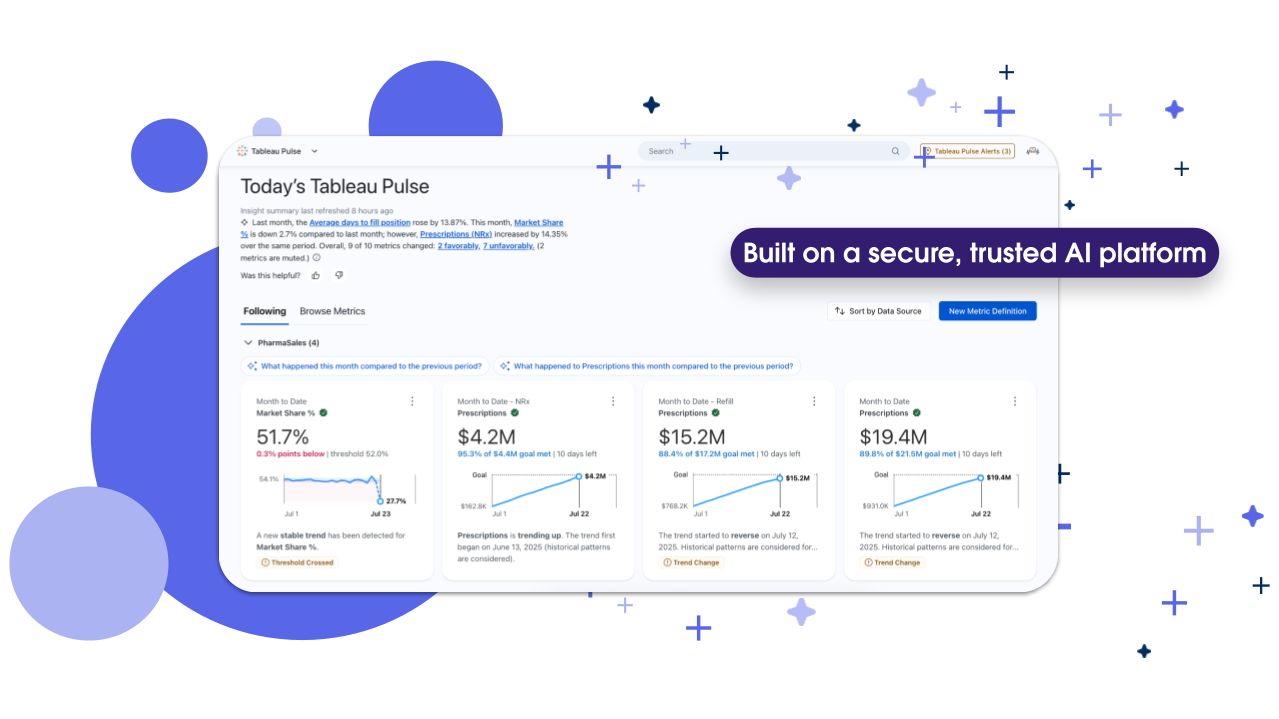
Tableau Pulse represents Salesforce's vision for democratizing data insights. Rather than requiring users to navigate dashboards, Pulse proactively delivers personalized metrics directly into daily workflows where teams already collaborate.
Tableau Pulse dashboard delivering personalized KPI insights with trend detection, threshold alerts, and natural language explanations. Source: Tableau
Core Capabilities
Automated Insight Detection
The insights engine automatically detects drivers, trends, and outliers in your data. It summarizes findings using natural language explanations paired with visual evidence, making complex analytics accessible to non-technical users.
Unified Metrics Layer
Pulse establishes consistent, business-context-rich metric definitions across the organization. This creates a single source of truth that ensures everyone from executives to frontline workers interprets data the same way.
Enhanced Q&A (Tableau+ Exclusive)
The premium Q&A feature enables conversational data exploration. Users ask questions in plain language and receive deeper insights with connections across multiple metrics, complete with explanations and supporting visualizations.
Field managers check regional performance during travel
Availability & Pricing
Included Free: Standard Tableau Pulse features come with all Tableau Cloud and Embedded Analytics editions at no additional cost.
Premium Features: Enhanced Q&A and advanced capabilities require a Tableau+ subscription. Contact Salesforce sales for pricing.
4
Tableau Agent: Your AI Analytics Assistant
Tableau Agent is a generative AI assistant integrated across the Tableau platform. It accelerates every phase of the analytics workflow—from data preparation to visualization creation—using natural language interactions.
Key Capabilities
Data Prep
Use natural language to clean, shape, and prepare data. The assistant generates multi-step plans, creates calculations, and pivots tables for both technical and non-technical users.
Catalog Documentation
Auto-generate comprehensive descriptions for data sources, workbooks, and tables with a single click. AI creates descriptions based on data attributes for review and publishing.
Visualization Authoring
Transform natural language prompts into visualizations. The agent formulates calculations, suggests questions, and builds charts based on your data context.
Platform Availability
Platform
Availability
Requirements
Tableau Cloud
Available in Web Authoring, Prep, and Catalog
Tableau Cloud subscription
Tableau Server
Available since Server 2025.3 (November 2025)
Server 2025.3 or later with a customer-connected LLM key (OpenAI; Azure OpenAI added in 2026.2)
Tableau Desktop
Available for exploration features
Desktop license with Cloud/Server connection
Cost Update: As of late 2025, Tableau Agent no longer consumes Einstein Request credits, significantly reducing operational costs for organizations using AI-powered features.
Now in Dashboards: Tableau Agent's conversational analytics reached general availability in June 2026, including the ability to ask questions directly against published dashboards.
Example: Natural Language Data Prep
Instead of manually writing complex transformations, you can now describe what you need:
Natural Language Prompt to Tableau Agent:
"Clean the sales data by removing duplicates based on Order ID, convert the date column to proper format, calculate profit margin as (Revenue - Cost) / Revenue, and filter out any orders with negative quantities"
Tableau Agent automatically generates the transformation steps:
STEP 1
Remove Duplicates
(Order ID)
STEP 2
Convert Date Field
(Date Format)
STEP 3
Create Calculation
Profit Margin
STEP 4
Apply Filter
Quantity > 0
Profit Margin = (Revenue - Cost) / Revenue
5
Agentforce Tableau: Always-On Analytics Agents
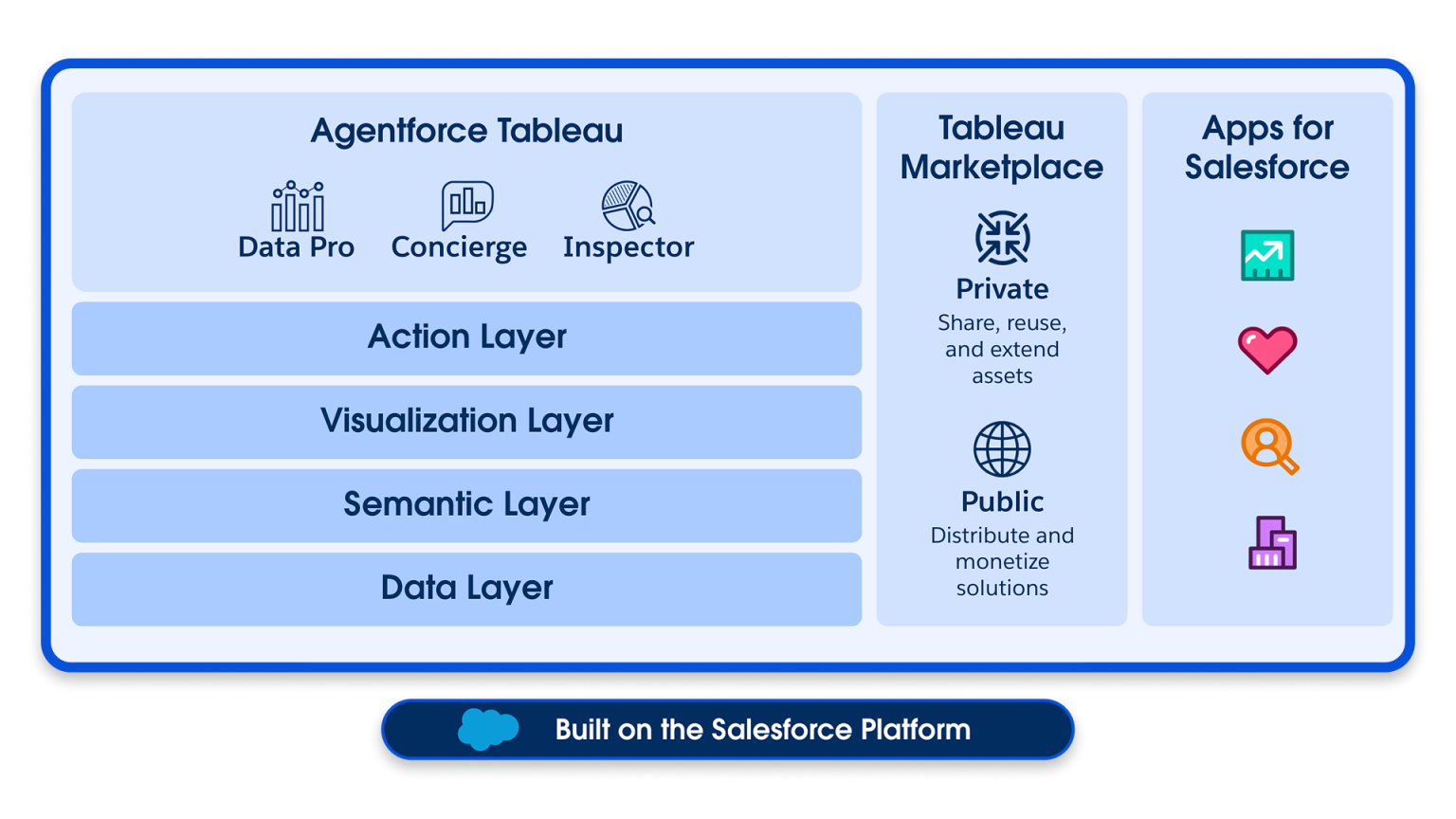
Agentforce Tableau represents the convergence of Salesforce's AI agent platform with Tableau's analytics capabilities. These specialized AI agents work autonomously to deliver insights, monitor metrics, and automate data workflows.
Agentforce Tableau architecture showing the three core AI agent skills (Data Pro, Concierge, Inspector) built on Tableau's layered platform integrated with Salesforce. Source: Tableau
Three Core Agent Skills
Agent Skill
Function
Business Value
Concierge
Conversational analytics providing trusted answers and root cause identification
Executives get instant answers to ad-hoc questions without analyst support
Inspector
Proactive monitoring that alerts users when trends change or thresholds are met
Operations teams catch anomalies before they become problems
Data Pro
Self-serve analytics automating data preparation and semantic model building
Analysts spend less time on data wrangling, more on insights
Model Context Protocol (MCP)
Tableau offers two MCP implementations for secure agent integration, and Tableau MCP servers reached general availability in May 2026 across Tableau Next, Tableau Cloud, and Tableau Server:
Tableau Next MCP: Agentic analytics protected by the Agentforce Trust Layer, enabling secure AI interactions with enterprise data
Tableau MCP: Enables custom agents to answer queries and conduct governed, deterministic analysis across your data assets
Integration Tip: Agentforce Tableau agents can be deployed across Salesforce CRM workflows, enabling sales reps to get pipeline insights directly within opportunity records without switching applications.
6
Tableau Next & Tableau Semantics
Tableau Next: The Future of Analytics
Tableau Next is Salesforce's next-generation analytics platform designed for the AI era. It features an API-first, composable architecture that enables organizations to embed agentic analytics everywhere work happens. Tableau Next has been generally available since April 2025 through the Tableau+ bundle, with Tableau Semantics also generally available and the Concierge and Data Pro agent skills GA since June 2025.
Key Architectural Differences
Feature
Standard Tableau
Tableau Next
Architecture
Monolithic application
API-first, composable modules
Data Layer
Traditional data sources
Unified Data 360 integration
AI Integration
Feature-based AI additions
Native Agentforce throughout
Semantic Layer
Published data sources
AI-infused Tableau Semantics
Actionability
View insights, export data
Take action at point of insight
Tableau Semantics: AI-Infused Data Understanding
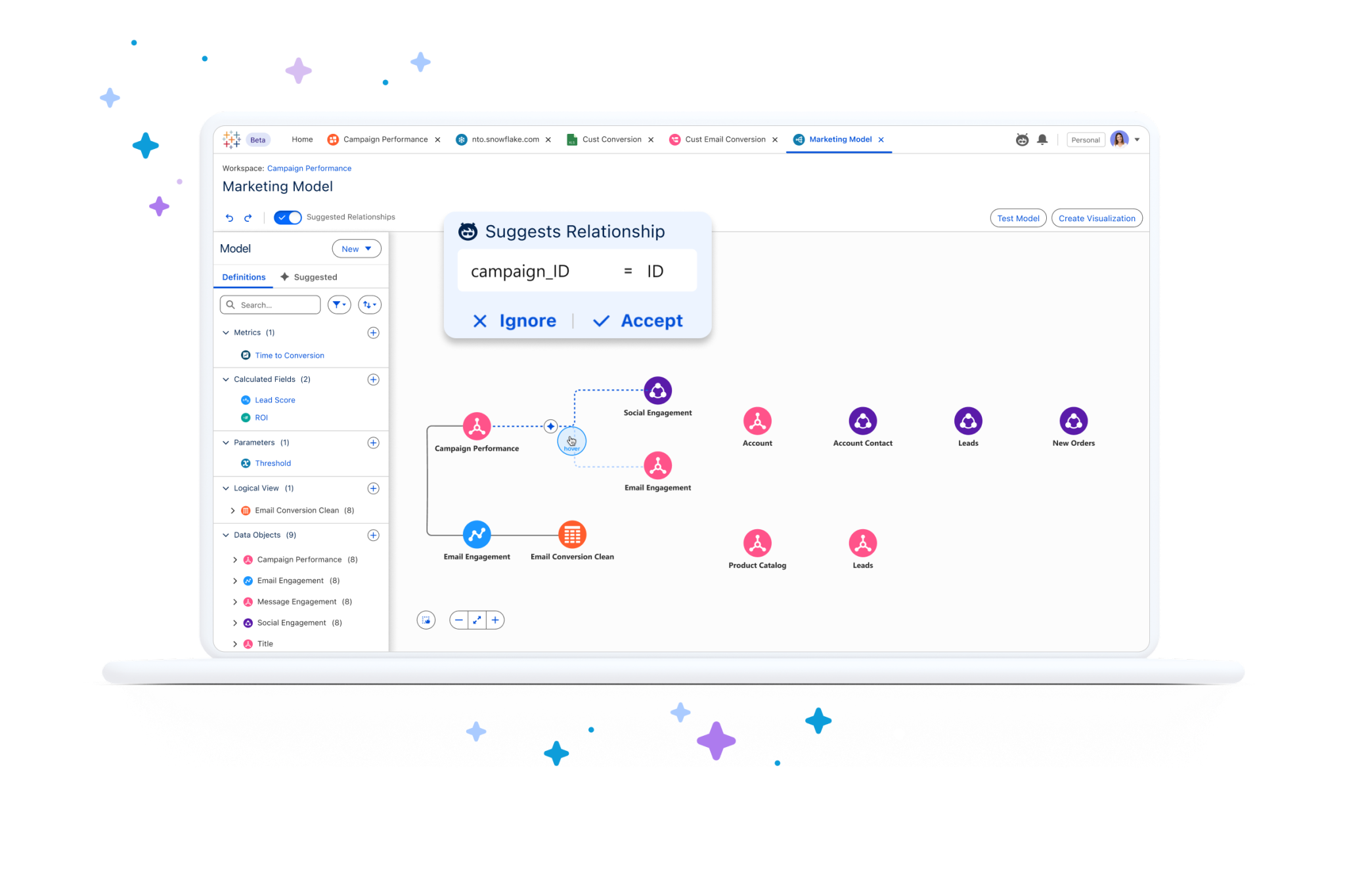
Tableau Semantics is an AI-powered semantic layer that translates raw data into business language. It serves as the foundation for accurate AI responses and consistent metrics across the organization.
Tableau Semantics interface demonstrating AI-powered relationship suggestions, composable data models, and visual data lineage for marketing analytics. Source: Tableau
Core Features
Composable Data Models: Define models once, use across multiple applications with built-in certification workflows
Centralized Metrics: Single source of truth for organizational KPIs with AI-powered deduplication
Relationship Suggestions: AI provides automated join recommendations using natural language
Semantic Learning: Agents expand knowledge through real-time Q&A, improving accuracy over time
Backward Compatibility: Import existing Tableau Published Data Sources without migration
Business Impact: Organizations report that Tableau Semantics establishes "a single source of truth" that reduces conflicting data interpretations while advancing AI accuracy across departments.
7
Built-in Analytics & AI Features
Beyond the flagship AI products, Tableau includes several built-in analytics features that leverage AI and statistical methods to enhance data exploration.
Explain Data
Explain Data is a built-in tool that helps users understand why a data point has its specific value. It constructs statistical models to propose explanations for individual visualization elements.
Capabilities
Analyze dashboards, sheets, or selected marks for outliers and correlations
Surface related data from the source not currently displayed
Share explanations via email and Slack (configurable by admins)
Important Limitation: Explain Data "can't tell you what is causing the relationships or how to interpret the data." Users must apply domain expertise to evaluate findings.
Returns probability of expected value being less than observed
Identify outliers, surface data correlations
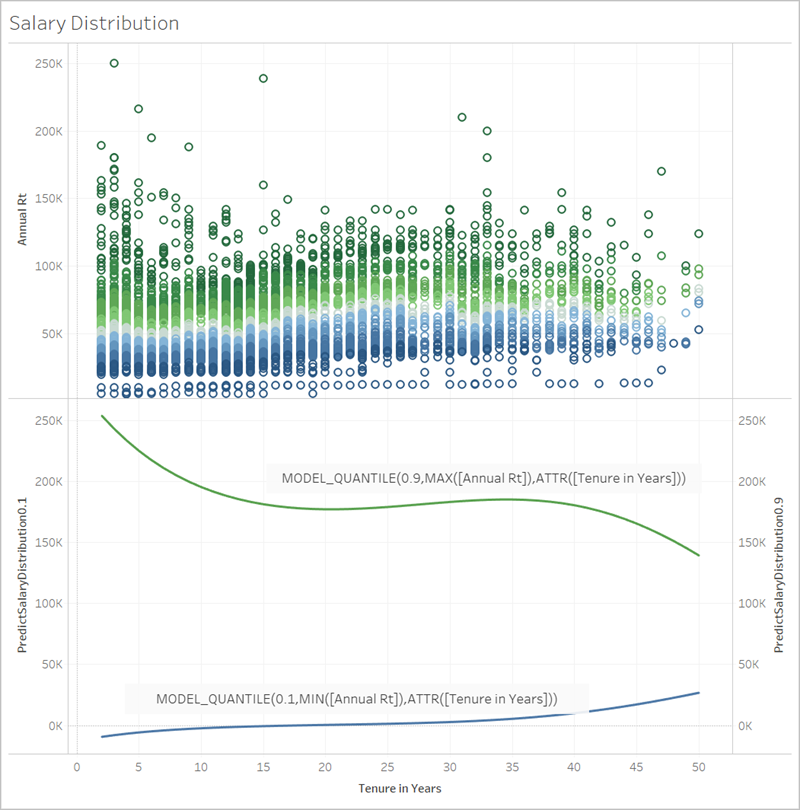
Tableau's built-in predictive modeling using MODEL_QUANTILE functions to visualize salary distribution prediction bands (10th and 90th percentiles) against employee tenure. Source: Tableau Help
Supported Statistical Models
Linear regression
Regularized linear regression
Gaussian process regression
Ask Data (Legacy - Retired)
Deprecation Notice: According to Tableau documentation, Ask Data was retired in Tableau Cloud (February 2024) and Tableau Server (version 2024.2). The company is replacing it with improved natural language capabilities through Tableau Pulse and Tableau Agent.
8
Pricing & Licensing Structure
Understanding Tableau's pricing is crucial for planning AI feature adoption. Tableau's pricing page outlines three main products with distinct license types.
Tableau Cloud & Server Pricing
License Type
Standard Edition
Enterprise Edition
Key Capabilities
Creator
$75/user/month
$115/user/month
Full authoring, Desktop, Prep Builder, Tableau Pulse
Explorer
$42/user/month
$70/user/month
Edit existing content, full data download, user management
Viewer
$15/user/month
$35/user/month
Dashboard interaction, alerts, summary data download
Minimum requirement: One Creator license per deployment. All prices billed annually.
Edition Comparison
Feature
Standard
Enterprise
Tableau Desktop & Prep Builder
Yes
Yes
Tableau Pulse (Basic)
Yes
Yes
Cloud Sites
Up to 3
Up to 10
Data Management Add-on
No
Yes
Advanced Management
No
Yes
eLearning Access
No
Yes
Tableau+ Bundle (Premium AI Features)
Tableau+ is the premium offering that unlocks agentic analytics capabilities:
Included Products: Tableau Next, Tableau Agent, Pulse premium features
Additional Features: Data 360, Tableau Semantics, Agentforce Skills
Cloud Sites: Up to 50
Data Services Credits: 250K included in the bundle (renamed from Data Cloud credits with the October 2025 Data 360 rebrand)
Credit Consumption: Tableau+ requires Flex Credits and Data Services Credits (formerly Data Cloud credits). Select AI features consume these credits beyond base licensing. Monitor usage to avoid unexpected costs.
AI Feature Availability by License
AI Feature
Viewer
Explorer
Creator
Tableau+
Tableau Pulse (Basic)
Yes
Yes
Yes
Yes
Pulse Enhanced Q&A
No
No
No
Yes
Tableau Agent
No
No
Yes
Yes
Agentforce Skills
No
No
No
Yes
Tableau Semantics
No
No
No
Yes
AI-Assisted Authoring
No
No
No
Yes
9
Deployment Models: Server vs Cloud
Choosing between Tableau Server (self-hosted) and Tableau Cloud (SaaS) significantly impacts AI feature availability, maintenance overhead, and total cost of ownership. Understanding these differences is critical for organizations planning their Tableau AI strategy.
Deployment Model Overview
Aspect
Tableau Cloud
Tableau Server
Hosting
Salesforce-managed SaaS
Self-hosted (on-premises or private cloud)
Infrastructure
No infrastructure management
Full infrastructure responsibility
Updates
Automatic quarterly releases
Manual upgrades on your schedule
Scaling
Automatic elastic scaling
Manual capacity planning
Data Residency
Regional data centers (US, EU, AP)
Complete control over data location
AI Feature Availability by Deployment
AI features have different availability and requirements depending on your deployment model. According to Tableau's AI product page and the Tableau Agent documentation, many next-generation AI features are Cloud-exclusive:
AI Feature
Tableau Cloud
Tableau Server
Tableau Pulse
Yes - full availability
No - not available
Tableau Agent
Yes - native integration
Yes - customer-connected LLM (2025.3+)
Agentforce Tableau
Yes - full Agentforce integration
No - limited availability
Tableau Next
Yes - via Tableau+
No - Cloud-only
Tableau Semantics
Yes - full availability
No - Cloud-only
Explain Data
Yes - available
Yes - available
Predictive Functions
Yes - available
Yes - available
TabPy Integration
Yes - via Bridge or direct
Yes - full control
R Integration
Yes - via Bridge or direct
Yes - full control
Critical Decision Point: If your organization requires Tableau Pulse, Agentforce integration, or Tableau Semantics, Tableau Cloud is mandatory. These next-generation AI features are cloud-exclusive and will not be backported to Server.
Starting with Tableau Server 2025.3 (released November 2025), Tableau Server supports Tableau Agent through a customer-connected LLM model. OpenAI was the initial supported provider, and Server 2026.2 adds Azure OpenAI as a second supported LLM provider.
Requirements
LLM API Key: Organization must have an account and API access with a supported LLM provider (OpenAI, or Azure OpenAI on Server 2026.2+)
Network Configuration: Server must be able to reach the LLM provider's endpoints
Tableau Server Version: 2025.3 or later
Site Administrator Access: AI features are enabled per site from the Settings page
Sign in to Tableau Server as a site administrator and open Settings
Go to the AI in Tableau section and select Connect
Enter the API key for your customer-connected LLM provider
Turn on Tableau AI for each feature you want to enable
Review Model Settings to confirm the model configuration for your site
Cost Consideration: A customer-connected key means your organization pays the LLM provider directly for all API calls. Monitor usage carefully—high-volume Tableau Agent usage can generate significant provider charges separate from Tableau licensing.
Tableau Cloud: Managed AI Infrastructure
Tableau Cloud provides a fully managed AI experience with several advantages:
Immediate Access
AI features are enabled automatically as they're released. No configuration or API keys required for native AI capabilities.
All AI interactions go through the Einstein Trust Layer with PII masking, zero data retention, and toxicity detection pre-configured.
Continuous Updates
AI models and features improve quarterly without manual intervention. Always access the latest capabilities.
Salesforce Integration
Native integration with Data 360, CRM Analytics, and other Salesforce products for unified AI-powered analytics.
Hybrid Deployment Patterns
Some organizations use hybrid approaches to balance compliance requirements with AI feature access:
Pattern 1: Cloud for AI, Server for Sensitive Data
Deploy Tableau Cloud for departments that need AI features (Sales, Marketing)
Maintain Tableau Server for regulated data (Finance, Healthcare)
Use Tableau Bridge to connect Cloud to on-premises data sources
Pattern 2: Gradual Migration
Start with Tableau Server for existing workloads
Pilot Tableau Cloud with a single team to evaluate AI features
Migrate additional teams as compliance concerns are addressed
Pattern 3: Analytics Extensions Bridge
Keep Tableau Server for visualization and distribution
Deploy TabPy/R servers on-premises for custom ML models
Use API-based integrations to external AI services
Decision Framework
Choose Tableau Cloud If...
Choose Tableau Server If...
AI features (Pulse, Agent, Semantics) are a priority
Regulatory requirements mandate on-premises data
You want Salesforce/Agentforce integration
You need complete control over upgrade timing
IT prefers managed infrastructure
Existing infrastructure investment is significant
You need automatic scaling for variable workloads
Air-gapped or highly restricted network environments
Faster time-to-value is important
Custom authentication (Kerberos, PKI) is required
Migration Path: Salesforce provides migration tools to move from Tableau Server to Tableau Cloud. If you're currently on Server but want AI features, work with your Salesforce account team to plan a phased migration strategy.
Total Cost of Ownership Comparison
While license pricing is identical for Cloud and Server, total cost of ownership differs significantly:
Cost Category
Tableau Cloud
Tableau Server
License Costs
Same pricing tiers
Same pricing tiers
Infrastructure
Included in license
Server hardware, VMs, or cloud compute
Administration
Minimal (user management only)
Full-time admin for large deployments
AI API Costs
Included (credit-based for Tableau+)
Separate LLM provider charges (customer-connected key)
Upgrades
Automatic, no downtime
Planned maintenance windows
Disaster Recovery
Built-in geo-redundancy
Additional infrastructure required
10
Tableau vs Industry Leaders: Power BI & Looker Comparison
How does Tableau stack up against other industry-leading analytics platforms? Choosing the right BI solution is a strategic decision that impacts analytics capabilities for years. In the 2026 Gartner Magic Quadrant for Analytics and Business Intelligence Platforms (published June 2026), Tableau (Salesforce), Power BI (Microsoft), and Looker (Google) are all positioned as Leaders—but each excels in different areas. The 2025 Magic Quadrant reached the same Leader verdict for all three.
Gartner Magic Quadrant 2026 Positioning
Platform
Vendor
Position
Key Strength (Gartner)
Power BI
Microsoft
Leader (19th consecutive year)
Furthest on Completeness of Vision, highest Ability to Execute
Tableau
Salesforce
Leader
Data visualization, automated insights, strong user community
The June 2026 report also names Qlik a Leader for the 16th consecutive year and ThoughtSpot a Leader, and shifts Gartner's framing toward agentic AI, governed semantics, and decision-centric analytics—directions that align closely with Tableau Next and Tableau Semantics.
Source: According to Microsoft's announcement, Power BI now has over 30 million monthly active users globally, making it the most widely adopted BI platform.
Feature-by-Feature Comparison
Capability
Tableau
Power BI
Looker
Data Visualization
Industry-leading
Strong, improving
Functional
Semantic Layer
Tableau Semantics (Tableau+)
Semantic models in Fabric
LookML (core strength)
AI Assistant
Tableau Agent, Agentforce
Copilot for Power BI
Gemini in Looker
Natural Language Query
Tableau Pulse Q&A
Q&A visual, Copilot chat
Looker Conversational Analytics
Proactive Insights
Tableau Pulse (automated)
Smart Narratives
Automated insights with Gemini
Data Preparation
Tableau Prep (visual, intuitive)
Power Query, Dataflows
SQL-based transformations
Embedded Analytics
Embedded Analytics edition
Power BI Embedded
Core strength
Real-time Analytics
Live connections, extracts
Real-Time Intelligence, Direct Lake
Live queries to warehouse
Governance
Content management, RLS
Microsoft Purview integration
Strong governance
Mobile Experience
Native mobile apps
Native mobile apps
Mobile-responsive dashboards
AI Capabilities Comparison
All three platforms have invested heavily in AI, but their approaches differ significantly:
Tableau AI
Philosophy: Agentic analytics with autonomous AI agents
Tableau Pulse for proactive insights
Tableau Agent for natural language
Agentforce integration (Salesforce ecosystem)
Einstein Trust Layer for security
Power BI + Copilot
Philosophy: AI-assisted productivity within Microsoft ecosystem
Copilot for report creation
DAX query generation
Chat with your data (preview)
Microsoft Fabric integration
Looker + Gemini
Philosophy: AI grounded in semantic models
Gemini-powered conversations
Automated data storytelling
Code generation for LookML
Vertex AI integration
Pricing Comparison (2026)
Pricing varies significantly based on deployment model, user types, and AI feature requirements:
License Type
Tableau Cloud
Power BI
Looker
Entry Level (Viewer)
$15/user/month
Free (limited) / $14 Pro
Contact sales
Standard User
$42-70/user/month (Explorer)
$14/user/month (Pro)
~$60/user/month (list prices no longer published; contact sales)
Power User (Creator)
$75-115/user/month
$24/user/month (Premium Per User)
~$125/user/month (list prices no longer published; contact sales)
Enterprise Capacity
Tableau+ (contact sales)
Fabric F64 ~$8,410/month pay-as-you-go (~$5,000/month with 1-year reservation)
Platform fee + users
AI Features
Included (credits for Tableau+)
Copilot requires Fabric capacity
Gemini included with Looker
Note: Pricing as of August 2026. Power BI Pro and Premium Per User reflect Microsoft's April 1, 2025 price update. Contact vendors for current enterprise pricing.
TCO Consideration: According to Tableau's comparison, Power BI's "free" tier requires Pro or Premium upgrades for meaningful enterprise functionality. Always evaluate total cost including infrastructure, training, and administration.
Bottom Line: All three platforms are Leaders in Gartner's Magic Quadrant. The best choice depends on your existing technology stack, primary use cases, and team capabilities. Many large enterprises use multiple platforms for different departments or use cases.
11
Custom AI & Machine Learning Solutions
While Tableau's out-of-box AI features cover many use cases, organizations often need custom machine learning models for specialized requirements. Tableau supports several integration approaches.
TabPy: Python Integration
TabPy (Tableau Python Server) is an open-source analytics extension that enables Python code execution directly within Tableau. It supports scikit-learn, TensorFlow, and other ML libraries.
Installation
# Install TabPy using pip
pip install tabpy

# Start the TabPy server
tabpy

# Default endpoint: http://localhost:9004
Example: Custom ML Model in Tableau
# Define a custom prediction function for TabPy
import pandas as pd
from sklearn.ensemble import RandomForestClassifier
import tabpy_client

# Train your model (simplified example)
def predict_churn(customer_tenure, monthly_charges, contract_type):
    """
    Predict customer churn probability
    Returns: List of churn probabilities
    """
    import pickle

    # Load pre-trained model
    with open('churn_model.pkl', 'rb') as f:
        model = pickle.load(f)

    # Prepare input data
    input_data = pd.DataFrame({
        'tenure': customer_tenure,
        'monthly_charges': monthly_charges,
        'contract': contract_type
    })

    # Return predictions
    return model.predict_proba(input_data)[:, 1].tolist()

# Deploy to TabPy
client = tabpy_client.Client('http://localhost:9004/')
client.deploy('predict_churn', predict_churn,
              'Predicts customer churn probability',
              override=True)
Security Warning: TabPy defaults to running without authentication. The official documentation warns that "unauthenticated individuals could remotely execute code on the machine running TabPy." Always enable authentication before production deployment.
// Tableau calculated field using R
SCRIPT_REAL(
    "
    # Perform time series decomposition
    ts_data <- ts(_arg1, frequency = 12)
    decomposed <- stl(ts_data, s.window = 'periodic')
    return(decomposed$time.series[, 'trend'])
    ",
    SUM([Sales])
)
Analytics Extensions API
For maximum flexibility, Tableau's Analytics Extensions API allows integration with any external service:
Cloud ML Services: AWS SageMaker, Azure ML, Google AI Platform
Custom APIs: Build REST endpoints that process Tableau data
Einstein Discovery: Salesforce's native ML platform (enable without additional configuration)
Integration Method Comparison
Method
Best For
Complexity
Maintenance
TabPy
Python ML models, data science workflows
Medium
Server management required
Rserve
Statistical analysis, R packages
Medium
R environment management
External APIs
Cloud ML, enterprise integrations
High
API versioning, authentication
Einstein Discovery
No-code ML, Salesforce ecosystem
Low
Managed by Salesforce
12
Real-World Implementation Scenarios
Understanding how to apply Tableau AI in practical scenarios helps organizations maximize their investment. Here are common implementation patterns across industries.
Scenario 1: Sales Pipeline Intelligence
Business Challenge
A B2B software company struggles with pipeline visibility. Sales managers spend hours in spreadsheets trying to understand deal health and forecast accuracy.
Solution with Tableau AI
Tableau Pulse: Configure metrics for pipeline value, win rate, and deal velocity with automatic Slack alerts
Agentforce Concierge: Enable conversational queries like "Why did our enterprise segment underperform last quarter?"
Custom TabPy Model: Deploy a deal scoring model trained on historical win/loss data
# Deal scoring model for Tableau integration
def score_deal(deal_size, days_in_stage, competitor_count, champion_engaged):
    """
    Score deals based on historical patterns
    Returns probability of winning (0-100)
    """
    import numpy as np

    # Feature engineering
    features = np.array([
        np.log1p(deal_size),
        days_in_stage / 30,  # Normalize to months
        competitor_count,
        1 if champion_engaged else 0
    ]).reshape(1, -1)

    # Load trained model
    model = load_model('deal_scorer.pkl')

    return (model.predict_proba(features)[0][1] * 100).tolist()
Scenario 2: Healthcare Operations Dashboard
Business Challenge
A hospital network needs to monitor patient flow, bed utilization, and staffing levels in real-time while predicting capacity issues before they occur.
Solution with Tableau AI
Explain Data: Automatically surface factors contributing to extended wait times
Agentforce Inspector: Alert administrators when utilization exceeds 85% threshold
Predictive Functions: Use MODEL_QUANTILE to forecast bed demand 7 days ahead
Scenario 3: E-commerce Customer Analytics
Business Challenge
An online retailer wants to understand customer segments, predict churn, and personalize marketing without building a data science team.
Solution with Tableau AI
Tableau Agent: Use natural language to prep customer transaction data and create RFM segments
Tableau Pulse: Track customer lifetime value and churn indicators with automated insights
A financial services firm needs to monitor portfolio risk, detect anomalies, and ensure compliance with regulatory requirements.
Solution with Tableau AI
R Integration: Connect to existing R-based risk models (VaR, stress testing)
Agentforce Inspector: Monitor for unusual trading patterns and trigger compliance alerts
External API: Integrate with enterprise risk management system via Analytics Extensions
13
Lessons Learned & Best Practices
Organizations implementing Tableau AI encounter common challenges. Here are key lessons learned from enterprise deployments.
Data Quality Foundation
Lesson #1: AI features amplify data quality issues. If your source data has inconsistencies, AI-generated insights will be misleading. Invest in data governance before enabling AI features.
Clean before you automate: Use Tableau Prep to standardize data before connecting AI features
Define metrics centrally: Tableau Semantics prevents conflicting calculations across teams
Monitor data freshness: Stale data produces stale insights—configure appropriate refresh schedules
Governance & Security
Lesson #2: AI features expand data access in unexpected ways. Agentforce agents can answer questions that reveal sensitive patterns. Implement row-level security before enabling conversational analytics.
Principle of least privilege: Grant Tableau Agent access only to users who need it
Audit AI interactions: Log queries made through conversational interfaces
TabPy security: Never deploy TabPy without authentication in production environments
Change Management
Lesson #3: Users accustomed to traditional dashboards may resist AI-driven insights. Start with Tableau Pulse in low-stakes scenarios to build trust before expanding.
Start small: Pilot AI features with a single team before organization-wide rollout
Train power users: Identify champions who can help others interpret AI insights
Set expectations: AI explanations are hypotheses, not conclusions—domain expertise remains essential
Cost Management
Lesson #4: Tableau+ credit consumption can grow unpredictably. Monitor Flex Credits and Data Services Credits weekly during initial deployment.
Baseline usage: Track credit consumption for 30 days before scaling
Set alerts: Configure notifications when credit usage exceeds thresholds
Optimize queries: Consolidate metrics to reduce redundant AI computations
Custom ML Integration Best Practices
Practice
Recommendation
Impact
Model Versioning
Use MLflow or similar to track model versions deployed to TabPy
Enables rollback if predictions degrade
Monitoring
Log prediction latency and accuracy metrics
Detect model drift before users notice
Error Handling
Return meaningful errors when models fail
Users understand why visualization is incomplete
Documentation
Document model assumptions and limitations
Prevents misinterpretation of predictions
Performance Optimization
Cache TabPy results: Use Tableau's extract functionality to cache expensive predictions
Batch predictions: Pre-compute predictions during off-peak hours rather than real-time
Optimize data models: Aggregate data at appropriate grain for AI analysis
Leverage Data 360: Zero-copy integrations reduce data movement overhead
Future-Proofing Your Implementation
Recommendation: Tableau's AI roadmap is closely tied to Salesforce Agentforce. Organizations investing in Tableau+ gain access to continuous AI improvements without migration. Consider the long-term platform strategy when choosing between out-of-box and custom solutions.
Stay on supported versions: AI features require recent Tableau versions—plan upgrade cycles
Follow deprecation notices: Ask Data retirement shows Tableau consolidates AI into fewer, more powerful features
Build on Tableau Semantics: Custom semantic models provide a stable foundation as AI features evolve
14
Frequently Asked Questions
Tableau AI is the suite of artificial intelligence capabilities across the Tableau platform, including Tableau Pulse for proactive insights, Tableau Agent for natural language analytics, Agentforce agent skills, Tableau Semantics, and the Tableau Next platform, all governed by the Einstein Trust Layer on Tableau Cloud.
Standard Tableau Pulse features are included with all Tableau Cloud and Embedded Analytics editions at no additional cost. Premium capabilities such as Enhanced Q&A require a Tableau+ subscription, which is priced through Salesforce sales.
Yes. Tableau Agent is available on Tableau Server 2025.3 or later using a customer-connected LLM. Administrators enable it from the site Settings page under AI in Tableau by connecting their own LLM API key. OpenAI was the initial supported provider, and Server 2026.2 adds Azure OpenAI. Note that this customer-connected model bypasses the Einstein Trust Layer used on Tableau Cloud.
Tableau pricing ranges from $15 per user per month for Viewer (Standard edition) up to $115 per user per month for Creator (Enterprise edition), billed annually. The Tableau+ bundle with premium AI features is priced separately through Salesforce sales.
Power BI Pro costs $14 per user per month and Power BI Premium Per User costs $24 per user per month following Microsoft's April 2025 price update, while Tableau ranges from $15 to $115 per user per month. Power BI is generally cheaper per seat, but total cost depends on Fabric capacity needs, AI features, and your existing ecosystem.
Tableau Next is Salesforce's next-generation agentic analytics platform with an API-first, composable architecture built on the Salesforce Platform. It has been generally available since April 2025 through the Tableau+ bundle, with Tableau Semantics GA and the Concierge and Data Pro agent skills GA since June 2025.
Ask Data was retired in Tableau Cloud in February 2024 and in Tableau Server version 2024.2. Its natural language capabilities have been replaced by Tableau Pulse and Tableau Agent.
Conclusion
Tableau AI has matured into a comprehensive analytics platform that serves organizations at every stage of their AI journey. From out-of-box features like Tableau Pulse and Tableau Agent that require no data science expertise, to deep integrations with TabPy and R for custom machine learning, Tableau provides flexibility to match diverse business needs.
Key takeaways:
Start with out-of-box: Tableau Pulse and basic AI features are included in standard licensing—begin there before investing in custom solutions
Evaluate Tableau+: For organizations committed to AI-driven analytics, Tableau+ provides the complete platform with Agentforce integration
Plan for governance: AI amplifies both insights and data quality issues—invest in data governance alongside AI adoption
Leverage the ecosystem: Salesforce integration (Data 360, Agentforce) provides unique capabilities not available in standalone BI tools
The future of Tableau AI is deeply integrated with Salesforce's Agentforce platform. Organizations that invest in understanding these capabilities today will be well-positioned to leverage continuous AI improvements as Salesforce advances its agent-based analytics vision.
Next Steps: Start with a free Tableau trial to explore AI features hands-on. For enterprise planning, contact your Salesforce account team to discuss Tableau+ pricing and implementation support.
Related Reading
Continue your Salesforce AI and analytics learning journey with these related guides: