Configure Salesforce MCP Server for Claude Code & MCP Clients
Connect AI assistants to Salesforce using Model Context Protocol. Master DX MCP Server, the now-GA Hosted MCP, OAuth via External Client Apps, and the verified-working mcp-remote setup.
Reading time: ~20 minutes| Last Updated: April 2026
Article Updated: April 2026
Refreshed after Salesforce Hosted MCP Servers reached General Availability in April 2026 and the previous beta URL pattern (v1-beta.2) was retired. Updated with the verified-working mcp-remote config, the new v1/platform/<server> URL pattern, the full GA endpoint catalog, and current External Client App OAuth scopes. Originally published January 30, 2026.
What's New in This Update (April 2026)
GA announcement: Salesforce Hosted MCP Servers are now Generally Available, with free access for Developer Edition orgs.
URL pattern changed:https://api.salesforce.com/platform/mcp/v1-beta.2/<server> → https://api.salesforce.com/platform/mcp/v1/platform/<server> (sandbox orgs use /v1/sandbox/<server>).
Endpoint catalog expanded from 2 to 11+: sobject-all, sobject-reads, sobject-mutations, sobject-deletes, invocable-actions, flows, api-catalog, custom-servers, data-360, prompt-builder, tableau-next.
Verified-working mcp-remote config with the new URL, port 8080 positional argument, and --static-oauth-client-info flag.
OAuth changes: Use the named scopes "Access MCP servers" and "Perform requests at any time" on an External Client App; PKCE is mandatory.
Per-client callback URLs documented for Claude, Cursor, Postman, and stdio clients via mcp-remote.
Ecosystem updates: Heroku MCP and MuleSoft MCP went GA; Mobile MCP entered Developer Preview; DX MCP picked up auto-approval for read-only tools and the renamed "Configure" tab in Spring '26.
Expanded supported clients: Claude (Desktop, Web, Code), Cursor, Postman, and ChatGPT (developer mode) are officially listed.
In This Guide
10
In-Depth Sections
MCP Feature
60+
Available Tools
In This Guide
5
FAQs Answered
MCP Feature
2
Server Types
1
What is Model Context Protocol (MCP)?
Quick Answer: MCP (Model Context Protocol) is an open standard created by Anthropic that enables AI assistants like Claude to securely connect with external tools, APIs, and data sources. For Salesforce developers, it means Claude Code can directly interact with your orgs to query data, deploy metadata, and run tests.
According to the official Salesforce Developers blog, MCP acts as a "universal translator between AI agents and your business data" - similar to how USB standardized device connections. This standardization allows any MCP-compatible AI client to work with any MCP server without custom integrations.
Why MCP Matters for Salesforce Development
Before MCP, integrating AI assistants with Salesforce required custom code, API wrappers, and significant development effort. With MCP, you can:
Query Salesforce data directly from your IDE using natural language
Deploy and retrieve metadata without switching to command line
Run Apex tests and get results analyzed by AI
Manage users and permissions through conversational commands
Get LWC development assistance with context-aware suggestions
Example: "Get me Opportunities from last quarter"
AI Assistant
Claude Code, Cursor, Windsurf
"Get Opportunities from last quarter"
MCP Protocol
Standardized communication
Tool: run_soql_query
Salesforce MCP Server
Executes SOQL query
SELECT Id, Name, Amount FROM Opportunity WHERE CloseDate = LAST_QUARTER
data toolset
Salesforce Org
Returns query results
47 Opportunities, $2.3M total
2
Salesforce MCP Server Options
Salesforce provides two official approaches to MCP connectivity, each designed for different use cases. Understanding these options helps you choose the right setup for your workflow.
Salesforce DX MCP Server
Local CLI-based (Developer Preview)
Runs locally using Salesforce CLI credentials
60+ tools for metadata, data, testing, LWC development
No OAuth setup required - uses existing CLI auth
Best for: Developers with Salesforce CLI already installed
Package:@salesforce/mcp on npm
Salesforce Hosted MCP Servers
Cloud-based (Generally Available, April 2026)
Runs on Salesforce infrastructure - no local CLI needed
OAuth 2.0 + PKCE via External Client Apps
11+ endpoints: sobject-all, sobject-reads, invocable-actions, flows, data-360, prompt-builder, tableau-next, and more
Best for: Teams without CLI access or cloud-first workflows
Requires: mcp-remote package for stdio clients
Recommendation: If you're a Salesforce developer with Salesforce CLI already set up, start with the DX MCP Server. It's easier to configure and provides more comprehensive tooling. Use Hosted MCP Servers when you need OAuth-based access or don't want to install the CLI.
Beyond the Platform: Other Salesforce MCP Servers
Alongside DX MCP and Platform Hosted MCP, the broader Salesforce ecosystem now ships several specialized MCP servers. They are out of scope for this guide but worth knowing about:
Heroku MCP Server (GA) - manage Heroku apps, dynos, and add-ons via natural language.
MuleSoft MCP Server (GA) - design, deploy, and operate MuleSoft projects from an AI client.
Mobile MCP Server (Developer Preview, January 2026) - generate native mobile app code with Mobile SDK.
Agentforce MCP Client - Agentforce can itself act as an MCP client and consume external MCP servers, with a registry and policy enforcement layer.
3
Salesforce DX MCP Server Setup
The Salesforce DX MCP Server is the recommended approach for developers already using Salesforce CLI. It provides the most comprehensive set of tools and requires minimal configuration.
Specify authorized orgs. Values: org alias, DEFAULT_TARGET_ORG, DEFAULT_TARGET_DEV_HUB, or ALLOW_ALL_ORGS
--toolsets
No
Enable specific tool groups (comma-separated). See section 4 for available toolsets.
--tools
No
Enable individual tools beyond selected toolsets
--allow-non-ga-tools
No
Include beta/preview tools not yet generally available
--no-telemetry
No
Disable anonymous usage data collection
--debug
No
Enable verbose logging for troubleshooting
Security Note: Use ALLOW_ALL_ORGS with caution as it grants MCP access to all locally authorized orgs. For better security, explicitly specify only the orgs needed using their aliases.
Verify Connection
After configuring, restart Claude Code and use the /mcp command to check server status. You should see "Salesforce DX" listed with available tools.
4
Available Toolsets & Tools
The Salesforce DX MCP Server organizes its 60+ tools into logical toolsets. According to the @salesforce/mcp npm package, you can selectively enable toolsets to reduce context window consumption and improve performance.
Toolset
Description
Key Capabilities
orgs
Org management
List orgs, view org details, check connections
data
Data operations
SOQL queries, record CRUD, bulk operations
metadata
Metadata management
Deploy, retrieve, list metadata components
users
User management
Permission sets, profiles, user assignments
testing
Test execution
Run Apex tests, agent tests
lwc-experts
LWC development
Component analysis, best practices, optimization
aura-experts
Aura migration
Aura to LWC migration assistance
code-analysis
Static analysis
Code quality checks, security scanning
mobile
Mobile development
Mobile app features and testing
scale-products
Performance
Apex antipattern detection
all
All toolsets
Enables all 60+ tools (use with caution)
Example: Focused Development Setup
For a typical LWC development workflow, use this focused configuration:
Performance Tip: Start with fewer toolsets and add more as needed. The all toolset loads 60+ tools which can significantly impact context window and response times.
Salesforce Hosted MCP Servers moved from beta to General Availability in April 2026, announced on the Salesforce Developers blog (with the GA milestone covered in the April 2026 Developer Edition update). They run on Salesforce infrastructure and expose Salesforce APIs as MCP tools without writing code. These servers authenticate via OAuth 2.0 + PKCE through an External Client App, and stdio-based clients like Claude Code connect through the mcp-remote package.
URL pattern changed at GA. The old beta URL pattern https://api.salesforce.com/platform/mcp/v1-beta.2/<server> no longer responds. The new pattern is https://api.salesforce.com/platform/mcp/v1/platform/<server> for production orgs and https://api.salesforce.com/platform/mcp/v1/sandbox/<server> for sandbox or scratch orgs.
URL Path (append to https://api.salesforce.com/platform/mcp/v1/platform)
Purpose
sObject All
/sobject-all
Full CRUD across every sObject
sObject Reads
/sobject-reads
Read-only sObject access (safer default)
sObject Mutations
/sobject-mutations
Create and update only (no deletes)
sObject Deletes
/sobject-deletes
Delete operations only
Invocable Actions
/invocable-actions
Apex @InvocableMethod exposed as MCP tools
Flows
/flows
Lightning Flows exposed as MCP tools
API Catalog
/api-catalog
Convert REST endpoints into custom MCP tools
Custom Servers
/custom-servers
User-built tailored MCP servers
Data 360
/data-360
Unified Data Cloud queries (formerly Data Cloud)
Prompt Builder
/prompt-builder
Prompt templates exposed as MCP resources
Tableau Next
/tableau-next
Semantic model discovery and analytics
Sandbox / scratch orgs: swap /v1/platform/ for /v1/sandbox/. For example: https://api.salesforce.com/platform/mcp/v1/sandbox/sobject-all.
Setup Requirements
Before connecting to Hosted MCP Servers, complete these steps in your Salesforce org:
1. Enable MCP Service
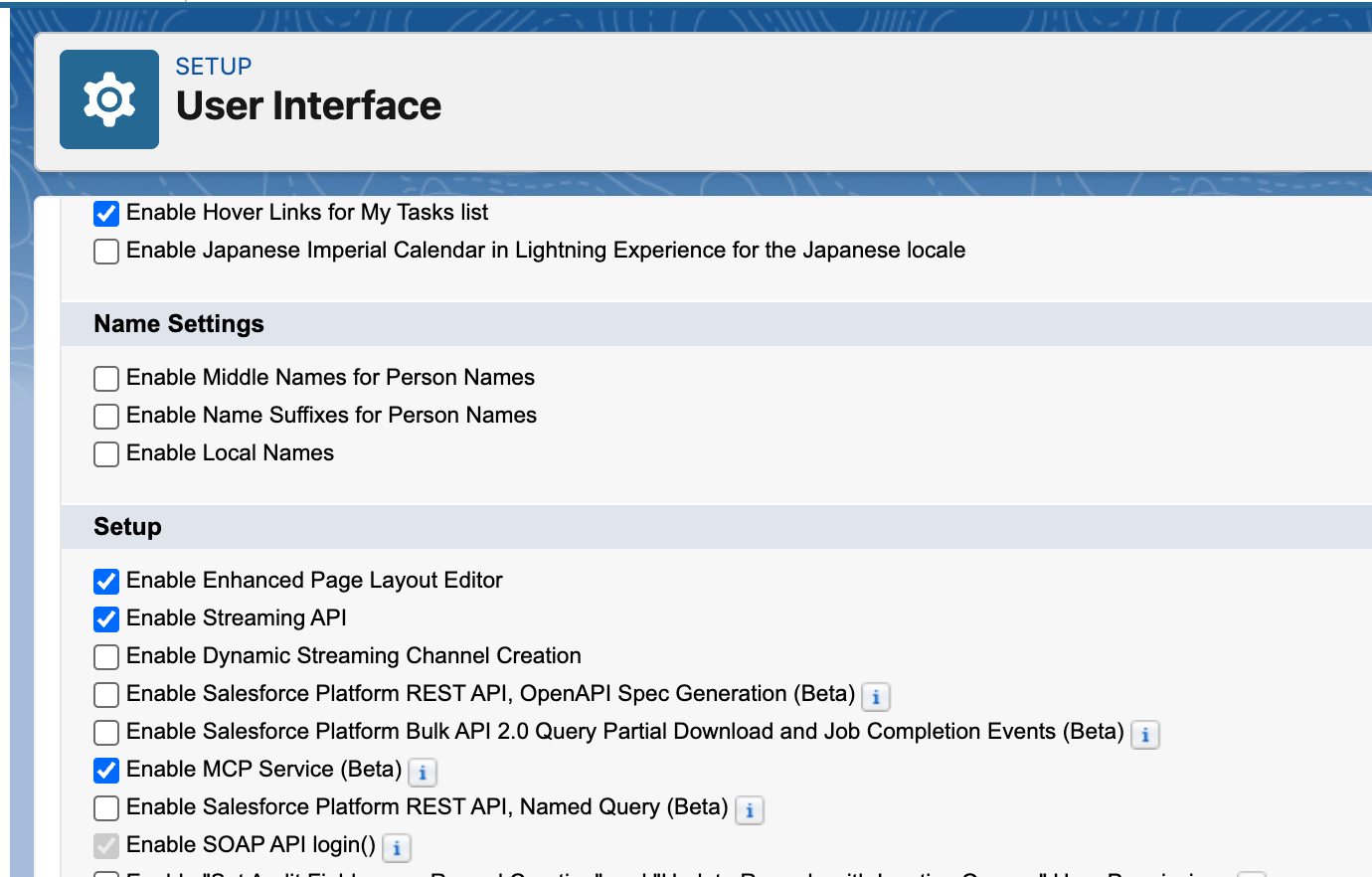
Setup > User Interface > User Interface > Enable MCP Service
Enable MCP Service in Salesforce Setup - Navigate to User Interface settings and check "Enable MCP Service". The "(Beta)" suffix shown in earlier screenshots was removed when Hosted MCP went GA in April 2026.
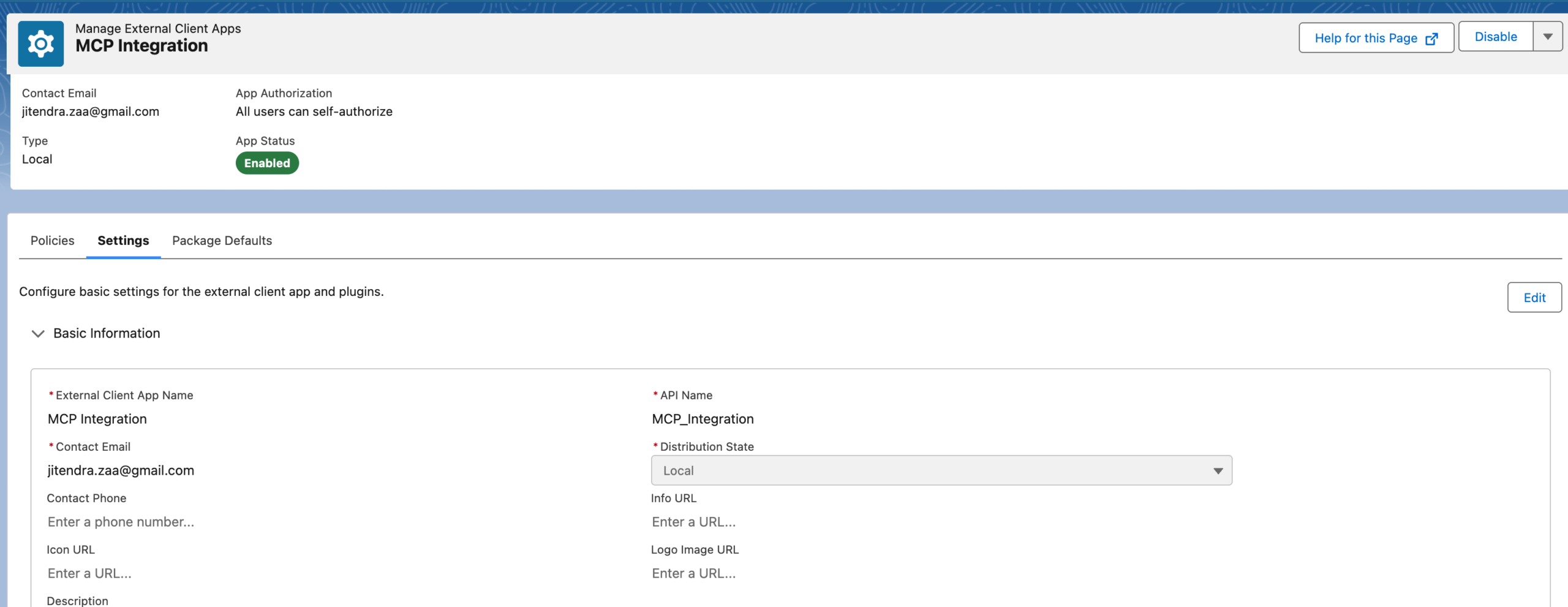
Configure the External Client App with OAuth settings for MCP access. External Client Apps are required for Hosted MCP; classic Connected Apps are not supported for this flow.
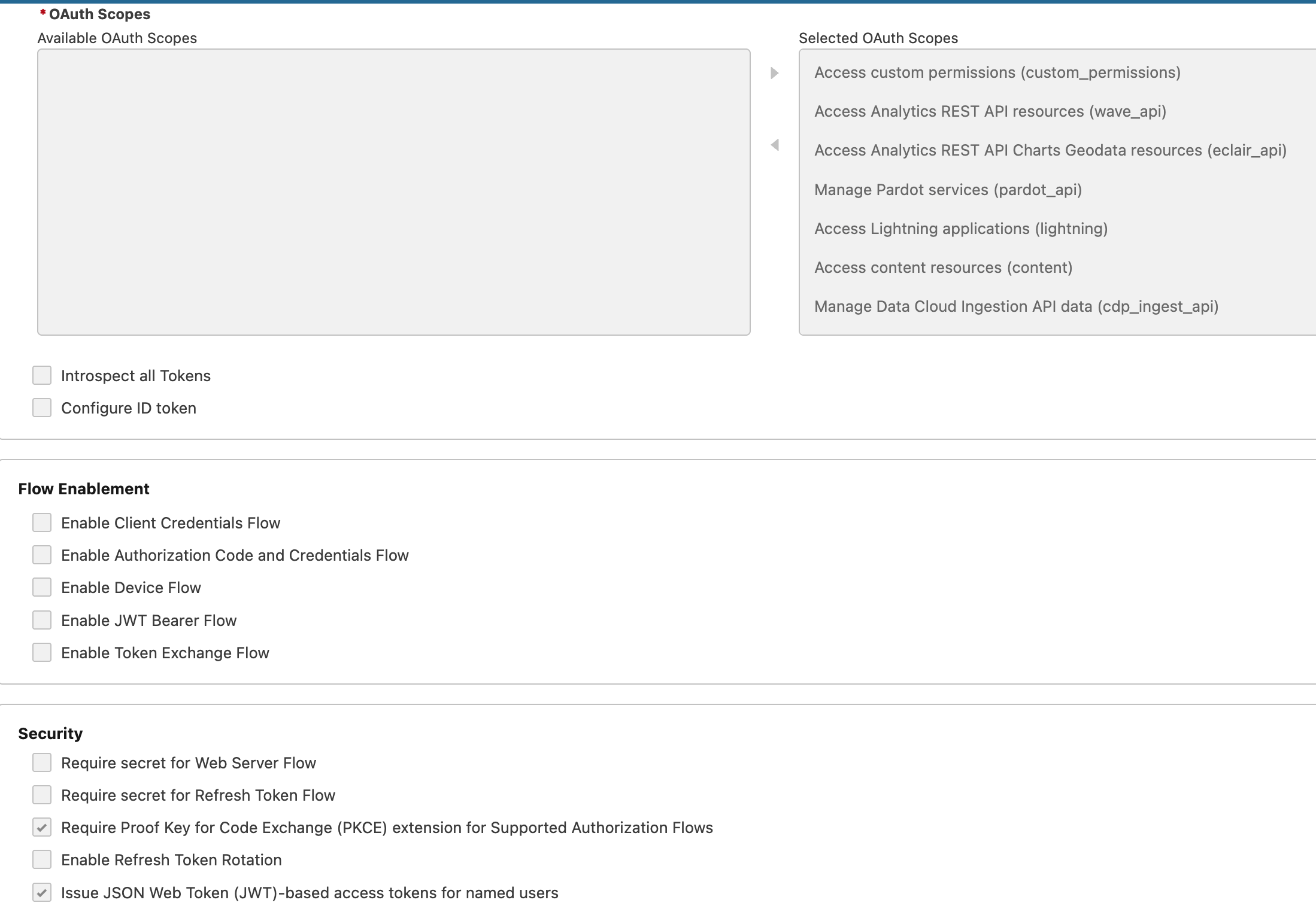
External Client App OAuth Settings - Configure the callback URL and select the OAuth scopes "Access MCP servers" and "Perform requests at any time" (refresh_token). PKCE is mandatory.
3. Configure Security Settings
Set up the security policies for your External Client App:
External Client App Security Settings - Configure OAuth policies, permitted users, and session settings for secure MCP access.
4. Save Client Credentials
After saving, click "Manage Consumer Details" to copy your Consumer Key (client_id) and Consumer Secret (client_secret) for MCP configuration.
GA Notice (April 2026): Salesforce Hosted MCP Servers are now Generally Available, and Developer Edition orgs include free access. See the announcement on the Salesforce Developers blog. Expect minor UI label changes between releases (for example, the "Installed" tab in the DX MCP Server config UI was renamed to "Configure" in Spring '26).
6
OAuth Configuration & Scopes
OAuth authentication is required for Salesforce Hosted MCP Servers. With the GA release, Salesforce surfaces two named scopes in the External Client App UI specifically for MCP - see the Create an External Client App guide.
Required OAuth Scopes (GA)
Scope (UI Label)
Purpose
When Required
Access MCP servers (mcp_api)
Allows the External Client App to call Hosted MCP endpoints
Always
Perform requests at any time (refresh_token)
Issues a refresh token so the client can renew sessions without re-prompting
Always
PKCE (extension, not a scope)
Code challenge / verifier for the Authorization Code flow
Mandatory - required for all Hosted MCP clients
Legacy beta scopes: Older guides reference api, refresh_token, sfap_api, and einstein_gpt_api. Those scopes still exist on the platform, but External Client Apps now expose the consolidated "Access MCP servers" scope for Hosted MCP. If you're migrating from a beta setup, recreate the OAuth scope list rather than mapping one-to-one.
OAuth Authorization URL Example
The Authorization Code + PKCE flow used by Hosted MCP produces URLs like this:
Different MCP clients expect different callback URLs. Add every client URL you plan to use to your External Client App's "Callback URL" field (one per line). The Connect MCP Clients overview page links out to per-client guides (Claude, Cursor, Postman, ChatGPT) where the exact callback URLs are documented; the table below summarizes the values used at the time of writing.
Client
Callback URL
Claude (Desktop, Web, and managed Code)
https://claude.ai/api/mcp/auth_callback
Cursor
cursor://anysphere.cursor-mcp/oauth/callback
Postman (testing)
https://oauth.pstmn.io/v1/callback
mcp-remote (stdio bridge for Claude Code, etc.)
http://localhost:8080/oauth/callback
External Client App Configuration
For Hosted MCP Servers, create an External Client App as described in Section 5. The key OAuth settings are:
Callback URL(s): add the URLs from the table above for every client you'll use.
Scopes: "Access MCP servers" + "Perform requests at any time".
PKCE: enabled (required by Hosted MCP).
Permitted Users: "Admin approved users" or "All users may self-authorize" depending on your security model.
After saving, click "Manage Consumer Details" to copy your Consumer Key (client_id) and Consumer Secret (client_secret). Salesforce notes propagation can take up to 30 minutes after first save.
Security Warning: Never commit client secrets to version control. Use environment variables, a secrets manager, or a file outside your repo for production deployments.
7
mcp-remote Configuration
The mcp-remote package bridges stdio-only MCP clients (like Claude Code) to remote MCP servers with OAuth support. It handles the authentication flow and protocol translation automatically.
Verified Configuration (April 2026)
Add this to your .mcp.json or ~/.claude.json. This is the configuration the author uses against the GA Hosted MCP Server after the previous beta URL stopped responding:
Why this config works at GA: The URL uses the new /v1/platform/<server> path (the old /v1-beta.2/<server> URL no longer responds). The bare "8080" is a positional argument telling mcp-remote which local port to bind for the OAuth callback (matching http://localhost:8080/oauth/callback on your External Client App). The --static-oauth-client-info flag pre-registers your client_id and client_secret so mcp-remote skips dynamic client registration.
mcp-remote Flags Reference
Flag
Purpose
Example
--static-oauth-client-info
Provide pre-registered OAuth credentials
"{"client_id":"xxx"}"
--host
Set OAuth callback hostname
--host localhost (default)
--transport
Protocol preference
http-first, sse-only, http-only
--header
Add custom HTTP headers
--header "Authorization:Bearer token"
--debug
Enable verbose logging
Logs to ~/.mcp-auth/{hash}_debug.log
--allow-http
Allow HTTP (insecure) connections
For trusted private networks only
Using Environment Variables
For better security, keep credentials out of the JSON and inject them through environment variables:
Callback URL: When you use mcp-remote with port 8080, the callback is http://localhost:8080/oauth/callback. Add this URL to your External Client App's "Callback URL" field. If you're connecting Claude directly (without mcp-remote), use https://claude.ai/api/mcp/auth_callback instead - see the callback URL table in Section 6.
8
Troubleshooting Common Issues
"No code verifier saved for session"
This error occurs when OAuth tokens expire or when switching between MCP server endpoints.
# Clear cached credentials
rm -rf ~/.mcp-auth/

# Restart Claude Code and re-authenticate
"MCP server not connected"
Check the following:
Verify Node.js version is 18+ with node --version
Check JSON syntax in your .mcp.json file
Ensure Salesforce CLI is installed and orgs are authorized
Run /mcp in Claude Code to see detailed error messages
"404" or No Response from Hosted MCP URL
Almost always a stale URL. Confirm:
You are not using https://api.salesforce.com/platform/mcp/v1-beta.2/... - that beta URL was retired at GA.
Production URL pattern: https://api.salesforce.com/platform/mcp/v1/platform/<server>
The <server> name matches an entry in the endpoint catalog (for example, sobject-all, not sobject_all).
"401 Unauthorized" with Hosted MCP
OAuth configuration issues. Verify:
Consumer Key and Secret are correct
External Client App has the OAuth scopes "Access MCP servers" and "Perform requests at any time" enabled
Callback URL on the External Client App matches your client (e.g., http://localhost:8080/oauth/callback for mcp-remote, or https://claude.ai/api/mcp/auth_callback for Claude direct)
PKCE is enabled on the External Client App
MCP service is enabled in Setup → User Interface
Wait up to 30 minutes after first save - External Client App settings can take that long to propagate.
DX MCP Server Shows No Tools
The --orgs flag is required. Ensure you've specified at least one authorized org:
# List authorized orgs
sf org list

# Use a valid org alias in your configuration
"--orgs", "your-org-alias"
Enable Debug Logging
For DX MCP Server:
{
  "args": ["--debug", "--orgs", "my-org", ...]
}
For mcp-remote:
# Add --debug flag
"args": ["mcp-remote", "URL", "--debug"]

# Check logs at
cat ~/.mcp-auth/*_debug.log
Quick Fix: Most MCP connection issues can be resolved by restarting Claude Code after configuration changes. The MCP servers are initialized when Claude Code starts.
9
Frequently Asked Questions
MCP (Model Context Protocol) is an open standard by Anthropic that enables AI assistants like Claude to securely interact with external systems. For Salesforce developers, it means Claude Code can directly query data, deploy metadata, run Apex tests, and manage orgs without leaving the IDE. This dramatically accelerates development workflows and enables natural language interactions with your Salesforce environments.
Salesforce DX MCP Server runs locally using Salesforce CLI credentials and provides 60+ development-focused tools like metadata deployment, Apex testing, and LWC analysis. It requires Salesforce CLI but needs no OAuth setup. Salesforce Hosted MCP Servers - Generally Available since April 2026 - run on Salesforce infrastructure, authenticate through External Client Apps (OAuth 2.0 + PKCE), and expose sObjects, Flows, Invocable Actions, Data 360, Prompt Builder, and Tableau Next as MCP tools without local CLI setup. Choose DX MCP for development workflows with CLI, and Hosted MCP for OAuth-based access without a local CLI.
For the GA Hosted MCP Server, configure your External Client App with the named scopes "Access MCP servers" and "Perform requests at any time" (refresh_token), and enable PKCE. The legacy beta scopes api, refresh_token, and sfap_api may still appear in older docs, but External Client Apps now surface the consolidated MCP scope in the UI. Make sure the callback URL on the app matches whatever client you're using (see Section 6).
When Hosted MCP went GA in April 2026, the URL pattern changed. Use https://api.salesforce.com/platform/mcp/v1/platform/<server> for production orgs (for example /v1/platform/sobject-all) and https://api.salesforce.com/platform/mcp/v1/sandbox/<server> for sandbox or scratch orgs. The previous /v1-beta.2/<server> URLs no longer respond.
This error occurs when switching between MCP server endpoints or when OAuth tokens expire. Clear the cached credentials by running rm -rf ~/.mcp-auth/ in your terminal, then restart Claude Code to re-authenticate with fresh tokens. If the issue persists, verify your External Client App's callback URL matches the one your client expects (see the table in Section 6).
Yes. Salesforce officially supports Claude (Desktop, Web, Code), Cursor, Postman (great for API testing), and ChatGPT (developer mode) as Hosted MCP clients. Any client that speaks OAuth 2.0 Authorization Code + PKCE will work. For stdio-only clients (like Claude Code), use the mcp-remote package to bridge the connection. Check each client's docs for the specific configuration file path.
Related Reading
Continue your Salesforce and AI development journey with these related guides:
Claude Code: The Complete Guide - Master Anthropic's AI-powered CLI tool from basic setup to advanced MCP servers and IDE integrations