Master no-code decision automation with Expression Sets, Decision Matrices, and Decision Tables for Insurance, Healthcare, and Financial Services
Reading time: ~24 minutes| Last Updated: August 2026
Article Updated: August 2026
This article has been refreshed with the latest Business Rules Engine capabilities, current limits and pricing tiers, and expanded integration guidance. Originally published December 2025.
What's New in This Update (August 2026)
Added: Spring '26 BRE enhancements — IF function in expression sets, automatic element naming, proactive constraint alerts, improved Flow integration, centralized decision-table monitoring dashboard, Salesforce Go setup, automated explanations for nested expression sets, and null/no-match handling controls
Added: Standard vs. advanced decision tables — scale up to 20 million rows with the advanced table type
Updated: Decision matrices now support text and numeric ranges plus grouped matrices
Updated: Edition-tiered included usage (10K calls/month on Enterprise Edition, 50K on Unlimited and Agentforce 1 Editions) and current add-on pricing
Added: Winter '26 usage-type categorization and asynchronous completion events
Expanded: Integration guidance now current through Agentforce actions
Included BRE Calls/Month (Enterprise vs. Unlimited & Agentforce 1 Editions)
100K-20M
Decision Table Rows by Table Type (Standard vs. Advanced)
No-Code
Visual Designer for Business Users
1
What is Salesforce Business Rules Engine?
Quick Answer: Salesforce Business Rules Engine (BRE) is a no-code/low-code framework within Salesforce Industries that enables business users to create, manage, and execute complex business logic using visual designers. It contains three core tools: Expression Sets (calculation engine), Decision Matrices (lookup tables), and Decision Tables (object-based rules).
According to the official Salesforce documentation, Business Rules Engine is a suite of services, components, and objects that apply advanced logic and automate complex decision-making. The engine powers guided interactions and workflows for virtually any industry process, operating at true business-to-consumer scale capable of maintaining thousands of rules and automating millions of interactions.
What makes BRE unique is its ability to put decision-making power directly into the hands of business users. Instead of waiting for developers to write and deploy Apex code every time a business rule changes, administrators and business analysts can create, test, and modify rules using intuitive visual tools.
History & Evolution of Business Rules Engine
Business Rules Engine has its roots in Salesforce's acquisition of Vlocity. The deal was announced on February 25, 2020 and closed on June 1, 2020 for $1.33 billion. Vlocity, founded in 2014 by former Siebel Systems executives, was a pioneer in industry-specific cloud solutions built natively on the Salesforce platform. The acquisition brought technologies like OmniStudio, DataRaptors, and process engines that eventually evolved into what we now know as Business Rules Engine.
Business Rules Engine was officially introduced in the Spring '22 release along with the Decision Explainer feature for audit trails. Initially available only to Salesforce Industries customers (Communications Cloud, Health Cloud, Financial Services Cloud), BRE was a subscription add-on. In the Summer '22 release, Salesforce began including 50,000 BRE calls per month with Unlimited Editions of Industry Clouds.
Today, BRE continues to evolve with each Salesforce release, gaining new features like enhanced Flow integration, improved Decision Table performance, expanded support across more Salesforce products, and the ability to invoke rules from Agentforce actions. Recent releases have added an IF function for expression sets, automatic element naming, proactive constraint alerts, a centralized decision-table monitoring dashboard, and finer control over null and no-match handling.
The Three Pillars of Business Rules Engine
Expression Sets
Sequential calculation workflows
Variables, constants, and formulas
Branching and conditional logic
Aggregation functions (SUM, AVG, MAX, MIN)
Can call Decision Matrices and Tables
Decision Matrices
Lookup tables with input/output columns
One-to-one row matching
CSV import capability
Version control for future pricing
Standalone or within Expression Sets
Decision Tables
Multiple outputs from multiple matches
Works with Salesforce objects directly
Supports operators (>, <, =, LIKE)
Standard tables: 30 input conditions, 10 output results
Advanced tables scale to 20 million rows
Pro Tip: You can access all three tools from the dedicated Business Rules Engine app in Salesforce. Navigate to App Launcher and search for "Business Rules Engine" to get started.
2
Why is Business Rules Engine Needed?
Before we dive into the technical details, it's crucial to understand why Salesforce created Business Rules Engine and what problems it solves. This understanding will help you evaluate whether BRE is the right tool for your organization.
The Problem: Hard-Coded Business Logic
In traditional Salesforce implementations, complex business rules are often implemented using:
Apex Triggers: Custom code that executes before or after DML operations
Validation Rules: Declarative rules that prevent saving records with invalid data
Workflow Rules / Process Builder: Automation tools that fire based on record criteria
Salesforce Flow: More powerful automation with complex logic capabilities
While these tools work, they present significant challenges.
Community Solutions Before BRE: The need for a configurable rule engine was recognized years before Salesforce introduced BRE. In 2017, I created SFDCRules - an open-source rule engine for Salesforce that allowed admins to configure business rules without hardcoding. The GitHub repository is still available for those interested in understanding how custom rule engines work.
Without BRE (Problems)
Developer Dependency: Every rule change requires developer involvement
Slow Time-to-Market: Changes take weeks due to dev cycles and deployments
Code Duplication: Similar logic scattered across triggers, flows, and classes
Limited Transparency: Business users can't see or understand the logic
Testing Complexity: Unit tests required for every code change
Version Control Issues: Hard to track and rollback rule changes
With BRE (Solutions)
Business User Empowerment: Admins can create and modify rules directly
Rapid Updates: Changes can be tested and deployed in hours
Centralized Logic: All business rules in one manageable location
Decision Explainer: Built-in auditing shows why rules produced results
Built-in Simulation: Test rules before activation without deployments
Native Versioning: Create multiple versions for future effective dates
Real-World Example: Insurance Premium Calculation
Consider an insurance company that needs to calculate health insurance premiums. The premium depends on:
Age of the applicant
Number of dependents
Geographic location (state/region)
Smoking status
Pre-existing conditions
Coverage tier (Bronze, Silver, Gold, Platinum)
Without BRE: You would need to write hundreds of lines of Apex code with nested IF-ELSE statements, maintain separate lookup tables in custom objects, and deploy code changes every time premium rates or factors change (often annually or quarterly). This typically requires a developer, a testing cycle, and a deployment window.
With BRE: The actuarial team creates Decision Matrices for each factor (age bands, location factors, coverage multipliers). An Expression Set combines these lookups and calculates the final premium. When rates change, the team simply updates the matrix values or creates a new version with a future effective date - no code, no deployment, no developer needed.
3
Core Components Deep Dive
Let's explore each component of the Business Rules Engine in detail, understanding their capabilities, use cases, and how they work together.
Expression Sets - The Calculation Engine
According to the Trailhead Expression Sets module, Expression Sets are the calculation engine of business rules. They're made up of variables, constants, and logic connected in a meaningful flow that takes JSON inputs, performs calculations, and returns JSON outputs.
Key Elements of Expression Sets:
Variables: Placeholders for dynamic values (inputs and calculated outputs)
Constants: Fixed values that don't change (tax rates, fixed fees)
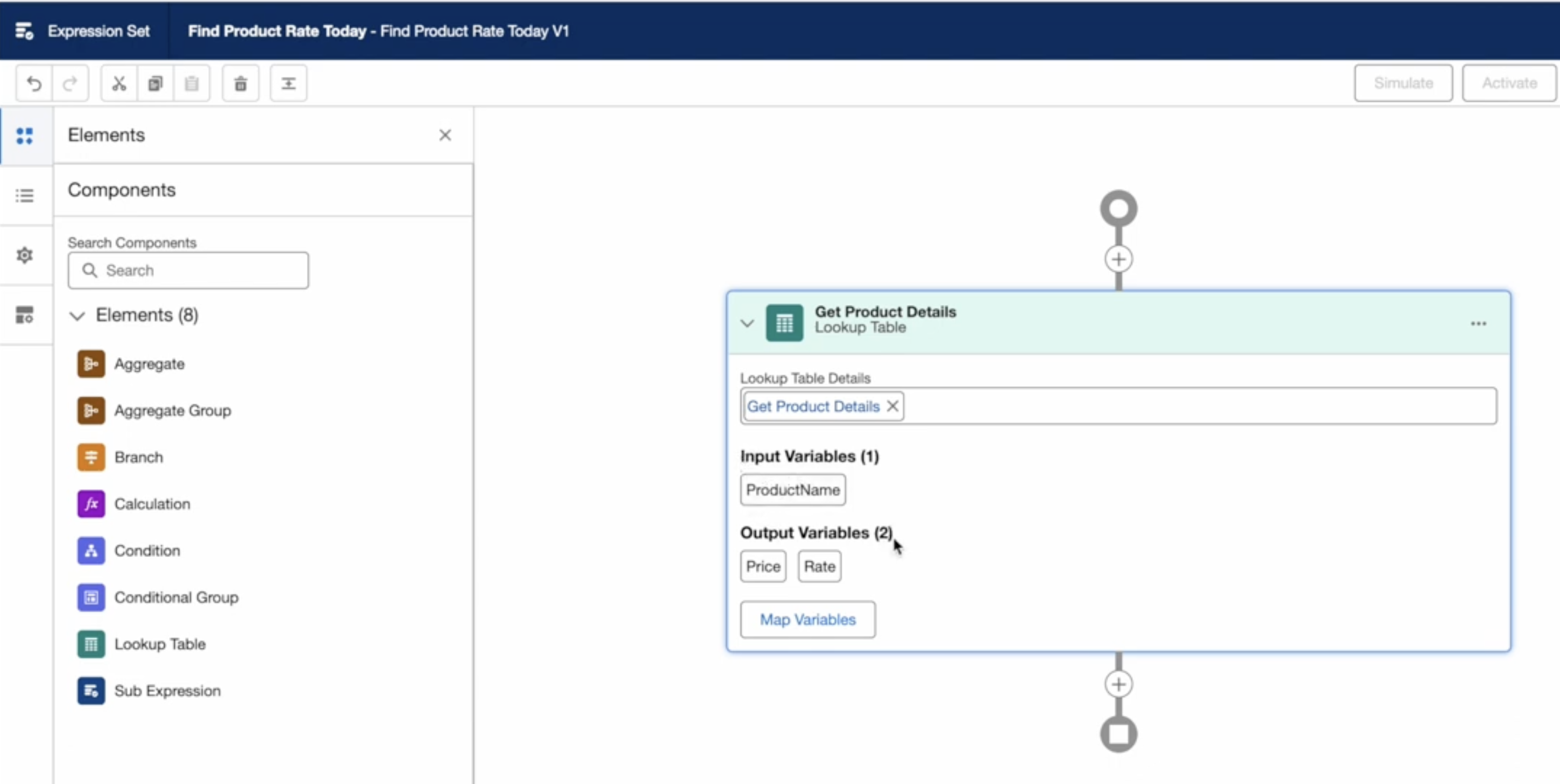
Lookup Table Steps: Reference Decision Matrices or Decision Tables
Calculation Steps: Mathematical operations and formulas
Branch Steps: Conditional logic (IF-THEN-ELSE)
Aggregate Steps: Functions like SUM, AVG, MAX, MIN across arrays
JSON Input
Receive input data from Flow, Omnistudio, or API
{age: 35, dependents: 2}
Lookup Tables
Query Decision Matrices for base values
Age Band Rate: $150
Calculate
Apply formulas and business logic
$150 × 1.25 = $187.50
JSON Output
Return results to calling process
{premium: 187.50}
Expression Set Builder - Visual workflow designer for creating calculation logic with drag-and-drop steps
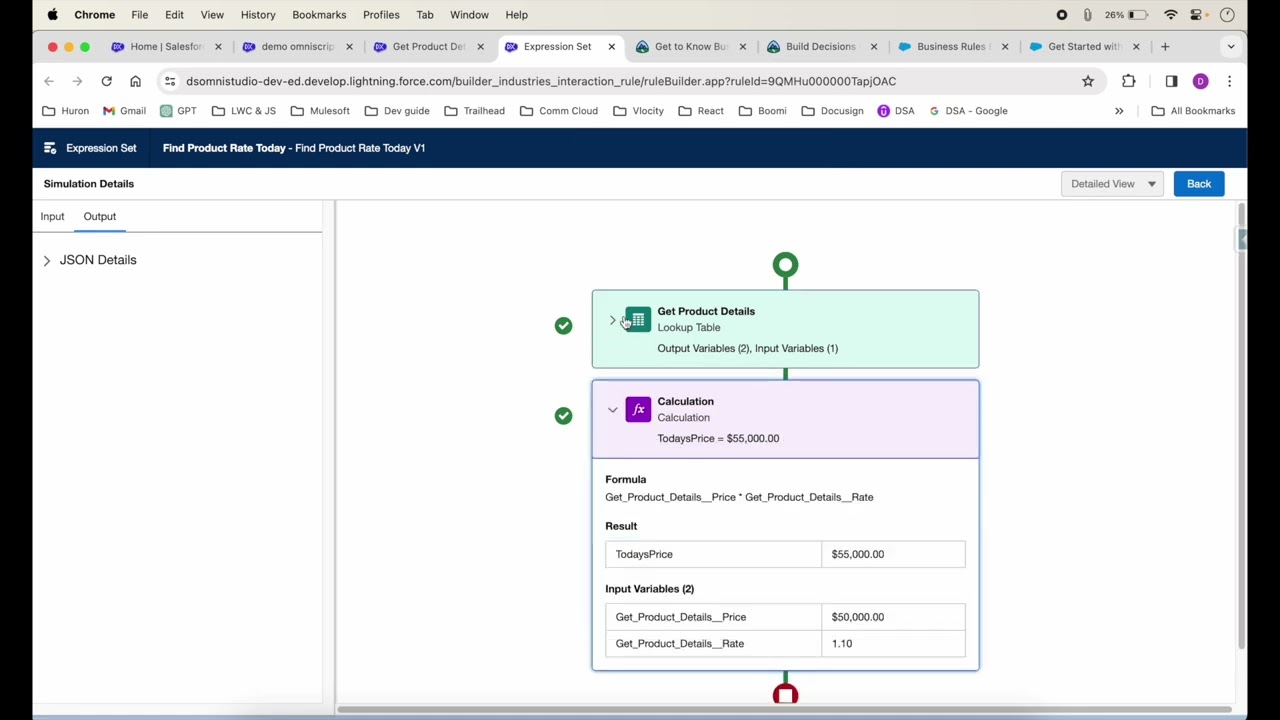
Expression Set Simulator - Test your rules with sample data and view step-by-step execution results
Decision Matrices - The Lookup Tables
Decision Matrices are powerful lookup tables with user-defined input and output columns. When called, the engine locates the row matching the input values and returns the corresponding output values. According to the Salesforce Help documentation on Decision Matrices, each matrix can have multiple versions for managing future pricing changes. Matrices come in standard and grouped types, and input columns support Text Ranges and Numeric Ranges in addition to exact matching, so a single row can cover a whole band of values such as ages 36-45 or credit scores 650-749.
Example: SLA-Based Retention Costs
Input: SLA Level
Output: Retention Cost
Output: Retention Rate
Bronze
$5,000
70%
Silver
$8,500
85%
Gold
$11,000
90%
Platinum
$12,500
95%
Decision Tables - Object-Based Rules
Decision Tables are advanced lookup tables that work directly with Salesforce objects (standard, custom, or custom metadata types). Unlike Decision Matrices, they can return multiple outputs from multiple matching rows and support operators like greater-than, less-than, and LIKE. According to the Salesforce Help documentation on Decision Tables, they now come in two types: standard decision tables process up to 100,000 rows with up to 30 input conditions and 10 output results, while advanced decision tables — designed for very large, CSV-based datasets — scale up to 20,000,000 rows with up to 10 output columns and 31 matched columns.
When to Use Decision Tables vs. Decision Matrices:
Feature
Decision Matrix
Decision Table
Data Source
Built-in matrix table or CSV import
Salesforce objects (standard, custom, metadata); CSV uploads for advanced tables
Matching
One row per input combination
Multiple rows can match
Operators
Exact match, plus Text and Numeric Ranges
Supports >, <, >=, <=, =, LIKE
Best For
Static rate tables, simple lookups
Dynamic rules, range-based logic
Max Rows
No documented limit
100,000 (standard) / 20,000,000 (advanced)
4
Key Objects & Architecture
Understanding the underlying data model helps you design better solutions and troubleshoot issues. According to the Salesforce Developer Documentation, BRE uses several standard objects to store configuration and metadata.
Key BRE Objects
Object
API Name
Purpose
Expression Set
ExpressionSet
Parent container for rule definitions
Expression Set Version
ExpressionSetVersion
Versioned instance with effective dates
Expression Set Element
ExpressionSetStep
Individual step (calculation, lookup, branch)
Decision Matrix
DecisionMatrix
Lookup table definition
Decision Matrix Version
DecisionMatrixVersion
Versioned matrix with effective dates
Decision Table
DecisionTable
Object-based rule table definition
Architecture Overview
Business Rules Engine is tightly integrated with Salesforce Industry Clouds (Communications, Financial Services, Healthcare, Energy) and works alongside Omnistudio for guided experiences. The diagram below shows the high-level architecture:
Visual Architecture Flow
Flow Omnistudio Agentforce REST API Apex
Business Rules Engine
Expression Sets Decision Matrices Decision Tables
Integration Options: BRE can be invoked from Salesforce Flow, Omnistudio, Agentforce actions, Connect REST API, and Apex. See Section 8: Integration Methods for detailed implementation guides and code examples.
5
Decision Matrix vs Decision Table: Selection Guide
One of the most common questions when implementing Business Rules Engine is: "Should I use a Decision Matrix or a Decision Table?" This section provides a clear decision framework to help you choose the right component for your use case.
Quick Decision Flowchart
Is your data stored in a Salesforce object?
YES
Do you need range operators (>, <, >=, LIKE)?
YES
Decision Table
NO
Either Works
NO
Is it static lookup data (rates, tiers, mappings)?
YES
Decision Matrix
NO
Use Apex/Flow
Key Differentiators at a Glance
Decision Matrix
Data Source: Built-in table or CSV import
Matching: Exact match plus text/numeric ranges
Output: Single row returned
Versioning: Built-in with effective dates
Best For: Business users managing rate tables
Decision Table
Data Source: Salesforce objects or CSV (up to 20M rows with advanced tables)
Business Rules Engine shines in industries with complex, frequently-changing business logic. Here are detailed use cases based on the Trailhead Business Rules Engine module.
Healthcare & Health Insurance
Prior Authorization
Determine if PA is required for services
Check coverage against policy terms
Validate provider network status
Calculate patient responsibility
Premium Calculation
Age band rating factors
Geographic location adjustments
Coverage tier multipliers
Subsidy calculations
Insurance (P&C, Life)
Underwriting Rules
Evaluate risk factors dynamically
Auto-approve low-risk applications
Flag high-risk cases for review
Calculate risk scores
Claims Processing
Validate claim eligibility
Calculate settlement amounts
Apply deductibles and limits
Fraud pattern detection
Financial Services
Loan Origination
Credit score evaluation
Debt-to-income ratio checks
Auto-approval thresholds
Interest rate determination
Compliance Monitoring
Real-time regulatory checks
KYC/AML rule enforcement
Transaction monitoring
Fee reversal eligibility
Communications & Utilities
Product Bundling
Eligibility based on location
Compatible product validation
Dynamic pricing rules
Promotional discounts
Energy Rating
Usage-based tier pricing
Time-of-use rate calculations
Demand charge computation
Rebate eligibility
7
Implementation Video Tutorial
Rather than reading through lengthy text-based instructions, watch this excellent video tutorial that walks you through implementing Business Rules Engine step-by-step. This hands-on demonstration is one of the best resources available for learning BRE implementation.
Video Credit: Special thanks to Dip Tech for creating this comprehensive tutorial.
Practice Tip: For the best learning experience, open a Salesforce org with Business Rules Engine enabled alongside the video. Follow along step-by-step to build your first Expression Set. You can explore BRE hands-on via the Trailhead Business Rules Engine module, and the help docs describe a trial-org path for practicing.
8
Integration Methods
According to the Salesforce Help documentation on BRE Integrations, Business Rules Engine components can be invoked from multiple platforms including Salesforce Flow, Omnistudio, Agentforce actions, Connect REST API, and Apex code.
Integration with Salesforce Flow
To invoke BRE from Flow Builder: Navigate to Setup → Quick Find → Flows → New Flow, then add an Action element. In the New Action window, select the category that matches the rule type you want to call — for example, Decision Matrices — and then pick the specific decision matrix or expression set by its name. Configure the action by mapping input variables from Flow variables and storing the outputs. The output JSON is automatically parsed into Flow variables that you can display on screens or use in subsequent elements.
Integration with Omnistudio
Omnistudio provides native integration with BRE through OmniScript and Integration Procedures:
OmniScript Integration
Use Expression Set Action element
Map DataRaptor output to BRE input
Display results in OmniScript UI
Real-time calculations during user input
Integration Procedure
Call BRE from backend processes
Batch processing capabilities
Combine with other IP actions
Error handling and retries
API Integration (Connect REST API)
For custom integrations or external systems, use the Connect REST API. The documented endpoint is POST /services/data/vXX.X/connect/business-rules/expressionSet/{expressionSetName}, which accepts the expression set's API name in the URL and a JSON body with inputs and options:
# Evaluate an expression set via Connect REST API
curl -X POST
  'https://yourinstance.salesforce.com/services/data/v62.0/connect/business-rules/expressionSet/Premium_Calculation'
  -H 'Authorization: Bearer YOUR_ACCESS_TOKEN'
  -H 'Content-Type: application/json'
  -d '{
    "inputs": [
        {
            "Age_Band": "36-45",
            "Dependents": "2",
            "Annual_Income": 45000
        }
    ],
    "options": {}
}'
Starting with Winter '23, Salesforce introduced the Invocable.Action class which allows Apex code to call invocable actions—including BRE components. This is useful for triggers, batch jobs, and custom controllers.
Method 1: Using Invocable.Action Class
/**
 * Calling an Expression Set from Apex using Invocable.Action
 * Available since Winter '23 (API v56.0+)
 */
public class BREApexIntegration {

    public static Map<String, Object> evaluateExpressionSet(
        String expressionSetName,
        Map<String, Object> inputVariables
    ) {
        Invocable.Action action = Invocable.Action.createStandardAction(
            'evaluateExpressionSet'
        );
        action.setInvocationParameter('expressionSetName', expressionSetName);
        action.setInvocationParameter('inputVariablesJSON', JSON.serialize(inputVariables));

        List<Invocable.Action.Result> results = action.invoke();

        if (results != null && !results.isEmpty() && results[0].isSuccess()) {
            return (Map<String, Object>) results[0].getOutputParameters();
        }
        throw new BREException('Expression Set evaluation failed');
    }

    public class BREException extends Exception {}
}
Method 2: Using HTTP Callout to Connect REST API
/**
 * Calling an expression set via Connect REST API from Apex
 */
public class BRERestIntegration {

    public static String evaluateExpressionSet(
        String expressionSetName,
        Map<String, Object> inputData
    ) {
        String baseUrl = URL.getOrgDomainUrl().toExternalForm();
        String endpoint = baseUrl + '/services/data/v62.0/connect/' +
            'business-rules/expressionSet/' + expressionSetName;

        HttpRequest req = new HttpRequest();
        req.setEndpoint(endpoint);
        req.setMethod('POST');
        req.setHeader('Content-Type', 'application/json');
        req.setHeader('Authorization', 'Bearer ' + UserInfo.getSessionId());
        req.setBody(JSON.serialize(new Map<String, Object>{
            'inputs' => new List<Object>{ inputData },
            'options' => new Map<String, Object>()
        }));

        HttpResponse res = new Http().send(req);
        if (res.getStatusCode() == 200) {
            return res.getBody();
        }
        throw new CalloutException('BRE API Error: ' + res.getStatusCode());
    }
}
Note: The exact invocable action name may vary based on your org configuration. Use the Invocable.Action documentation to discover available actions in your org.
9
Limitations & Constraints
While powerful, Business Rules Engine has specific limitations you must consider during solution design. According to the official BRE limits documentation, understanding these constraints helps avoid implementation issues.
Expression Set Limitations
Limitation
Value
Workaround
Nesting Depth
Maximum 2 levels (depth of 3 is not supported)
Chain multiple Expression Sets
Aggregate Steps
Recommended practice: place last in the sequence
Use second Expression Set for post-aggregate logic
Version Limit
Multiple versions supported
Archive old versions regularly
Decision Table Limits: Standard vs. Advanced
Decision tables come in two types with different limits, so pick the type that matches your data volume:
Limit
Standard Decision Table
Advanced Decision Table
Row Capacity
Up to 100,000 rows
Up to 20,000,000 rows
Input / Matched Columns
Up to 30 input conditions
Up to 31 matched columns
Output Columns
Up to 10 output results
Up to 10 output columns
Active Tables per Org
Up to 20
Up to 100
Data Loading
Salesforce object records
CSV-based: up to 1,000,000 rows processed per run, 50,000 rows per CSV upload
Source object note: The requirement that decision table source objects include CreatedDate and IsDeleted fields has been historically documented; verify against the current documentation for your release, and prefer Custom Metadata Types when a source object isn't compatible.
Performance Consideration: Complex BRE logic can impact platform performance. According to industry best practices, monitor execution times and optimize rule structures. Consider caching frequently-used lookups and avoiding deeply nested conditions where possible.
When NOT to Use BRE
Real-time, high-frequency operations: Triggers requiring sub-second response for every record
Complex data transformations: Heavy data manipulation better suited for Apex
Deep integrations: Callouts to external systems requiring error handling
Rules with 3+ nesting levels: Requires architectural redesign
Document business requirements in step descriptions
Test with edge cases and boundary values
Use Decision Explainer for auditing
Avoid This
Creating one massive Expression Set for all rules
Hard-coding values that should be in matrices
Modifying active matrix versions directly
Skipping simulation testing
Ignoring version effective dates
Exceeding nesting limits with workarounds
Governance Recommendations
Naming Conventions: Use consistent prefixes - ES_ for Expression Sets, DM_ for Decision Matrices, DT_ for Decision Tables
Change Management: Require business approval before activating new versions. Document change reasons in version descriptions.
Testing Protocol: Create test cases for happy path, edge cases, and error scenarios. Maintain test data sets for regression testing.
Monitoring & Auditing: Enable Decision Explainer for compliance-critical rules. Review execution logs regularly for anomalies.
Lessons Learned from Enterprise Implementations
Start Small: Begin with a single, well-defined use case before expanding. This builds team expertise and establishes patterns.
Involve Business Users Early: BRE is designed for business user ownership. Train them on the tools and establish their role in maintaining rules.
Plan for Versioning: Insurance and financial services often have annual rate changes. Design your matrices with version management from day one.
Use Decision Explainer: For regulated industries (healthcare, insurance, finance), Decision Explainer provides the audit trail regulators require.
11
Common Problems and Solutions
Based on discussions in the Salesforce Trailblazer Community and Salesforce Known Issues, here are the most frequently reported problems and questions from developers and administrators implementing Business Rules Engine.
1. Expression Set Returns Null or Empty Results
Problem: Expression Set executes without errors but returns null or unexpected empty values.
Common Causes:
Input variables not properly mapped or contain null values
Decision Matrix lookup fails silently when no matching row exists
Variable names are case-sensitive - mismatched casing causes null returns
Expression Set version not activated or wrong version is active
Solution: Use the Simulation tool to trace each step. Check that all input variables have values before the Expression Set runs. Add defensive null checks in your calling Flow or OmniScript.
2. Decision Matrix "No Match Found" Issues
Problem: Decision Matrix returns empty results even when data should match.
Common Causes:
Input value has trailing spaces or different casing than matrix data
Matrix version is not active or effective date hasn't started
When using "Any Value" filter with non-identical outputs, returns empty
Data type mismatch (sending string "100" when number 100 expected)
Debugging Tip: Use the Decision Explainer feature to understand why a Decision Matrix returned no results. This was added in recent releases specifically for troubleshooting.
3. Permission and Access Errors
Problem: Users receive "Insufficient Privileges" or cannot access BRE components.
Field-Level Security blocking access to BRE objects
Profile doesn't have access to Business Rules Engine app
Past release transitions have occasionally required re-assigning permission sets
Solution: Assign the appropriate permission sets from Setup — Rule Engine Runtime for users who execute rules, Rule Engine Designer for rule builders, and Decision Explainer Service Access where explainability is used. According to the BRE Permission Sets documentation, users need specific permissions for runtime execution vs. design-time editing.
4. Expression Set Nesting Depth Exceeded
Problem: Complex business logic requires more than 2 levels of nesting, which BRE doesn't support.
Workaround:
Split logic into multiple Expression Sets and chain them together
Use the output of one Expression Set as input to another
Move some calculations to Decision Matrices to reduce Expression Set complexity
Consider if Apex is more appropriate for deeply nested logic
5. Decision Table Source Object Compatibility
Problem: Custom object cannot be used as Decision Table source.
Cause: Decision Tables have historically been documented as requiring source objects to have CreatedDate and IsDeleted fields — verify against the current documentation for your release. Some custom objects or certain standard objects may not have these fields.
Solution: Use Custom Metadata Types instead of custom objects for Decision Table rules. Metadata types are fully compatible and offer additional benefits like deployability.
6. Flow Integration Errors
Problem: The expression set or decision matrix action in Flow fails or returns unexpected results.
Common Causes:
JSON input format doesn't match Expression Set's expected schema
Flow variable types don't match BRE variable types
Expression Set API name changed but Flow still references old name
Bulkified Flow passes collection when Expression Set expects single record
Understanding BRE licensing is crucial for budgeting and capacity planning. According to the Salesforce Add-on Pricing documentation, here's what you need to know.
Included with Industry Clouds
Business Rules Engine is included with Salesforce Industry Cloud licenses, and the included usage is edition-tiered:
Enterprise Edition - 10,000 BRE calls/org/month included
Unlimited and Agentforce 1 Editions - 50,000 BRE calls/org/month included
BRE now spans roughly ten industry clouds - including Financial Services Cloud, Health Cloud, Manufacturing Cloud, Automotive Cloud, and Communications Cloud - and is also available with Service Cloud editions per the current add-ons price list.
Additional Capacity
Add-On
Capacity
Price (USD)
Business Rules Engine - Additional Calls
100,000 BRE calls/month
$10,000/unit/month ($120,000/year)
Capacity Planning: A "BRE call" is one invocation of an Expression Set or Decision Table. High-volume implementations (e.g., real-time quoting on a website) can consume calls quickly. Monitor usage from Setup under your org's usage-based entitlements. Since Winter '26, usage is also categorized by usage type, and asynchronous runs can publish completion events for easier tracking.
What Counts as a BRE Call?
The metering behavior below reflects commonly understood behavior; confirm with Salesforce for contractual purposes:
Each Expression Set evaluation = 1 call
Each Decision Table evaluation = 1 call
Decision Matrix lookups within an Expression Set are bundled (not separate calls)
Simulation/testing does NOT count against limits
?
Frequently Asked Questions
Salesforce Business Rules Engine (BRE) is a no-code/low-code framework within Salesforce Industries that enables business users to create, manage, and execute complex business logic using visual designers. It includes three core tools: Expression Sets for calculations and workflows, Decision Matrices for lookup tables, and Decision Tables for object-based rules with multiple outputs.
Expression Sets are sequential calculation workflows that can include variables, formulas, branching, and aggregation functions. Decision Matrices are lookup tables that match inputs to a single row and return corresponding outputs, supporting exact matches as well as text and numeric ranges. Decision Tables work with Salesforce objects, can return multiple outputs from multiple matching rows, and support operators like greater-than and less-than.
Business Rules Engine is included with Salesforce Industry Cloud licenses such as Financial Services Cloud, Health Cloud, Manufacturing Cloud, Automotive Cloud, and Communications Cloud. Included usage is edition-tiered: Enterprise Edition orgs get 10,000 BRE calls per month, while Unlimited and Agentforce 1 Editions get 50,000 calls per month. Additional capacity can be purchased at $10,000/unit/month for 100,000 additional calls.
Key limitations include: Expression Sets support up to 2 levels of nesting depth; standard Decision Tables process up to 100,000 rows with a maximum of 30 input conditions and 10 output results; advanced Decision Tables scale up to 20 million rows with up to 10 output columns. Performance may also be impacted with complex rules or very high row counts.
BRE can replace Apex for many business logic scenarios including calculations, eligibility checks, pricing rules, and decision-making workflows. However, it's not suitable for complex integrations requiring callouts, real-time high-frequency processing, or scenarios requiring logic nesting deeper than 2 levels. Use BRE for maintainable, business-user-editable rules and Apex for complex system-level logic.
13
Abbreviations & Glossary
Abbreviations & Glossary
Reference guide for technical terms and abbreviations used throughout this article.
BRE-Business Rules Engine
DM-Decision Matrix
DT-Decision Table
ES-Expression Set
FSC-Financial Services Cloud
PA-Prior Authorization
API-Application Programming Interface
JSON-JavaScript Object Notation
CSV-Comma-Separated Values
IP-Integration Procedure
KYC-Know Your Customer
AML-Anti-Money Laundering
P&C-Property and Casualty
SLA-Service Level Agreement
DML-Data Manipulation Language
Related Reading
Continue your Salesforce automation and architecture learning journey with these related guides:
Business Rules Engine (BRE) operates on a consumption-based pricing model. When the standard monthly limit of 50,000 calls is exceeded in editions like Unlimited or Agentforce 1, users are typically billed for additional usage in the form of overages


any idea, what happens after BRElimit 50,000 exhausted in org? does it get billed? appreciate your response
Business Rules Engine (BRE) operates on a consumption-based pricing model. When the standard monthly limit of 50,000 calls is exceeded in editions like Unlimited or Agentforce 1, users are typically billed for additional usage in the form of overages