Master config corruption fixes, backup restoration, gateway health monitoring, and error auto-remediation for your personal AI assistant
Reading time: ~18 minutes| Last Updated: February 2026
In This Guide
10
In-Depth Sections
Reliability Feature
5
Backup Versions
In This Guide
5
FAQs Answered
Health Checks
5
Monitor Types
1
What is OpenClaw Auto-Recovery?
Quick Answer: OpenClaw auto-recovery is a multi-layered system that automatically detects and repairs gateway failures, config corruption, and channel issues without human intervention. It uses health monitors, backup restoration, and intelligent error diagnosis to maintain 24/7 AI assistant uptime.
OpenClaw is an open-source personal AI assistant platform that runs as a multi-channel gateway supporting Telegram and WhatsApp. As your AI assistant runs continuously for days, weeks, or months, various issues can occur: configuration files can become corrupted, channels can silently fail, and the gateway can enter "zombie states" where it appears healthy but isn't functioning properly.
The auto-recovery system addresses these challenges through five defense layers that work together to ensure your assistant stays operational. According to the official OpenClaw documentation, the platform only accepts configurations that fully match the schema, and when validation fails, diagnostic commands like openclaw doctor become essential for recovery.
Multi-Layer Defense Architecture
OpenClaw Reliability Layers
Layer 1: Gateway Health Monitor
Proactive health checks every 15 minutes - detects zombie states, channel failures, and unresponsive gateways
Every 15 min
Layer 2: Config Validation & Auto-Fix
Validates config before any restart, runs openclaw doctor --fix for automatic repair
Before restart
Layer 3: Backup Cascade Restoration
Tests 5 backup config versions in sequence, restores first valid backup automatically
5 Versions
Layer 4: Error Monitor & Auto-Remediation
Scans error logs every 5 minutes, diagnoses issues, and auto-fixes known problems
Every 5 min
Layer 5: Telegram Notifications
Real-time alerts for all recovery actions, health issues, and manual intervention needs
Real-time
These layers work together to create a self-healing system. When a problem is detected, the monitor first validates the configuration, attempts automatic repair, falls back to backups if needed, and notifies you throughout the process.
2
The Zombie State Problem
One of the most challenging issues with long-running AI assistants is the "zombie state" - a condition where the gateway process is running and health checks pass, but channels like Telegram or WhatsApp silently stop receiving messages. This can go unnoticed for hours or even days.
Real-World Scenario
Consider this actual incident: A Telegram channel was silent for 46 hours (February 2-4, 2026) while the gateway reported "OK" status. The process was running, the health endpoint responded, but no messages were being received or sent. Without proactive monitoring, this would have continued indefinitely.
The Hidden Failure: Traditional health checks only verify the process is running and responding to HTTP requests. They don't validate that messaging channels are actively receiving and processing messages - the core function of your AI assistant.
Root Causes of Zombie States
Cause
Description
Detection Method
Long-Polling Timeout
Telegram long-polling connection drops without reconnection
Check provider age > 6 hours
Rate Limit Cascade
Excessive API calls trigger rate limiting that cascades
The standard approach of checking http://localhost:18789/health returns OK as long as the Node.js process responds. This tells you nothing about:
Channel connectivity: Is Telegram actually connected?
Message flow: Are messages being received and sent?
Provider state: Is the long-polling session active?
Processing capability: Can the AI actually respond?
This is why OpenClaw auto-recovery implements five distinct health checks that go beyond simple process monitoring to validate actual messaging functionality.
3
Config Corruption & Recovery
Configuration corruption is a common cause of gateway failures. According to the OpenClaw doctor documentation, the gateway validates all configuration against OpenClawSchema (a Zod schema) before startup. Invalid configs cause the gateway to refuse to start for safety.
Common Config Corruption Causes
Manual editing errors: Typos, missing commas, or invalid JSON syntax
The openclaw doctor command is the primary repair tool. As noted in the CLI reference, it automates common repair tasks and runs a series of checks with fixes for detected issues.
# Run health check (diagnosis only)
openclaw doctor

# Run with automatic fixes
openclaw doctor --fix

# Run without interactive prompts (for scripts/cron)
openclaw doctor --non-interactive --fix

# Deep diagnostics
openclaw doctor --deep
Important: The --fix flag creates a backup to ~/.openclaw/openclaw.json.bak before making changes. It drops unknown config keys and lists each removal. The --non-interactive flag prevents prompts for keychain/OAuth fixes, essential for automated recovery.
Config Validation Process
Before any restart, the health monitor validates the configuration using the native OpenClaw API:
The validation function checks the .valid field and, if false, counts issues from the .issues array to provide detailed diagnostics.
Recovery Flow
Detect Corruption
Config validation fails
config.get returns invalid
Doctor Auto-Fix
Run doctor --fix
openclaw doctor --fix
Backup Cascade
Test .bak files
.bak → .bak.1 → .bak.4
Restore & Restart
First valid backup wins
Gateway restarts
4
Backup System Architecture
OpenClaw maintains a rotating backup system that preserves the last 5 versions of your configuration. These backups are created automatically on config modifications, providing a safety net for recovery.
Backup File Locations
File
Description
Age
~/.openclaw/openclaw.json
Current active configuration
Current
~/.openclaw/openclaw.json.bak
Most recent backup (created by doctor --fix)
Newest backup
~/.openclaw/openclaw.json.bak.1
Second most recent backup
Older
~/.openclaw/openclaw.json.bak.2
Third backup version
Older
~/.openclaw/openclaw.json.bak.3
Fourth backup version
Older
~/.openclaw/openclaw.json.bak.4
Oldest preserved backup
Oldest
Cascade Backup Testing
When config corruption is detected and doctor auto-fix fails, the recovery system tests backups in order from newest to oldest. Here's the actual restoration logic:
restore_from_backup() {
    log "Attempting config restore from backups..."

    # Try backups in order: .bak, .bak.1, .bak.2, .bak.3, .bak.4
    for backup in "" ".1" ".2" ".3" ".4"; do
        local backup_file="$OPENCLAW_DIR/openclaw.json.bak$backup"

        if [[ ! -f "$backup_file" ]]; then
            continue
        fi

        log "Testing backup: $(basename "$backup_file")"
        cp "$backup_file" "$OPENCLAW_DIR/openclaw.json"

        if validate_config; then
            log "Successfully restored from $(basename "$backup_file")"
            notify "[OK] Config Restored from: $(basename "$backup_file")"
            return 0
        fi
    done

    log "CRITICAL: All backups failed validation"
    notify "[ALERT] Config Recovery Failed - Manual intervention required"
    return 1
}
Why This Approach Works
Non-destructive: Original config is preserved during testing
Validation-first: Each backup is validated before being accepted
Ordered cascade: Newest backups tried first (most likely to be valid)
Graceful degradation: Falls back through progressively older configs
Clear notifications: You're informed at every recovery step
Result: No more infinite crash loops from bad configs! The system will either find a working configuration or clearly alert you that manual intervention is needed, rather than repeatedly trying to start with a corrupted config.
5
Gateway Health Monitor
The gateway health monitor is the first line of defense against zombie states and channel failures. It runs every 15 minutes via macOS LaunchAgent and performs five distinct health checks.
The Five Health Checks
Check
What It Detects
Threshold
Action
Gateway Responsive
Process not responding to health endpoint
Timeout > 10 seconds
Auto-restart
Telegram Provider Age
Provider hasn't started/restarted recently
> 6 hours since start
Auto-restart
Channel Exit Detection
Channel exited without recovery
Exit < 10 min ago, no start
Auto-restart
Message Activity
No messages sent or received (silent bot)
> 6 hours no activity
Auto-restart
Rate Limiting
Excessive API rate limit errors
> 10 timeouts/hour
Alert only
Message Activity Check Strategy
The message activity check uses a two-strategy approach for maximum reliability:
1
Strategy 1: Session File Modification Time
Checks the modification time of the most recent session file in ~/.openclaw/agents/main/sessions/*.jsonl. Most reliable indicator of actual message processing.
2
Strategy 2: Provider Start Timestamp Fallback
If session files aren't available, checks the last Telegram provider start timestamp from gateway logs. Less precise but catches reconnection activity.
Restart Process
When issues are detected, the monitor triggers a safe restart sequence:
restart_gateway() {
    log "Validating config before restart..."

    # Step 1: Validate current config
    if ! validate_config; then
        log "Config invalid - attempting auto-repair"
        notify "[WARNING] Config Corruption Detected - Attempting repair..."

        # Step 2: Try doctor auto-fix
        if openclaw doctor --non-interactive --fix; then
            if validate_config; then
                notify "[FIX] Config Auto-Fixed Successfully"
            else
                # Step 3: Fall back to backup restoration
                restore_from_backup || return 1
            fi
        else
            restore_from_backup || return 1
        fi
    fi

    # Step 4: Config valid, safe to restart
    log "Config validated - initiating gateway restart..."
    launchctl kickstart -k "gui/$(id -u)/ai.openclaw.gateway"
    sleep 5
    log "Gateway restart complete"
}
Running the Health Monitor
# Check health monitor service status
launchctl list | grep health-monitor

# Force run health check immediately
launchctl kickstart -k gui/$(id -u)/ai.openclaw.health-monitor

# View health monitor logs
tail -f ~/.openclaw/logs/health-monitor.log

# Manual test run
~/.openclaw/scripts/gateway-health-monitor.sh
6
Error Monitor & Auto-Remediation
The error monitor provides intelligent error diagnosis with automatic remediation for known issues. It scans the error log every 5 minutes and takes corrective action when possible.
Error Categories & Auto-Fixes
Error Type
Pattern Detected
Auto-Fix Action
Config Invalid
Config invalid
Runs openclaw doctor --fix
Docker Not Running
docker not found
Opens Docker Desktop app
SearXNG Down
ECONNREFUSED :8888
Runs docker start searxng
Command Not Found
not found, command not found
Suggests installation command
File Not Found
ENOENT, No such file
Suggests verification steps
Connection Timeout
ETIMEDOUT, timeout
Network troubleshooting tips
API Errors
Error.*API
Suggests API key verification
Unknown Errors
Any unrecognized pattern
Searches SearXNG for solutions
Intelligent Deduplication
The error monitor implements smart deduplication to prevent notification spam:
6-hour window: Same error signature won't notify again for 6 hours
Signature normalization: Timestamps, PIDs, and session IDs are stripped before hashing
Rate limiting: 5-minute minimum between any notifications
Ignore patterns: Deprecation warnings and known non-issues are filtered
# Clear deduplication cache to re-enable all alerts
rm ~/.openclaw/logs/.sent-errors

# Check which errors have been sent
cat ~/.openclaw/logs/.sent-errors

# View error monitor activity
tail -f ~/.openclaw/logs/error-monitor.log
SearXNG Integration for Unknown Errors
When an error doesn't match any known pattern, the monitor searches for solutions using a self-hosted SearXNG instance:
search_for_solution() {
    local error_text="$1"
    local search_query

    # Create focused search query by cleaning error text
    search_query=$(echo "$error_text" |
        sed 's/[.*]//g' |            # Remove brackets
        sed 's/[0-9]{4}-[0-9]{2}...//g' |   # Remove timestamps
        sed 's//Users/[^[:space:]]*//g' |    # Remove paths
        head -c 100)

    search_query="fix $search_query"

    # Query local SearXNG instance
    curl -s "${SEARXNG_URL}/search?q=${search_query}&format=json"
}
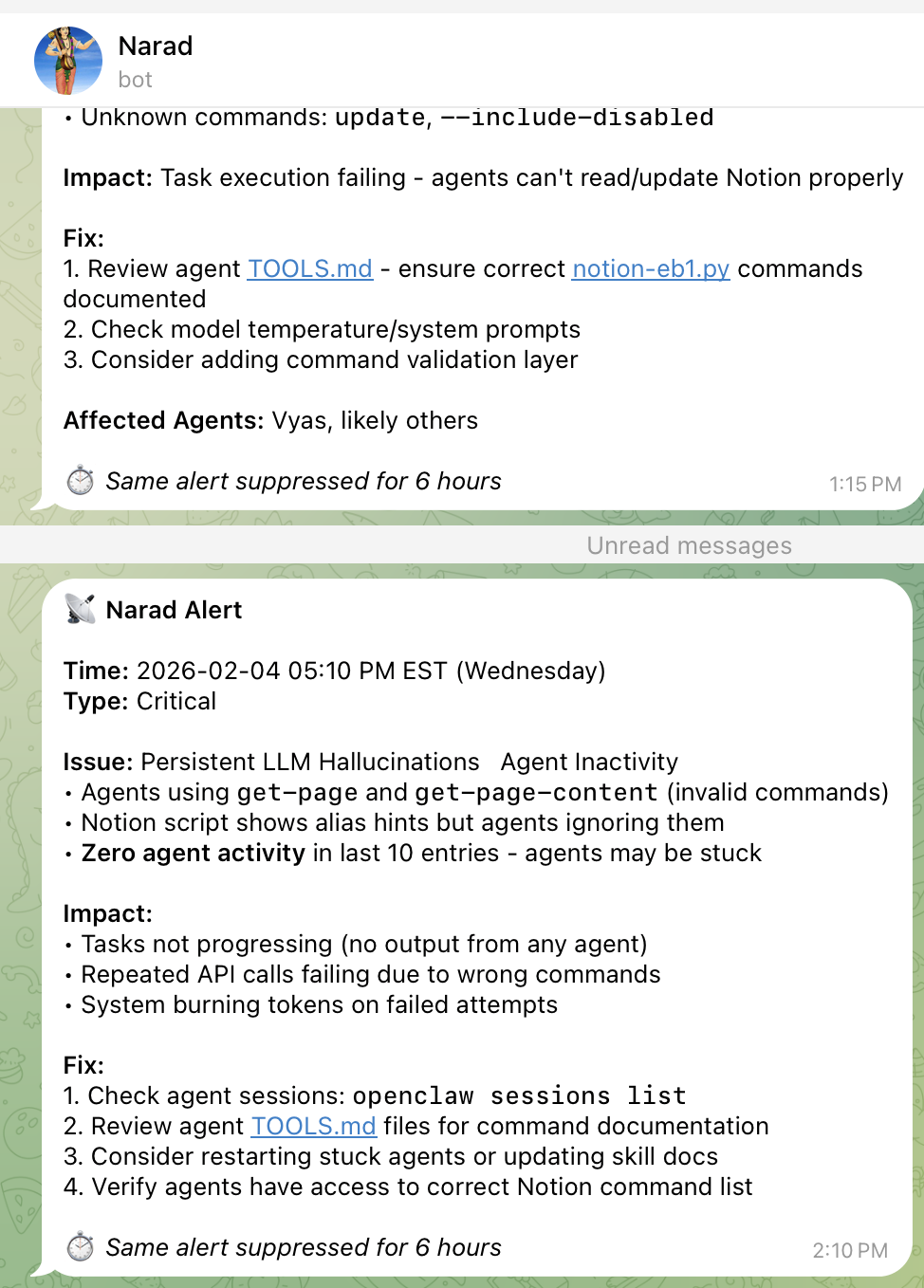
Pro Tip: Consider using a dedicated notification bot separate from your main AI assistant bot. This ensures you receive health alerts even when the main bot is experiencing issues. In my setup, I use a bot named "Narad" - the divine messenger from Hindu mythology who travels between worlds delivering important messages to gods and humans. Fitting for a bot that delivers critical system alerts!
Narad Bot in Action - A dedicated Telegram notification bot delivering real-time health alerts, auto-restart confirmations, and config recovery status. Named after the divine messenger who never misses a message!
7
Implementation Guide
Setting up the auto-recovery system requires creating the health monitoring scripts and configuring LaunchAgents on macOS. Here's a complete implementation guide.
Prerequisites
OpenClaw installed and configured (openclaw status should work)
macOS with LaunchAgent support
Telegram bot for notifications (optional but recommended)
# Check if service is loaded
launchctl list | grep health-monitor

# Force run to test
launchctl kickstart -k gui/$(id -u)/ai.openclaw.health-monitor

# Check logs
tail -20 ~/.openclaw/logs/health-monitor.log
Security Note: Store your Telegram bot token securely. Consider using macOS Keychain or environment variables rather than hardcoding in scripts. Never commit credentials to version control.
8
Troubleshooting Common Issues
Gateway Won't Start After Config Change
1
Run Doctor Diagnostics
openclaw doctor - Shows exact validation errors
2
Attempt Auto-Fix
openclaw doctor --fix - Backs up and repairs config
# Check LaunchAgent status
launchctl list | grep health-monitor

# If not listed, reload it
launchctl bootstrap gui/$(id -u) ~/Library/LaunchAgents/ai.openclaw.health-monitor.plist

# Check for errors
launchctl print gui/$(id -u)/ai.openclaw.health-monitor

# Verify script is executable
chmod +x ~/.openclaw/scripts/gateway-health-monitor.sh
Telegram Notifications Not Working
# Test notification script manually
~/.openclaw/scripts/telegram-notify.sh "Test message"

# Verify bot token
curl "https://api.telegram.org/botYOUR_TOKEN/getMe"

# Check chat ID is correct
curl "https://api.telegram.org/botYOUR_TOKEN/getUpdates"
Error Monitor Missing Errors
# Clear deduplication cache
rm ~/.openclaw/logs/.sent-errors

# Check state file
cat ~/.openclaw/logs/.error-monitor-state

# Reset state to reprocess all logs
rm ~/.openclaw/logs/.error-monitor-state

# Force run
launchctl kickstart -k gui/$(id -u)/ai.openclaw.error-monitor
All Backups Are Corrupted
If all 5 backup versions are corrupted (rare but possible), you'll need to manually recreate the configuration:
Run openclaw doctor --fix to automatically repair config issues. If that fails, OpenClaw maintains 5 backup files (.bak through .bak.4) that can be restored. The gateway health monitor can also automatically detect and recover from config corruption when running as a LaunchAgent.
The openclaw doctor --fix command creates a backup of your config to ~/.openclaw/openclaw.json.bak, then validates and repairs common issues like unknown config keys, permission problems, and missing directories. The --non-interactive flag allows headless operation for cron jobs and automated scripts.
Use the gateway health monitor script that runs via LaunchAgent every 15 minutes. It checks Telegram provider age, channel exits, gateway responsiveness, message activity, and rate limits. It auto-restarts the gateway when issues are detected and sends Telegram notifications via a dedicated notification bot.
OpenClaw automatically maintains 5 rotating backup versions: openclaw.json.bak (most recent), .bak.1, .bak.2, .bak.3, and .bak.4. These are created on config modifications and during doctor --fix operations. The recovery system tests each backup in order, restoring the first valid one found.
Zombie states occur when the gateway process runs and health endpoint returns OK, but channels like Telegram stop receiving messages. Common causes include: long-polling timeouts without reconnection, rate limiting cascades, channel crashes without recovery, and resource exhaustion. The health monitor detects these by checking message activity and provider timestamps rather than just process status.
10
Abbreviations & Glossary
Abbreviations & Glossary
Reference guide for technical terms and abbreviations used throughout this article.
API-Application Programming Interface
CLI-Command Line Interface
Config-Configuration (settings file)
EST-Eastern Standard Time
FAQ-Frequently Asked Questions
Gateway-OpenClaw background service handling channels