1 What is Lightning Web Runtime (LWR)?
Lightning Web Runtime is Salesforce's next-generation framework for building Experience Cloud sites. According to the official Salesforce developer documentation, unlike Aura-based sites that render components dynamically at runtime, LWR takes a fundamentally different approach by pre-compiling and caching static content during the publish process.
Core Promises of LWR
Sub-second Page Loads
Through static content delivery and CDN caching, LWR delivers significantly faster page loads than Aura sites.
Standards-Based Development
Built on modern web technologies (HTML, JavaScript, CSS) without proprietary abstractions.
Enhanced Security
Uses Lightning Web Security (LWS) instead of Lightning Locker for better component isolation.
Future-Proofing
All new Experience Cloud features and enhancements will be built exclusively for LWR.
2 Understanding LWR Architecture
How LWR Achieves Performance
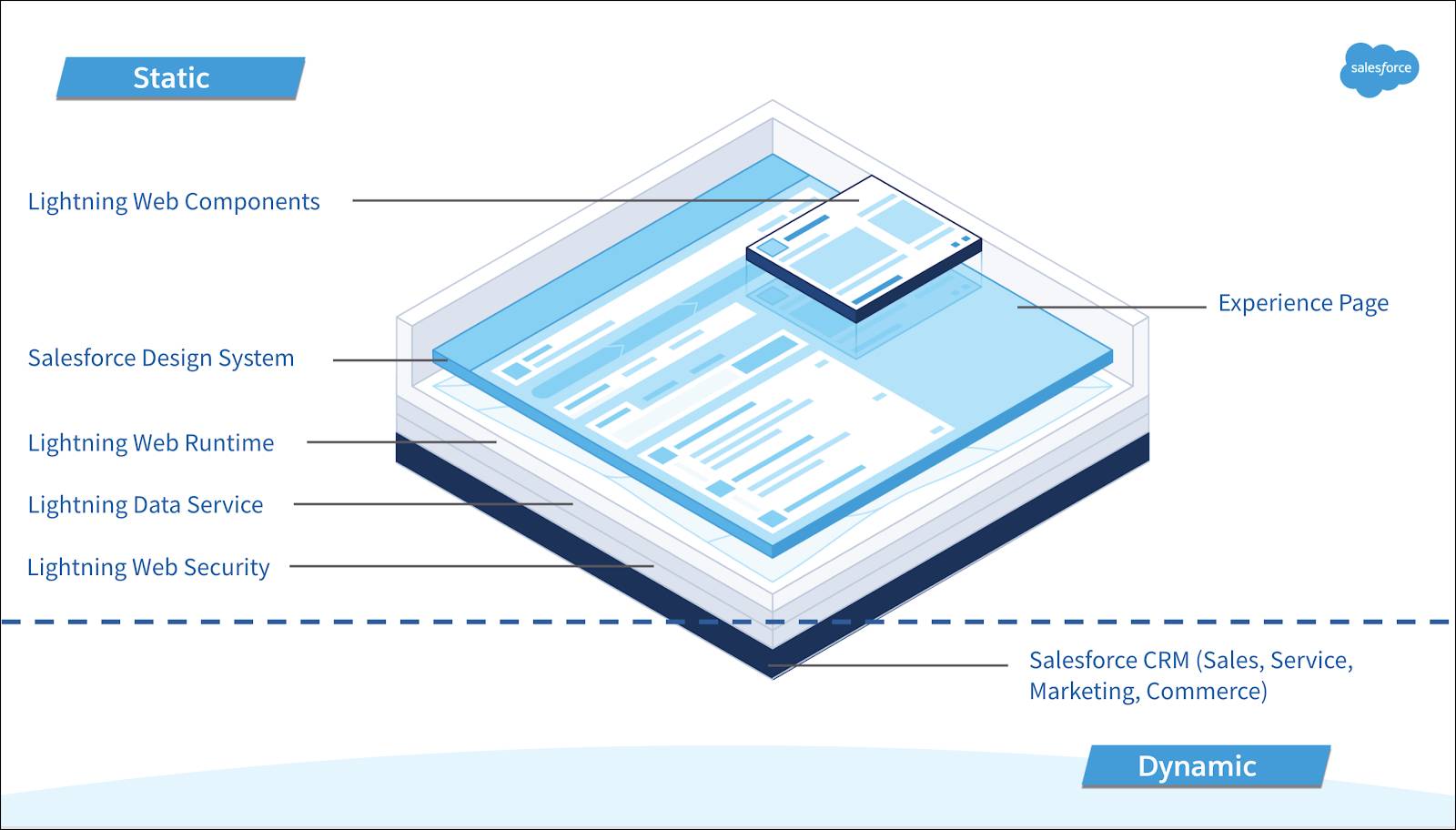
The fundamental architectural difference between Aura and LWR lies in when content is generated. The Trailhead module on LWR explains this comprehensively:
| Aspect | Aura Sites | LWR Sites |
|---|---|---|
| Rendering | Dynamic at runtime | Pre-compiled at publish time |
| Component Changes | Immediate (no republish needed) | Requires republishing |
| Caching | Limited server-side caching | Aggressive CDN caching |
| Content Delivery | Server-generated per request | Static files from CDN edge |
| Security Model | Lightning Locker | Lightning Web Security (LWS) |
Key Insight
When you publish an LWR site, Salesforce essentially takes a "snapshot" of your codebase. The framework, components, and UI layer are compiled into static, immutable, and cacheable resources stored in Salesforce's CDN. Every time you change an LWC component, you must republish for changes to take effect.
3 Performance Benefits Explained
Why LWR is Faster
The performance gains in LWR are real and measurable, stemming from several architectural decisions documented in the Salesforce Help article on LWR basics:
- Static Content Generation - Pages are generated at build time, not runtime
- CDN Distribution - HTTP/3 protocols serve content from edge locations globally
- Reduced Server Load - No dynamic component rendering per request
- Optimized Caching - All static resources are HTTP cacheable with long TTLs
Reality Check
If you end up building 10+ custom components as workarounds for missing LWR functionality, your "faster" LWR site may not be faster at all. Page performance is ultimately the combined performance of all components, and custom components often can't match the optimization of standard components.
4 Critical Limitations Architects Must Know
This is where marketing diverges from reality. Based on real-world implementation experiences with enterprise deployments (78,000+ members, 120+ audience segments), here are the limitations that will impact your architecture decisions. The official LWR limitations documentation covers some of these:
1. Record Pages: No Generic Record Detail Page
Unlike Aura templates, LWR has no generic record pages. This means:
- Record-specific components (Record Detail, Record Header, Record Banner) can only be used on object-specific pages
- You cannot display record details on a regular site page like you could in Aura
- If you want a "My Account" page showing user account details, you must create an Account-specific object page
- Creating a generic record display component requires building complex custom LWC
2. Audiences vs. Visibility: A Fundamental Gap
Aura's robust audience targeting system is replaced by "Visibility Rules" in LWR, which is significantly more limited. The Salesforce Help article on visibility rules explains the available options:
| Feature | Aura Audiences | LWR Visibility |
|---|---|---|
| Starting Point | User, Profile, Domain, Custom Permissions, Audiences | User records, Contact fields, Account fields only |
| Rule Reusability | Can reuse across components | Must rebuild from scratch for each component |
| Profile-based Rules | Supported | Not directly supported |
| Custom Permissions | Supported | Not supported |
| Domain-based Rules | Supported | Not supported |
Real-World Impact
Organizations with complex audience segmentation (100+ audiences) face significant challenges. You cannot simply reference existing visibility rules for new components - each rule must be configured from scratch.
3. Page Variations: Gone
In Aura, you could create multiple variations of a page for different audiences. In LWR, there are no page variations.
- Different themes or layouts require completely separate pages
- If one affiliation needs a blue theme and another needs gold, you need two separate pages
- Navigation between these pages must be handled through custom logic, flows, or separate navigation items
- Aura's automatic page variation selection based on audience is not available
4. CMS Collections: Limited Content Type Support
- News content type - Not fully supported in LWR
- Announcements - Cannot be displayed using standard LWR components
- Carousel component - Not available out-of-the-box; requires custom development
5. Navigation: Merge Fields Don't Work in URLs
This is a significant limitation that affects dynamic record navigation:
- Merge fields like
{!User.FirstName}work for component content - The same merge fields do not work in dynamic URLs
- Creating a "My Account" link that navigates to the user's specific account record requires custom workarounds
6-7. Missing Components and CSS Changes
- Record Detail, Carousel, some CMS display components missing
- Site-wide CSS editor is not available
- CSS must be migrated to
sfdc_cms__stylesfolder in DigitalExperienceBundle metadata - Must use
--dxpstyling hooks for consistent branding
5 Migration Considerations and Challenges
Component Migration
The most significant migration effort involves components. According to the Salesforce migration considerations guide:
- Aura components cannot run in LWR - Period. They must be rebuilt as LWC.
- LWC components may need modifications for LWR-specific features
- Out-of-the-box Aura components may not have LWR equivalents
URL Structure
- LWR sites don't use the
/s/URL segment by default - Plan URL redirects carefully to preserve SEO and bookmarks
- Audit all internal and external links
Page Layout Conversion
- Convert to Flexible Layouts
- Plan for creating separate pages where page variations were used
- Design custom navigation logic for audience-specific pages
Route Limits
LWR sites support up to 500 routes (unique URLs). For optimal performance, keep routes below 250. Use dynamic content instead of creating individual pages for each content item.
6 When to Migrate: A Decision Framework
LWR is a Good Fit When:
- New Implementation - Starting fresh without legacy Aura components
- Simple Site Structure - Limited audience segmentation needs
- Performance is Critical - High-traffic public-facing sites
- Strong LWC Development Team - Resources to build custom components
- Minimal Record-Based Pages - Site doesn't heavily depend on CRM record displays
Consider Waiting When:
- Complex Audience Requirements - 50+ audience segments with intricate rules
- Heavy CRM Integration - Site displays many record types on various pages
- Legacy Aura Investment - Significant custom Aura component development
- Limited LWC Resources - Team not comfortable building custom components
- CMS-Heavy Sites - Heavy reliance on News, Announcements, Carousels
"To be honest, if I were a customer with the experience I have now, I wouldn't recommend switching to LWR right now. It's super early. It's a fresh product. It's not fully ready for complex enterprise use cases. My recommendation: please wait until LWR is more mature and feature-complete."
- Enterprise Implementation Team Feedback7 Practical Workarounds and Solutions
For Audience Targeting
Implement a custom visibility solution:
- Create component variations instead of page variations
- Use Expression-Based Visibility (Summer '23+) for enhanced LWR sites
- Build custom LWC that checks user attributes and conditionally renders content
- Consider using Flows for complex audience logic
For Dynamic Navigation
- Create intermediate redirect pages
- Build custom LWC components that query record IDs via Lightning Data Service
- Implement programmatic navigation using
lightning/navigationAPI
For Missing Components
Develop a reusable component library:
- Generic Record Display component
- Custom Carousel component
- CMS Content Display for unsupported types
- Dynamic Navigation Menu component
Silver Lining
These custom components can be leveraged across multiple projects, turning limitations into opportunities for reusable assets and accelerators.
8 Strategic Recommendations for Architects
1. Conduct a Thorough Assessment
Before committing to LWR migration:
- Inventory all Aura components in your current site
- Document audience segmentation requirements
- List all page variations and their purposes
- Identify CMS content types in use
- Map dynamic navigation requirements
2. Plan for Custom Development
Budget for building custom components to replace missing functionality:
- Generic record display components
- Custom navigation solutions
- Carousel and content display components
- Visibility/audience management logic
3. Consider a Hybrid Approach
For large existing sites, as recommended by LaunchPad Lab's migration guide:
- Build new features on LWR
- Maintain existing Aura site for complex functionality
- Gradual migration as LWR matures with each release
4. Stay Current with Releases
Salesforce enhances LWR with each release. Key recent improvements from the Salesforce Release Notes:
- Expression-Based Visibility (Summer '23)
- Enhanced CMS workspaces (Winter '25)
- Partial deployment capabilities
- New standard components
5. Document Your Decisions
Create an Architecture Decision Record (ADR) documenting:
- Why you're migrating (or not)
- Known limitations and accepted risks
- Custom development requirements
- Timeline considerations
Key Takeaway
LWR represents the future of Salesforce Experience Cloud. The performance benefits are real, and all new platform enhancements will target LWR. However, don't let marketing hype drive technical decisions. Conduct honest assessments, understand the limitations, plan for custom development, and make informed decisions based on your organization's specific requirements.
Have Questions About LWR Migration?
This analysis is based on official Salesforce documentation and real-world implementation experiences from enterprise Experience Cloud deployments.
Contact Me for Consultation