Salesforce Releases
Jitendra's Blog
Salesforce Release Guide 2026

Salesforce Spring '26 Release

Complete guide to Agentforce, Flow Builder, LWC, Apex, and Security updates - compiled from the official 826-page Salesforce Release Notes

70+
Features Covered
10
Code Examples
7
Top Picks
826
Pages Summarized

My Favorite Features

Real problems I've faced and how Spring '26 solves them

"I need to process millions of records but keep hitting governor limits in batch jobs."

Apex Cursors GA

Process unlimited SOQL results with cursor-based pagination. Maintain state across transactions and resume from any position - perfect for data migrations and large-scale processing.

"I want to link directly to a flow from an email or external system without embedding it in a page."

Screen Flow URLs GA

Open flows directly via URL with parameter passing. Include flow links in emails, external apps, or custom navigation - no embedding required.

"I want AI coding assistants to understand my Salesforce org and help me write better code."

MCP Tools for LWC BETA

Connect Claude, Cursor, or VS Code to your Salesforce org via MCP. Get context-aware code suggestions, LWC development help, and metadata-integrated AI assistance.

"I'm writing too many getter functions just to do simple calculations in my LWC templates."

Complex Template Expressions BETA

Write expressions directly in templates: {quantity * price}, ternary operators, string concatenation - all without JavaScript getters.

"Connected Apps feel outdated and I need better security for my integrations."

External Client Apps NEW

Modern replacement for Connected Apps with enhanced OAuth, better packaging support, and improved security model. Connected App creation is now disabled by default.

"Building complex AI agents with multiple topics and actions is hard to visualize and manage."

Agentforce Canvas View BETA

Visual drag-and-drop builder for complex agents. See the entire agent flow, connect topics, and manage escalation paths in an intuitive canvas interface.

"I need to expose SOQL queries via REST API but don't want to write Apex for simple data access."

Named Query API GA

Define SOQL queries in Setup and expose them as REST endpoints - no Apex required. Automatic security enforcement and parameter support for external integrations.

1 Release Timeline

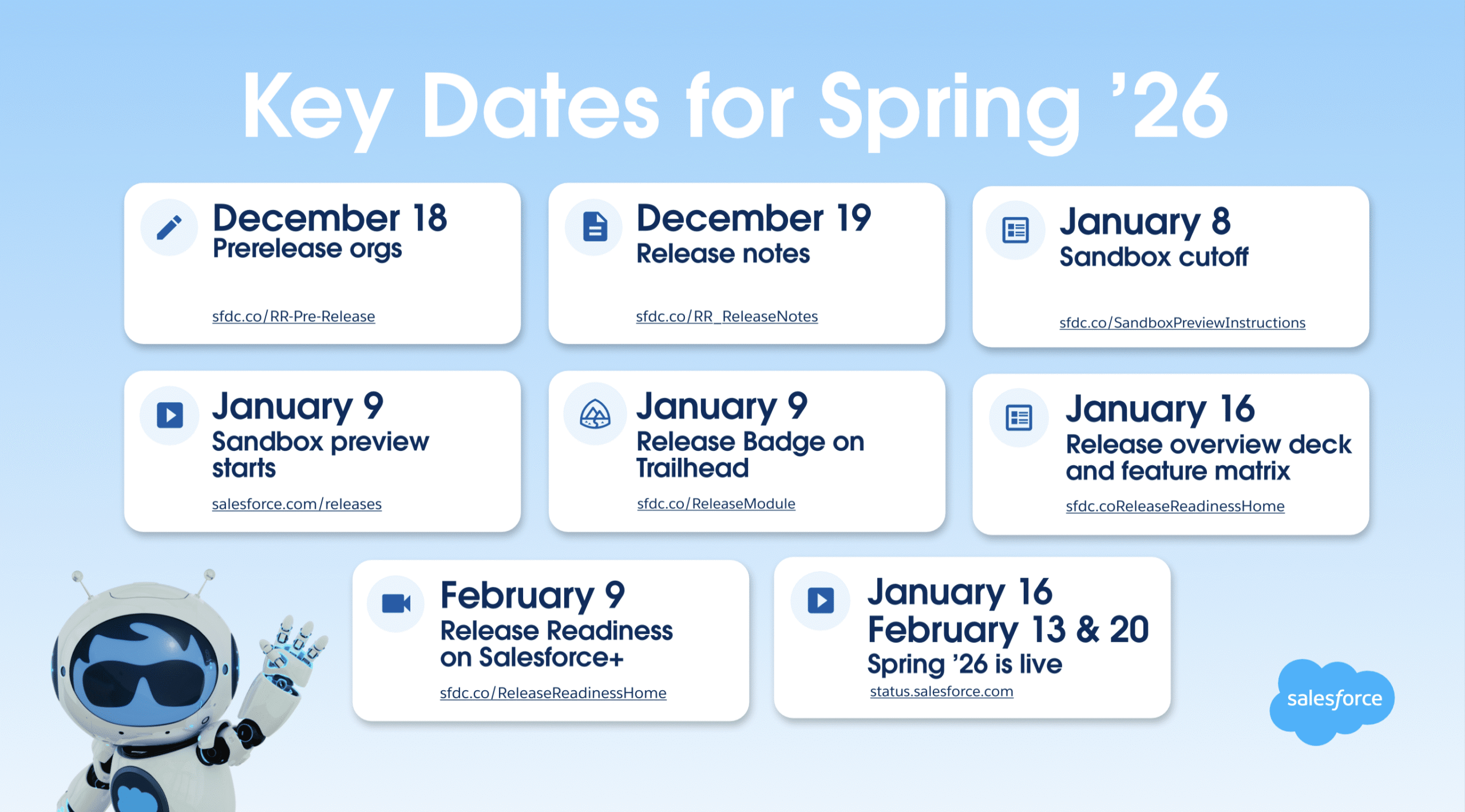
The Spring '26 release helps companies accelerate their journey to becoming an Agentic Enterprise by combining human expertise and AI agents. Here are the key dates from the official Salesforce Admin blog:
Salesforce Spring 2026 Release Overview - Key features including Agentforce, Flow Builder, LWC updates, and Security enhancements
Salesforce Spring '26 Release Overview - Featuring Agentforce Canvas, AI-powered Flows, and Enhanced Developer Tools
December 18, 2025

Pre-release Developer Edition

Sign up for a pre-release Developer Edition to explore Spring '26 features early.

December 19, 2025

Release Notes Available

Official Spring '26 Release Notes (826 pages) become available for review.

January 8, 2026

Sandbox Refresh Deadline

Last day to refresh sandboxes before preview (by 5 p.m. PT).

January 9, 2026

Sandbox Preview Begins

Sandbox preview instances are upgraded to Spring '26.

January 16, 2026

First Production Rollout

First wave of production orgs receive Spring '26.

February 13, 2026

Second Production Rollout

Second wave of production orgs receive Spring '26.

February 20, 2026

Final Production Rollout

Final wave of production orgs receive Spring '26.
Source: Salesforce Spring '26 Release Notes | Admin Release Countdown

2 Agentforce & Einstein

Supercharge your workforce efficiency with predictive and generative AI. Spring '26 brings major enhancements to the Agentforce platform.

Agentforce Builder Enhancements

BETA

Build Complex Agents Faster with Canvas View

The new Canvas View provides a visual, text editor-inspired interface for building sophisticated agents. Design complex conversation flows, manage branching logic, and visualize agent behavior all in one place. Canvas View makes it easier to understand and modify agent workflows without switching between multiple screens.

BETA

Connect Agents to Enhanced Chat v2

Deploy your agents to Enhanced Chat v2 channels directly from Agentforce Builder. This integration enables seamless customer interactions through chat while maintaining full control over agent behavior and responses. Configure messaging connections without leaving the builder interface.

BETA

Create Employee Agents

Build internal-facing agents to help employees with common tasks like HR inquiries, IT support, and policy questions. Employee agents can access internal knowledge bases and systems, providing instant answers and reducing the burden on support teams while improving employee productivity.

BETA

Validation Enhancements

Enhanced validation in Agentforce Builder catches configuration issues before deployment. The improved validation checks for incomplete actions, missing connections, and potential runtime errors, helping you build reliable agents that perform correctly in production environments.

Agent Configuration

Einstein Development

DEVELOPER PREVIEW

Lightning Types MCP Tool

Accelerate custom Lightning type creation for Agentforce using the Model Context Protocol (MCP). This tool integrates with AI coding assistants like Claude to help developers generate type-safe Lightning components faster. Define your data structures and let AI assist with boilerplate code generation while maintaining proper typing.

Supported Models Updates

Retirement Notice: Article Answers for Einstein Bots is being retired. Plan your migration accordingly.
Source: Agentforce Release Notes

3 Flow Builder

Compose intelligent workflows with Flow Builder and Flow Orchestration. Integrate across any system with Flow Integration.

AI-Powered Flow Building

GA

Get More Accurate Draft Flows with AI

AI-powered flow generation is now generally available. Describe your business process in natural language and let Einstein generate a draft flow with the correct elements, logic, and data operations. The improved AI produces more accurate flows that require less manual refinement, accelerating your automation development.

NEW

Evolve Flows Iteratively with Agentforce

Continue refining your flows through conversation with Agentforce. Ask for modifications, explain issues, or request new functionality and watch your flow evolve iteratively. This collaborative approach combines human intent with AI capabilities to build better automations faster.

Builder Experience Improvements

Flow Orchestration

Flow Marketing Cloud Integration

Source: Flow Builder Release Notes

4 Screen Flows

Screen flows get major enhancements for data management, visualization, and user experience.

Data Table Enhancements

GA

Organize Data Table Records with Column Sorting

Users can now click column headers to sort data table records at runtime, making it easier to find and organize information. Flow builders can configure which columns are sortable and set default sort order, giving users familiar spreadsheet-like functionality within screen flows.

GA

Edit Records Directly in the Data Table

Enable inline editing in data tables to let users modify field values directly without opening separate edit forms. Users can click cells to edit, and changes are captured in the flow for saving. This streamlines data entry workflows and reduces the number of screens users navigate.

Kanban Boards

BETA

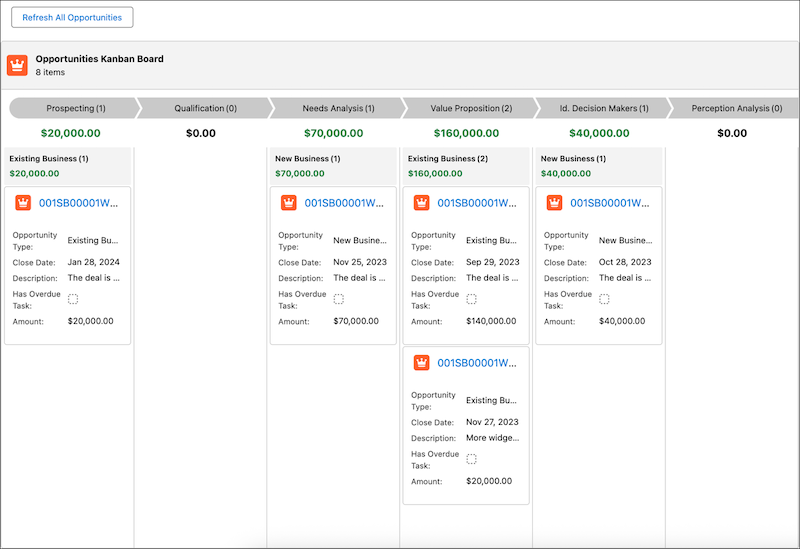
Visualize and Track Record Progress with Kanban Boards

Add Kanban board components to screen flows for visual record management. Users can drag and drop cards between columns to update status fields, view records grouped by stages, and quickly understand work distribution. Ideal for managing opportunities, cases, tasks, or any records with status-based workflows.

Salesforce Spring 2026 Kanban Board in Screen Flows - Visual record management with drag-and-drop cards for opportunity and case tracking
New Kanban Board Component in Screen Flows - Drag-and-drop cards to update record status fields visually

Styling and UX

Navigation

Launch screen flows directly from a URL in Lightning Experience without embedding them in pages or using buttons. Pass parameters through URL query strings to pre-populate flow variables. This capability enables direct linking to flows from emails, external systems, or custom navigation, making flows more accessible across your organization.

URL Formats
# Basic Flow URL
/lightning/flow/My_Onboarding_Flow

# Run Specific Flow Version
/lightning/flow/My_Onboarding_Flow/301xx000000001ABC

# Pass Single Variable
/lightning/flow/Case_Handler?flow__CaseId={!Case.Id}

# Pass Multiple Variables
/lightning/flow/User_Setup?flow__FirstName={!$User.FirstName}&flow__LastName={!$User.LastName}

# Control Finish Behavior (redirect after completion)
/lightning/flow/My_Flow?retURL=/lightning/o/Account/list

# Full URL Example for Email Links
https://yourorg.lightning.force.com/lightning/flow/Support_Case_Flow?flow__CaseNumber={!Case.CaseNumber}
Source: Screen Flow Release Notes

5 Lightning Web Components & Development

Whether you're using Lightning components, Visualforce, Apex, or Salesforce APIs with your favorite programming language, these enhancements help you develop amazing applications.

LWC API Version 66.0

Write JavaScript expressions directly in LWC templates using a comprehensive subset of operators including arithmetic, comparison, logical, and ternary. Reduce component complexity by eliminating helper getters for simple transformations. Write cleaner, more readable templates while maintaining full reactivity.

LWC Template
<!-- Before: Required getter in JS -->
<template if:true={isHighPriority}>
    <span class="priority-badge">{priorityLabel}</span>
</template>

<!-- After: Direct expressions in template (Beta) -->
<template lwc:if={priority > 5}>
    <span class="priority-badge">{priority > 8 ? 'Critical' : 'High'}</span>
</template>

<!-- More expression examples -->
<p>Total: {quantity * price}</p>
<p class={isActive && hasPermission ? 'enabled' : 'disabled'}>Status</p>
<span>{firstName + ' ' + lastName}</span>
BETA

LWC TypeScript Converter MCP Tool

Convert existing JavaScript-based LWC components to TypeScript using the Model Context Protocol (MCP) tool. Integrates with AI coding assistants to analyze your components and generate type-safe TypeScript versions, helping teams modernize their codebase while maintaining functionality.

MCP Tools for LWC Development

What is MCP? Model Context Protocol (MCP) Tools for Salesforce LWC is a beta service providing AI-powered capabilities for Lightning Web Components development. These tools offer advanced code intelligence, context-aware suggestions, and seamless integration with Salesforce metadata to enhance developer workflows.

To get started with MCP tools, you have two options:

Configure MCP Server for Your AI Client

Add the following configuration to your MCP client's settings file. Replace DEFAULT_TARGET_ORG with your authorized org alias:

Claude Code / Cursor / Cline Configuration

Add to .mcp.json (Claude Code), mcp.json (Cursor), or cline_mcp_settings.json (Cline):

JSON
{
  "mcpServers": {
    "Salesforce DX": {
      "command": "npx",
      "args": [
        "-y", "@salesforce/mcp",
        "--orgs", "DEFAULT_TARGET_ORG",
        "--toolsets", "lwc-experts,aura-experts,metadata,data",
        "--allow-non-ga-tools"
      ]
    }
  }
}

VS Code Configuration

Add to .vscode/mcp.json in your project:

JSON
{
  "servers": {
    "Salesforce DX": {
      "command": "npx",
      "args": [
        "-y", "@salesforce/mcp",
        "--orgs", "DEFAULT_TARGET_ORG",
        "--toolsets", "lwc-experts,aura-experts,metadata,data",
        "--allow-non-ga-tools"
      ]
    }
  }
}

Available Toolsets

Toolset Purpose
lwc-experts LWC development, testing, optimization, and TypeScript tools
aura-experts Aura framework analysis and LWC migration support
metadata Deploy/retrieve metadata between projects and orgs
data Data management operations including SOQL queries
code-analysis Static code analysis using Salesforce Code Analyzer
testing Apex and agent test execution
all Enables all 60+ tools across all toolsets

Learn more in the official MCP Tools documentation and the Salesforce DX MCP GitHub repository.

BETA

Display Consistent Empty State Illustrations with Theme Support

Use new standard empty state illustrations that automatically adapt to light and dark themes. These consistent visuals improve user experience when displaying no-data scenarios like empty lists, search results, or initial states. Reduces custom illustration development while ensuring UI consistency.

NEW

Get Complete Type Definitions for Lightning Base Components

Access full TypeScript type definitions for all Lightning base components, enabling better IDE support, compile-time error checking, and code completion. These type definitions help developers catch errors earlier and write more maintainable component code with proper typing.

Lightning Component Updates

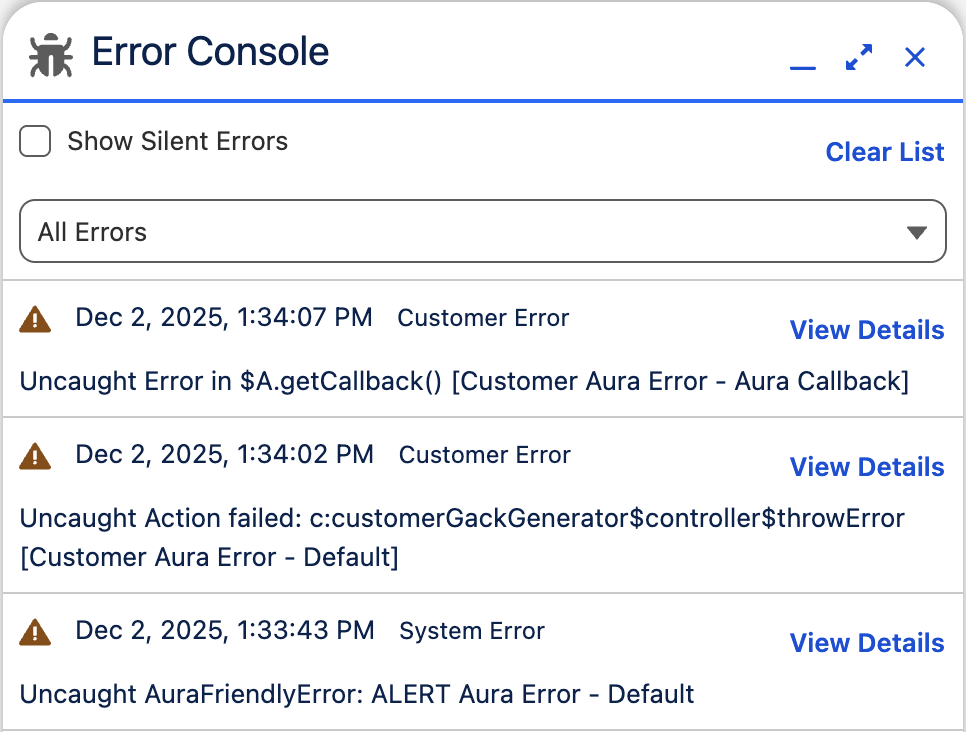
Salesforce Spring 2026 LWC Error Console - Centralized error management for Lightning Web Components with debugging tools
New LWC Error Console - Centralized view for diagnosing and resolving Lightning component errors

Lightning Design System

Retirement (January 2026): Lightning Component Library Is Retiring as the Spring '26 release rolls out. The legacy Component Library pages will redirect users to the new Lightning Component Reference. Update your bookmarks and references to use the new component documentation at developer.salesforce.com.
Source: Lightning Web Components Release Notes

6 Apex & API

Apex Enhancements

BETA

Deploy Apex Components Faster by Running Only Relevant Tests

Significantly reduce deployment times by running only tests that cover the specific components being deployed. The platform analyzes code dependencies to identify relevant tests, eliminating unnecessary test execution. This improvement is especially impactful for large orgs with extensive test suites.

Apex Cursors enable processing of SOQL query results that exceed standard governor limits. Iterate through millions of records efficiently using cursor-based pagination, maintaining state across transactions. Ideal for batch operations, data migrations, and reports requiring large dataset processing.

Apex
// Create a cursor for large dataset processing
Database.Cursor cursor = Database.getCursor(
    'SELECT Id, Name, Email FROM Contact WHERE CreatedDate = THIS_YEAR'
);

// Process records in batches using the cursor
while (cursor.hasNext()) {
    List<Contact> contacts = cursor.fetch(200); // Fetch 200 at a time

    for (Contact c : contacts) {
        // Process each contact
        System.debug('Processing: ' + c.Name);
    }
}

// Get cursor position for resumability
String cursorId = cursor.getCursorId();
Integer position = cursor.getPosition();

// Resume from saved position in another transaction
Database.Cursor resumedCursor = Database.getCursor(cursorId);
resumedCursor.setPosition(position);

Learn more in the Apex Cursors Developer Guide.

Transform your existing Apex methods into Agentforce actions with minimal code changes. REST endpoints and AuraEnabled methods can be exposed to agents, enabling AI to call your custom business logic. Leverage your existing Apex investment to power intelligent agent capabilities.

Apex
// Expose existing AuraEnabled method as Agent Action
public class OrderService {

    @AuraEnabled(cacheable=false)
    @InvocableMethod(label='Get Order Status'
                     description='Retrieves the current status of an order')
    public static List<OrderStatus> getOrderStatus(List<String> orderIds) {
        List<OrderStatus> results = new List<OrderStatus>();

        for (Order__c order : [SELECT Id, Status__c, ShipDate__c
                                FROM Order__c
                                WHERE Id IN :orderIds]) {
            results.add(new OrderStatus(order));
        }
        return results;
    }

    public class OrderStatus {
        @InvocableVariable public String status;
        @InvocableVariable public Date estimatedDelivery;

        public OrderStatus(Order__c order) {
            this.status = order.Status__c;
            this.estimatedDelivery = order.ShipDate__c;
        }
    }
}

Retrieve picklist values that are available for a specific record type programmatically. This capability enables dynamic UIs that show only valid picklist options, respecting record type configurations. Essential for building custom forms and validation logic that honor your data model.

Apex
// Get picklist values for a specific Record Type
public class PicklistHelper {

    @AuraEnabled(cacheable=true)
    public static List<PicklistOption> getPicklistValues(
        String objectName,
        String fieldName,
        String recordTypeId
    ) {
        List<PicklistOption> options = new List<PicklistOption>();

        // Get the describe result for the object
        Schema.DescribeSObjectResult objDescribe =
            Schema.getGlobalDescribe().get(objectName).getDescribe();

        // Get Record Type info
        Schema.RecordTypeInfo rtInfo =
            objDescribe.getRecordTypeInfosById().get(recordTypeId);

        // Get picklist values for this Record Type
        Schema.DescribeFieldResult fieldDescribe =
            objDescribe.fields.getMap().get(fieldName).getDescribe();

        for (Schema.PicklistEntry entry :
             fieldDescribe.getPicklistValues(rtInfo)) {
            if (entry.isActive()) {
                options.add(new PicklistOption(entry.getLabel(), entry.getValue()));
            }
        }
        return options;
    }

    public class PicklistOption {
        @AuraEnabled public String label;
        @AuraEnabled public String value;

        public PicklistOption(String label, String value) {
            this.label = label;
            this.value = value;
        }
    }
}

The Blob.toPdf() method now uses the Visualforce PDF rendering service for consistent PDF generation across the platform. This release update improves reliability and ensures PDF output matches Visualforce page rendering behavior.

Apex
// Generate PDF from HTML content using Blob.toPdf()
public class PdfGenerator {

    public static void generateInvoicePdf(Id accountId) {
        Account acc = [SELECT Id, Name, BillingStreet, BillingCity
                       FROM Account WHERE Id = :accountId];

        // Build HTML content for PDF
        String htmlContent = '<html><head>' +
            '<style>body { font-family: Arial, sans-serif; } ' +
            '.header { background: #032D60; color: white; padding: 20px; } ' +
            '.content { padding: 20px; }</style></head>' +
            '<body><div class="header"><h1>Invoice</h1></div>' +
            '<div class="content"><h2>' + acc.Name + '</h2>' +
            '<p>' + acc.BillingStreet + ', ' + acc.BillingCity + '</p>' +
            '</div></body></html>';

        // Convert HTML to PDF using Visualforce rendering service
        Blob pdfBlob = Blob.toPdf(htmlContent);

        // Save as ContentVersion (File)
        ContentVersion cv = new ContentVersion();
        cv.Title = 'Invoice_' + acc.Name + '.pdf';
        cv.PathOnClient = cv.Title;
        cv.VersionData = pdfBlob;
        cv.FirstPublishLocationId = accountId;
        insert cv;
    }
}

Additional Apex Features

API Updates

Create named queries that expose custom SOQL through REST API endpoints without writing Apex. Define queries with parameters in Setup, then call them via REST with automatic security enforcement. Enables secure, governed data access for external integrations and mobile apps without custom code.

REST API
// Define Named Query in Setup (no code required!)
// Query Name: GetActiveOpportunities
// SOQL: SELECT Id, Name, Amount, CloseDate
//       FROM Opportunity
//       WHERE StageName != 'Closed Lost'
//       AND OwnerId = :userId

// Call via REST API
fetch('/services/data/v66.0/query/GetActiveOpportunities', {
    method: 'GET',
    headers: {
        'Authorization': 'Bearer ' + accessToken,
        'Content-Type': 'application/json'
    },
    // Pass parameters as URL params
    params: {
        userId: '005xx000001234ABC'
    }
})
.then(response => response.json())
.then(data => {
    console.log('Opportunities:', data.records);
    // Returns: [{ Id, Name, Amount, CloseDate }, ...]
});

API Changes and Retirements

Change Impact
Update Instanced URLs in API Traffic (Release Update) Instanced URLs (like na1.salesforce.com) are being deprecated. Update all API integrations to use your My Domain URL to ensure continued connectivity. Review your codebase and third-party integrations for hardcoded instance URLs.
Sending Session IDs in Outbound Messages Is Being Removed Session IDs can no longer be sent in outbound messages. Update your external systems to authenticate using OAuth 2.0 or other supported authentication methods instead of relying on session IDs.
Metadata Deployments and Retrievals Have New Limits New limits apply to metadata deployments and retrievals. Review your deployment processes and package sizes to ensure they remain within the new limits. Consider breaking large deployments into smaller chunks if needed.
Data 360 SOQL Query Results Are Limited to 12-MB Data 360 SOQL queries now have a 12-MB result size limit. Optimize queries that return large result sets by adding filters, limiting fields, or using pagination to stay within the limit.
SOAP API login() Call Versions 31.0-64.0 Being Retired in Summer '27 In Summer '27, the SOAP API login() call in versions 31.0 through 64.0 will no longer be supported and will be unavailable. Before Summer '27, customers and partners must modify or upgrade their applications to use external client apps for authentication. Update all integrations to API version 65.0 or later to maintain connectivity.
EventBusSubscriber Position and Tip Fields Deprecated The Position and Tip fields on EventBusSubscriber are deprecated. Update any code or reports that reference these fields to use the recommended replacement fields before they are removed.
Source: Apex Release Notes | API Release Notes

7 Security, Identity, and Privacy

Redirections end for legacy host names, including instanced host names in API calls. Connected app creation is disabled by default for all Salesforce orgs.

Backup & Recover

NEW

Protect and Recover Your Data with the Backup & Recover App

Salesforce Backup & Recover is now available as a native Lightning app for comprehensive data protection. Schedule automated backups, monitor backup status, and restore individual records or entire datasets when needed. The native integration ensures seamless recovery without third-party tools, protecting against accidental deletions and data corruption.

Identity and Access Management

Creating new Connected Apps is disabled by default in all Salesforce orgs to improve security. Existing Connected Apps continue to function normally. For new integrations, use External Client Apps which offer enhanced security features, better OAuth support, and streamlined management. Plan your migration strategy now.

External Client App (Metadata API)
<!-- externalClientApps/MyIntegration.eca-meta.xml -->
<?xml version="1.0" encoding="UTF-8"?>
<ExternalClientApp xmlns="http://soap.sforce.com/2006/04/metadata">
    <label>My Integration App</label>
    <contactEmail>admin@company.com</contactEmail>
    <description>Integration for external system</description>

    <!-- OAuth Configuration -->
    <oauthConfig>
        <callbackUrl>https://myapp.com/oauth/callback</callbackUrl>
        <scopes>api</scopes>
        <scopes>refresh_token</scopes>
        <isSecretRequired>true</isSecretRequired>
        <certificate>MyCertificate</certificate>
    </oauthConfig>

    <!-- IP Restrictions -->
    <ipRanges>
        <start>192.168.1.0</start>
        <end>192.168.1.255</end>
    </ipRanges>
</ExternalClientApp>
BETA

Set Up Passwordless Login with Passkeys

Enable passwordless authentication using FIDO2-compliant passkeys stored on users' devices or password managers. Passkeys eliminate password-related security risks like phishing and credential stuffing while providing a seamless login experience. Users authenticate using biometrics or device PINs.

NEW

Configure Canvas Plugin for External Client App

Configure Canvas apps as plugins within the External Client App framework. This capability enables embedding third-party applications in Salesforce while using the modern External Client App security model. Migrate existing Canvas Connected Apps to take advantage of improved security and management features.

Domain Updates

Security Health Check

Additional Security Updates

Action Required: Migrate old integrations using instance-based domains (like na1.salesforce.com) to My Domain URLs. Update Connected Apps to External Client Apps.
Source: Security, Identity, and Privacy Release Notes

8 Frequently Asked Questions

Sandbox preview begins January 9, 2026. Production rollouts occur on January 16, February 13, and February 20, 2026, depending on your instance. Pre-release Developer Edition environments are available from December 18, 2025.

Key features include Canvas View for building complex agents (Beta), Enhanced Chat v2 connectivity (Beta), Employee Agents in new Agentforce Builder (Beta), validation enhancements, knowledge source connections, and the Lightning Types MCP Tool for Einstein Development.

LWC API Version 66.0 introduces Complex Template Expressions (Beta) for using JavaScript expressions in templates, TypeScript Converter MCP Tool (Beta), Error Console for page errors, Lightning Out 2.0 improvements, and complete type definitions for base components. Note: Lightning Component Library is retiring.

Key improvements include AI-powered draft flows (GA), Evolve Flows Iteratively with Agentforce, collapsible branching elements, Kanban Boards in Screen Flows (Beta), component-level styling overrides, inline editing in data tables, and enhanced scrolling navigation.

No, creation of new Connected Apps is disabled by default in Spring '26. Salesforce recommends migrating to External Client Apps for new integrations. Existing Connected Apps continue to work, but you should plan migration to the new framework.

Apex Cursors allow you to process SOQL query results that exceed governor limits. Use Database.getCursor() with your SOQL query, then iterate using cursor.hasNext() and cursor.fetch(batchSize). You can save cursor position with getCursorId() and getPosition() to resume in another transaction. This is ideal for batch operations and data migrations processing millions of records.

Use the URL format /lightning/flow/Your_Flow_Name to open a flow directly. Pass variables using query parameters like ?flow__VariableName={!Record.Field}. For multiple variables, chain with &. Control finish behavior with ?retURL=/lightning/o/Object/list. This enables direct linking from emails, external systems, or custom navigation.

Add a JSON configuration to your .mcp.json (Claude Code) or mcp.json (Cursor) file. Set "command": "npx" with args ["-y", "@salesforce/mcp", "--orgs", "YOUR_ORG_ALIAS", "--toolsets", "lwc-experts,aura-experts,metadata,data"]. For VS Code, use .vscode/mcp.json with a "servers" object. Available toolsets include lwc-experts, aura-experts, metadata, data, code-analysis, and testing.

Build an HTML string with your content and styling, then call Blob.toPdf(htmlContent) to convert it to a PDF blob. Save as a ContentVersion by setting VersionData = pdfBlob, Title, PathOnClient, and optionally FirstPublishLocationId to link it to a record. The method now uses the Visualforce PDF rendering service for consistent output.

Use Schema methods: get the object describe with Schema.getGlobalDescribe().get(objectName).getDescribe(), then get RecordTypeInfo with getRecordTypeInfosById().get(recordTypeId). Get field describe and call getPicklistValues(rtInfo) to retrieve only the values available for that record type. Filter with isActive() to get active values only.

Use the Named Query API: define your SOQL query with parameters in Setup, then call it via REST at /services/data/v66.0/query/YourQueryName. Pass parameters as URL query strings. The API automatically enforces security and supports parameterized queries. This enables secure data access for integrations without custom Apex code.

In LWC templates, you can now write expressions like {quantity * price}, {priority > 5 ? 'High' : 'Normal'}, and {firstName + ' ' + lastName} directly without JavaScript getters. Use arithmetic, comparison, logical, and ternary operators. This Beta feature reduces component complexity by eliminating helper functions for simple transformations.

Create a metadata file externalClientApps/YourApp.eca-meta.xml with the ExternalClientApp structure. Include label, contactEmail, description, and oauthConfig with callbackUrl, scopes (api, refresh_token), isSecretRequired, and certificate. Optionally add ipRanges for IP restrictions. External Client Apps replace Connected Apps with enhanced security features.

Add the @InvocableMethod annotation with label and description to your Apex method. Use @InvocableVariable on inner class properties for input/output parameters. The method can also have @AuraEnabled for dual use. Agents can then call your custom business logic through these exposed actions with automatic parameter handling.

Official Resources

This guide was compiled from the official 826-page Salesforce Spring '26 Release Notes PDF. For complete details, visit:

Related Reading

Continue your Salesforce learning journey with these related guides:

Previous Post
Salesforce Shield Platform Encryption: Complete Guide 2026 | Setup, Best Practices & Implementation
Next Post
Salesforce Mobile Offline Complete Guide 2026 | Briefcase Builder, LWC Offline & Best Practices
Archives by Year
2026 4 2025 16 2024 2 2023 9 2022 8 2021 4 2020 18 2019 16 2018 21 2017 34 2016 44 2015 54 2014 30 2013 31 2012 46 2011 114 2010 162
Search Blog

Leave a Reply

This site uses Akismet to reduce spam. Learn how your comment data is processed.

Discover more from Jitendra Zaa

Subscribe now to keep reading and get access to the full archive.

Continue Reading