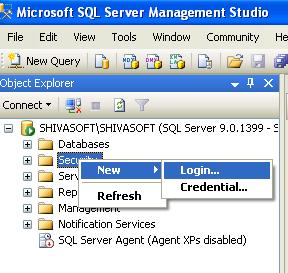
Login into SQL Server and right click on security tab.
Select New -> Login.
On Next screen, enter Username and password as shown in below image.
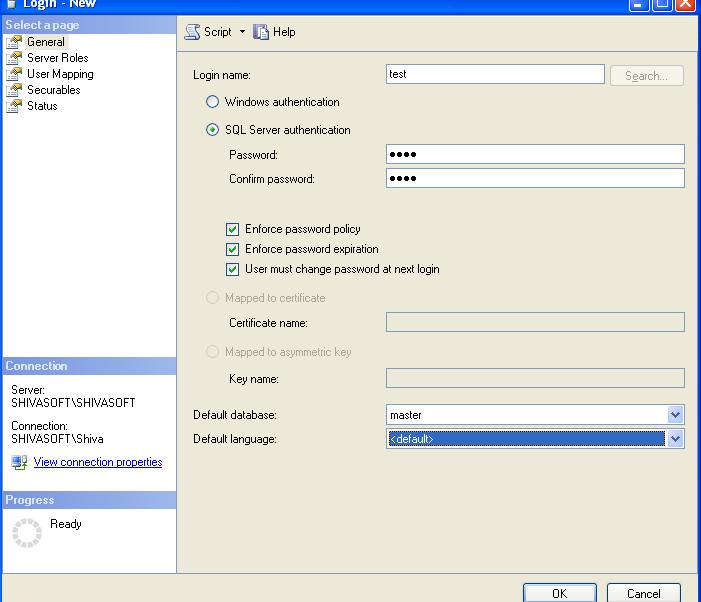
Click on ok button, a new user with specified credentials will be created.
Login into SQL Server and right click on security tab.
Select New -> Login.
On Next screen, enter Username and password as shown in below image.
Click on ok button, a new user with specified credentials will be created.
by
Tags:

Nice tutorial. it will help beginner.
AI ANT Apex API ASP.NET Automation best practices C# continuous integration CSS DataLoader Eclipse Einstein Flow Git Google Heroku HTML Integration Interview Questions J2EE JAVA Javascript JQuery JSON Lightning component Lightning Web Component LWC Mulesoft OAuth PHP Release Salesforce Salesforce DX SAP sfdx SQL SQL Server Students Trailhead Video Tutorial Visualforce Windows XP WordPress XML
Leave a Reply